
Meta's flexible ad format puts up to 10 images and videos in one ad, and Meta's delivery system decides whether each person sees a single image, a video or a carousel. Use it when you want Meta to choose the format and you can live with format-level reporting. Use one ad per creative when you need a clean read on which creative won. Before planning around it, check your account: Meta's help center now says the format "may not be available to you" and points advertisers who have lost it to multi-media ads instead.
Disclosure: We build AdManage. This is a vendor-written guide. Every Meta fact below links to Meta's own help center or developer documentation, checked on 17 November 2026. We have not included performance benchmarks, because we have not run an independent test that would support one.
What Meta's flexible ad format is
Meta describes the flexible format as a way to "automatically optimize your ad format" based on placement and audience. You select Flexible as the ad format in Ad setup, add up to 10 images and videos, and the delivery system picks the media, or combination of media, to show. That can be a single image, a video or a carousel. About the flexible ad format.
Meta's stated benefits: format optimization when you have no strong format preference, fewer ads to build per placement or format, and grouping media with different combinations of text. Flexible ads can deliver across several placements, depending on the aspect ratio of your media and the format shown. About the flexible ad format.
Flexible format is not flexible media
The names are close, but the features are different. Flexible media lets one image or video run in additional placements, for example a 9:16 image used in Feed. The flexible ad format looks at several uploaded assets and decides which ad format to show. Meta makes this distinction itself. About flexible media.
Is the flexible format still available?
Every current Meta help page about the format carries the same note: the feature "may not be available to you", and if you no longer have access to the flexible format in Ad setup, Meta points you to multi-media ads. Create a flexible ad in Meta Ads Manager.
In practice, that means three things:
- Check Ad setup first. If Flexible is not in the format list, Meta says to click More options before concluding it is gone.
- Multi-media ads are the Ads Manager successor. A multi-media ad also takes up to 10 images and videos in one ad, and Meta matches media to placements. About multi-media ads.
- The API still documents it. Meta's Marketing API has a "Get started with the flexible ad format" guide built on the
creative_asset_groups_specfield. Flexible ad format, Marketing API.
Our Meta ad formats guide covers the wider format changes in Ads Manager this year.
Specs and limits
| Item | What Meta documents | Source |
|---|---|---|
| Media per ad | Up to 10 images and videos | Help center |
| Formats Meta can show | Single image, video or carousel | Help center |
| Objectives (Ads Manager) | Traffic, Engagement, Sales and App promotion | Help center |
Note the objective mismatch. The help center lists four objectives for Ads Manager, while the developer guide lists only Sales and App promotion for the API. If you launch through any tool that uses the API, plan for Sales or App promotion campaigns.
Text is optional in Ads Manager. Meta's setup steps say you can enter primary text, headline and description, then a website URL, deep link or deferred deep link as the destination. Create a flexible ad.
Flexible ads vs Dynamic Creative, multi-media ads and Advantage+ creative
These three features are often mixed up. They work at different levels and answer different questions.
| Feature | Where you turn it on | What Meta varies | What you can read in reporting |
|---|---|---|---|
| Flexible ad format | Ad level, Ad setup | Which media and which format (single image, video, carousel) to show | A flexible format breakdown by format, with estimated values |
| Dynamic Creative | Ad set level | Combinations of the creative elements you upload | Aggregate results across all combinations |
| Multi-media ads |
Dynamic Creative combines elements such as images and headlines into variations, and you turn it on at the ad set level. Meta says that since June 2024 you may not be able to use it when creating ad sets with the Sales or App promotion objective, and it recommends the flexible format for a similar result. Dynamic Creative also does not work with multi-language ads, asset customization or ads with political content. About Dynamic Creative.
Advantage+ creative enhancements are a separate layer. They can adjust the media and text you upload, some are on by default, and you can turn individual enhancements off. Meta recommends checking the ad preview before publishing. Turn off Advantage+ creative enhancements. For the trade-off between Meta's automation and manual control, see Advantage+ vs manual creative.
Reporting: what you can and cannot see
This is the main cost of the flexible format.
For flexible ads, Meta offers a Flexible format breakdown. In Ads Manager, open a campaign that uses the format, click Breakdown, and under Creative choose the flexible format breakdown. You see outcomes, such as conversions, for each format: single media, carousel or collection. Meta notes that these values are estimated. Flexible format breakdown.
That breakdown answers "which format worked". It does not, by Meta's description, answer "which video worked". If your goal is to find a winning creative, that gap matters.
Multi-media ads have more detailed reporting. Meta documents a Media breakdown under Creative that shows results for each uploaded asset, and a Dynamic creative element breakdown for text variations. Results for collection or carousel display options do not appear in the media breakdown. View creative performance for individual media assets.
Dynamic Creative is the most limited. Meta shows aggregate results across combinations and says it is not a substitute for split testing. About Dynamic Creative.
When to use flexible ads, and when to test one ad per creative
Use the flexible format when:
- You have approved creatives and want Meta to pick formats and placements.
- You care about ad-set results more than a per-creative verdict.
- You run Sales or App promotion campaigns and can no longer create Dynamic Creative ad sets.
Use one ad per creative when:
- You are testing new concepts, hooks or angles and need a winner to scale.
- Your team decides budgets and briefs from creative-level results.
- You need to pause one weak creative without touching the others.
A common pattern is to do both in sequence. Test new concepts as separate ads, then group proven winners into flexible ads for scale. Our Facebook ad creative testing framework covers how to structure the testing side.
Worked example: 40 approved creatives
Say a brand has 40 approved images and videos for one Sales campaign. Two ways to launch them:
| Setup | Ads created | What reporting tells you | Effect on the Page ad limit |
|---|---|---|---|
| One ad per creative | 40 | Results for each of the 40 creatives | 40 ads running or in review |
| Four flexible ads of 10 assets | 4 | Results for each of the 4 ads, plus format breakdowns | 4 ads running or in review |
The flexible setup uses a tenth of the ad slots, which matters if the Page is near its cap: Meta counts ads, not the assets inside them, toward the Page limit (see our guide to Meta ad limits per ad account and Page). The cost is the creative-level read. If you later need to know which of the 40 is the winner, you have to test them as separate ads.
A practical split: put the 10 to 15 newest concepts into single-creative ads so you can judge them, and group the proven ones into flexible ads.
How to launch flexible ads in bulk
In Ads Manager, each flexible ad is built by hand: choose the objective, conversion location, manual upload, Flexible format, then add media, text and a destination. That works for one ad. It is slow for 30.
AdManage creates flexible ads through Meta's Marketing API. Here is the workflow.
- Bring in your creatives. Load images and videos into the launcher from the media library or a connected cloud source. For a spreadsheet launch, a format column can mark a row as flexible.
- Choose Flexible as the ad type. Flexible appears in the ad type picker for Meta ad accounts.
- Build groups. The Flexible format dialog lets you place up to 10 images or videos in a group and up to 3 groups per flexible ad. Select all splits a large set of loaded media into flexible ads of 10 each, so 40 creatives become four flexible ads. You can also copy media from one group into another.
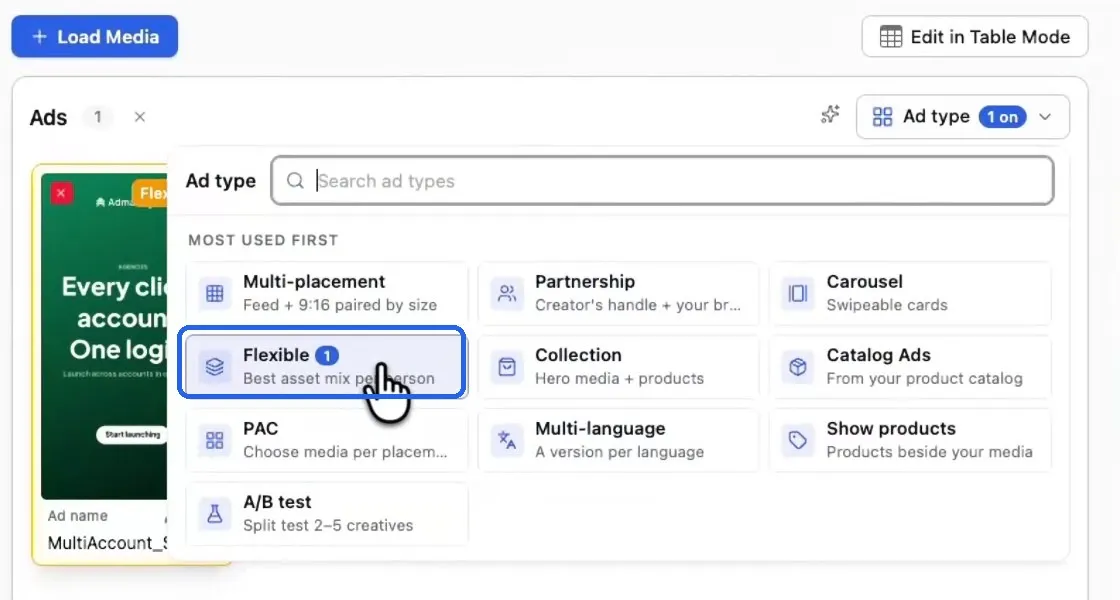
The ad type picker in the AdManage launcher, with Flexible selected for a Meta ad.
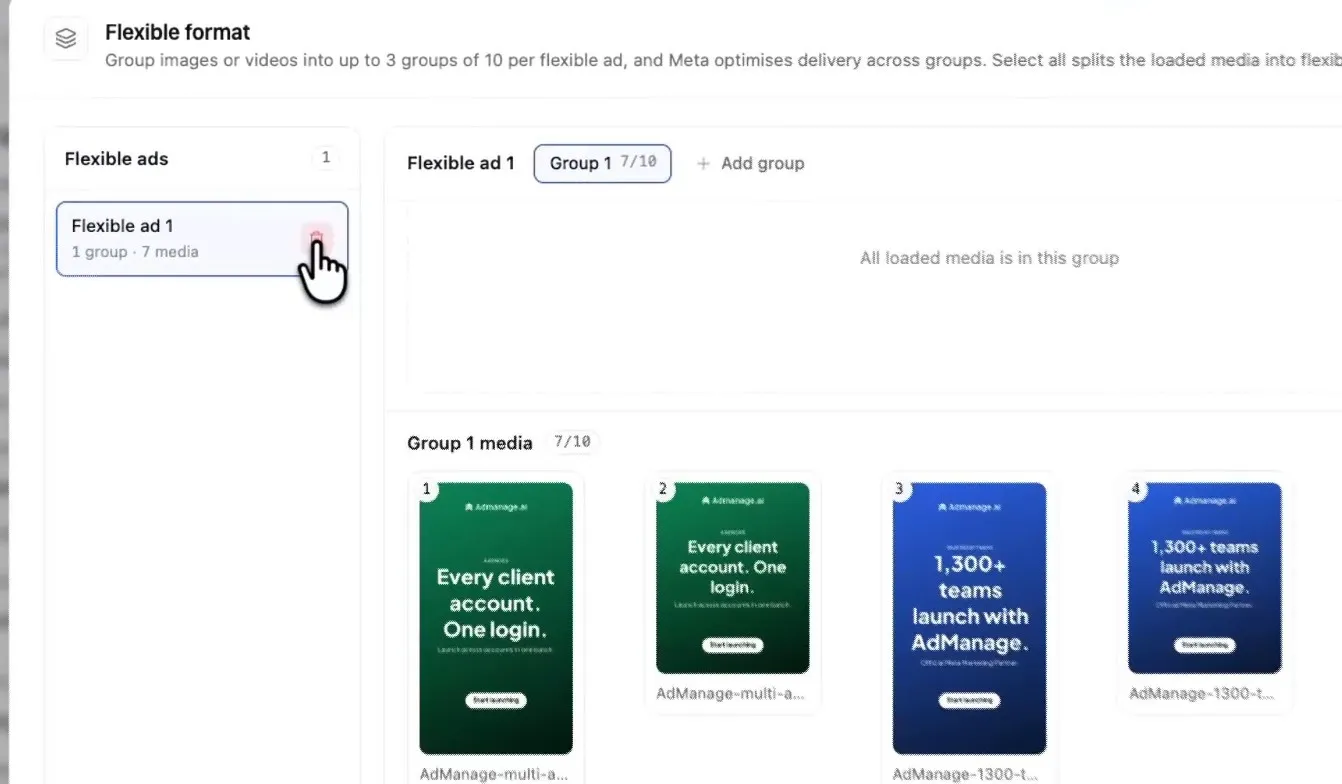
The Flexible format dialog: each flexible ad has up to three groups of up to 10 images or videos. Here, group 1 holds 7 of 10.
- Add text variations. Primary text, headline and description variations are sent with the ad. AdManage caps each text type at five, which is Meta's documented limit per group.
- Apply naming and settings. Your naming convention names each flexible creative. The creative enhancement settings you choose are sent explicitly with each ad, including the ones you turned off.
- Review and launch paused. Check the batch, then confirm the ads in Ads Manager before turning on delivery.
AdManage also handles a few edge cases:
- Size variants. If a group holds one creative cut in different placement sizes (for example 1:1 and 9:16), AdManage suggests Multi-placement instead, because Flexible does not map a size to a placement.
- Group limits. If Meta rejects the groups because the ad account allows fewer, AdManage retries once with all media merged into a single group.
- Existing posts. A flexible ad cannot reference an existing post or creative. A flexible row using Post ID or Creative ID as its ad source launches as several ads, and AdManage shows a warning saying so.
- Switching to testing. You can split a flexible row into several flexible rows or into single-creative rows.
AdManage reports also include a Creative setup breakdown that groups ads as Dynamic creative (which includes flexible ads), Catalog or Standard, so you can see how much spend runs through Meta-assembled ads. It does not replace Meta's per-format or per-asset breakdowns.
For more on bulk workflows in general, see Facebook ads bulk upload.
Frequently asked questions
What are Meta flexible ads?
They are ads using Meta's flexible format: up to 10 images and videos in one ad, with Meta's delivery system choosing whether to show a single image, a video or a carousel to each person. About the flexible ad format.
What is the difference between flexible ads and Dynamic Creative?
Dynamic Creative is an ad set setting that mixes creative elements into combinations. The flexible format is an ad-level format choice that lets Meta pick the format and media. Meta recommends the flexible format for Sales and App promotion campaigns, where you may no longer be able to create Dynamic Creative ad sets. About Dynamic Creative.
How many images, videos and text options can a flexible ad have?
Up to 10 images and videos per ad in Ads Manager. Through the API, each group needs at least one image or video and can have no more than five texts per text type. Meta's Page ad limit counts ads, so a flexible ad uses one slot however many assets it holds. Help center, developer docs.
Why can't I find Flexible in Ads Manager?
First click More options in Ad setup. Also check that your objective and conversion location qualify, and that you did not choose Advantage+ catalog ads as the creative source. If Flexible is still missing, Meta says to use multi-media ads. Create a flexible ad.
Can I see which creative performed best in a flexible ad?
Meta documents a flexible format breakdown that shows results by format, with estimated values. It does not document a per-asset breakdown for the flexible format. If you need a creative-level winner, run one ad per creative. Flexible format breakdown.
Can I launch flexible ads in bulk?
Not in Ads Manager, where each ad is set up individually. AdManage builds flexible ads in batches through Meta's API, with groups, text variations and naming applied across the batch. Launch a small paused batch first to confirm your ad account accepts the format.
Try flexible ads in AdManage
Group your creatives, add text variations and launch a paused batch of flexible ads, then check them in Ads Manager before going live. [Create an account](https://admanage.ai/sign_up?returnUrl=%2Flaunch) or read more about the Meta flexible ads launcher.
Sources
All checked 17 November 2026.
- About the flexible ad format, Meta Business Help Center
- Create a flexible ad in Meta Ads Manager, Meta Business Help Center
- How to use the flexible format breakdown for reporting, Meta Business Help Center
- About flexible media, Meta Business Help Center
- About multi-media ads and customizing your ad creative, Meta Business Help Center
- View creative performance for individual media assets, Meta Business Help Center
- About Dynamic Creative in Meta Ads Manager, Meta Business Help Center
- Turn off Advantage+ creative enhancements, Meta Business Help Center
- Get started with the flexible ad format

Cedric Yarish is a Meta ads expert, performance marketer and product builder with 10+ years of experience across Photoroom, Nextdoor and MVF. At Photoroom, he led user acquisition with more than $1 million in monthly ad spend and a creative operation producing 400 ads a month across 30 languages.
Today, he leads product and engineering at AdManage, the platform he co-founded with his brother Raphael to help marketers launch, test and manage ads at scale. Meta has quoted him on its developer blog and invited him to speak on its Partner API Panel in New York. His insights on creative testing and advertising automation have also featured in RevenueCat and In Growth We Trust.
Full founder bio & interviews