
Your Mintegral creatives.Together from the start.
Connect your existing advertiser account, prepare videos and playables, and build creative sets for your offers. Keep uploads and launch review in one workspace.
Plans from £199.99/mo. Flat fee, no percentage of ad spend, cancel anytime.
Explore features & formats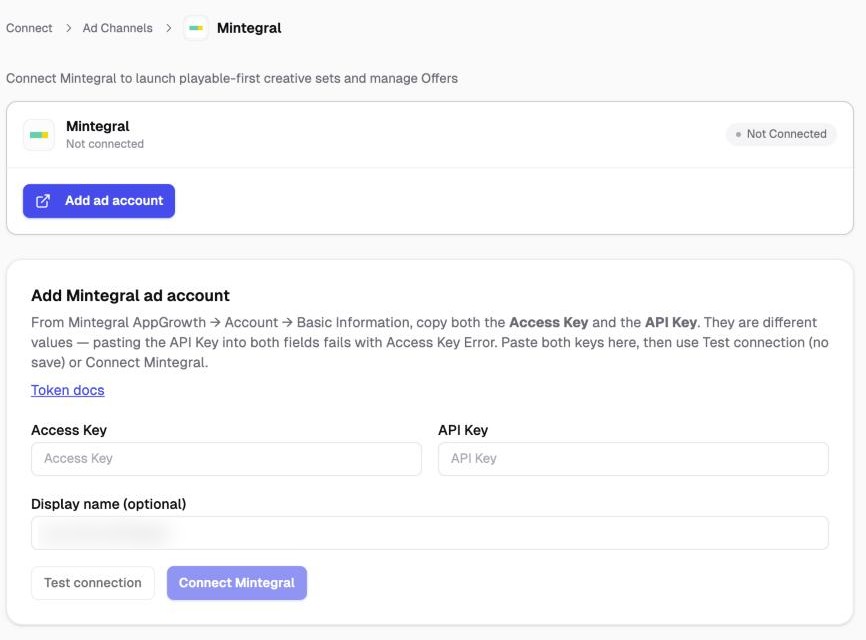
Built for the teams behind





From setup to launch
A clear path to your next batch.
Connect your account, prepare the creative and review the details before you publish.
- 01
Connect with both Mintegral keys
Copy the Access Key and API Key from Mintegral AppGrowth → Account → Basic Information. Paste them into Integrations → Mintegral, test the connection, and connect the account.
- 02
Select offers and assemble sets
In Launch, select offers for one promoted app. Add your MP4 videos, images, or playables, choose the format, and set a creative-set name and geos if needed.
- 03
Submit and check the review result
Launch the creative sets and open the batch review to inspect each offer's outcome. Replace rejected assets and follow any sets still awaiting Mintegral approval.
Close-up · before you launch
Requires an existing Mintegral account and valid Access Key/API Key pair. Each launch selects offers from one campaign/app. Upload, set creation, creative approval, and delivery are separate stages.
 View screenshot full size ↗
Mintegral creative workflow
Mintegral features and formats
Upload video, image, and playable assets, build creative sets, and send them to selected offers for one promoted app.
Mintegral features
- Launch to several offersChoose multiple offers from a single Mintegral campaign, which represents the promoted app.
- Infer the format from your mediaUse Auto to infer a creative format, or select the supported video and playable formats in launch settings.
- Creative-set names and geosGive your creative sets a name and specify country codes, or leave geos at ALL.
- Reuse companion assetsFor supported sets, the launcher can reuse approved companion assets from the offer and fill a missing icon from the app when available.
- Fit supported image sizesLarger images with a matching aspect ratio can be reduced to supported Mintegral sizes before upload.
- Check files before uploadValidate MP4 videos, image sizes, playable files, and required combinations before creating the creative sets.
- Follow creative-set reviewSee approved, rejected, and pending sets in the batch review. Pending reviews are checked again as the batch progresses.
Mintegral creative-set formats
- Video + end cardCombine an MP4 video with an image end card in the creative set.
- Video + playablePair an MP4 video with a playable HTML or ZIP asset up to 5 MB, with the required companion assets.
- Full-screen videoCreate a full-screen video set from MP4 media, with required companion assets resolved for the offer.
- Playable onlyUse an HTML or ZIP playable up to 5 MB, with the required app icon and companion assets.
- Full-screen imageAdd supported images and let Auto infer the full-screen image format for an image-only set.
Requires an existing Mintegral account and valid Access Key/API Key pair. Each launch selects offers from one campaign/app. Upload, set creation, creative approval, and delivery are separate stages.
Explore features by channelGood to know
Your Mintegral questions, answered.
Formats, account access and the details that matter before you launch.
Talk through your workflowHow do I get Mintegral access in AdManage?
Sign in to AdManage, open Integrations → Mintegral, and enter your Mintegral Access Key and API Key. Use Test connection to check the keys without saving, then Connect Mintegral to connect your account to the workspace.
Where do I find my Mintegral Access Key and API Key?
In Mintegral AppGrowth, open Account → Basic Information. Copy the Access Key and API Key into their separate fields in AdManage. They are different values: using the API Key in both fields can cause an Access Key Error.
Does AdManage create or approve a Mintegral advertiser account?
No. Connect an existing Mintegral advertiser account with valid API credentials. AdManage provides the creative upload and launch workflow; advertiser account access and creative review remain with Mintegral.
Can I upload videos and playable ads to Mintegral?
Yes. AdManage supports Mintegral video and playable creative workflows, with image and icon assets for creative sets. The assets you need depend on the selected format. The launcher checks supported files and upload limits before sending them to Mintegral.
Can I use creative files from Google Drive or Dropbox?
Yes. Import media through your connected source in AdManage. The Mintegral launcher supports authenticated source downloads and attempts to refresh expired Dropbox links when the original file and valid credentials are available. Disconnected sources need to be reconnected.
Does a successful upload mean my ad is live?
No. Upload, creative-set creation, Mintegral review, and delivery are separate steps. Check the launch result and creative-set review status before treating an ad as ready to serve.
 Moloco
 Unity Ads
Ready for the next creative test?
Put your Mintegral workflow in motion.
Flat monthly pricing. No percentage of ad spend.