Meta's main "ad limit" is set per Page, not per ad account. Each Page can have between 250 and 20,000 ads running or in review at once, depending on the most it has ever spent in a single calendar month. Every ad account that advertises for that Page shares the same allowance. On top of that, Meta caps the total number of ads an ad account can hold and the number of ads in a single ad set. Those two caps count paused ads too. If a bulk launch fails with "ad limit reached", you need to know which of the three you hit, because the fix is different for each.
Disclosure: We build AdManage, a tool for bulk-launching ads. Every Meta number below comes from Meta's own Business Help Center or Marketing API documentation, checked on 17 November 2026 and linked inline. We have not added benchmarks or test results of our own. Meta can change these limits, so the number shown for your own Page is the one that counts.
The three Meta limits at a glance
People say "ad limit" for three different caps. Here is how they compare.
Limit
Applies to
What counts
Cap
Ad limit per Page
One Facebook Page, across every ad account that uses it
Ads running or in review. Paused and future-scheduled ads do not count
250, 1,000, 5,000 or 20,000, set by the Page's highest monthly spend
Ads per ad account
One ad account
Every ad that is not archived or deleted, so paused ads count
6,000 for a regular account, 50,000 for a bulk account, plus up to 100,000 archived ads
Ads per ad set
One ad set
Every ad that is not archived, so paused ads count
Meta frames the Page limit as a performance rule: when a Page runs too many ads at once, fewer ads leave the learning phase. Source: About managing ad volume.
Meta uses four tiers, based on the Page's highest spending month since September 2019. Source: Ad limits per Page.
Page size
Highest single-month spend
Ads running or in review
Small to medium
Less than $100K USD
250
Medium to large
Less than $1M USD
1,000
Larger
Less than $10M USD
5,000
Largest
$10M USD or more
20,000
A few details from the same Meta article matter in practice:
Upgrades are automatic. A tier upgrade usually lands 2 to 3 days after the Page spends the qualifying amount. You cannot request one.
The spend must happen in one calendar month, for example 1 to 31 January. Two strong half-months that straddle a month boundary do not combine.
What counts toward the limit
The Page limit counts every ad that is running or in review for that Page. An ad belongs to the Page you choose in the Identity section when you create it. Source: Ad limits per Page.
Counts:
Active ads that are delivering.
Ads that are switched on and waiting for review or processing. Meta's API definition includes pending review and pending processing. Source: Ads Volume, Marketing API.
Ads from every ad account, business and person advertising for that Page. There is one limit per Page, not one per account.
Does not count:
Paused ads. Only running or in-review ads are counted.
Scheduled ads, until it is time for them to run. Meta's API docs add that if you use dayparting, the ad counts for the whole day, not just the hours it runs.
Extra creatives inside a single ad. Meta says each dynamic creative ad, Advantage+ placements ad or Advantage+ catalog ad counts as one ad, even when it uses many creatives.
The shared allowance is the trap for agencies: a brand's in-house team and its agencies all draw on one pool. Someone with full control of the Page can split the pool by setting extra ad limits for each partner or person. If that number is set to 0 for your account, you cannot run ads for that Page at all until it is raised. Source: Troubleshoot ad limit reached: error 3253001.
What happens when you hit it
Once a Page is over its limit, Meta says you cannot run more ads or publish edits to existing ads, other than turning them off. That stays true until you bring the volume back under the limit. Source: Ad limits per Page.
Your account is over a limit set for it by the Page owner.
The error is old. Ads have since ended or been deleted, and you only need to switch the affected ads back on.
You do not have ads access to the Page. You may still be able to select it while building the ad, then get blocked when you publish.
The account and ad set caps fail differently: Meta rejects the new ad at creation. The account-level error says the account has reached the maximum number of ads allowed and asks you to delete older ads. Pausing does not help with either cap, because paused ads still count.
How to check your usage and free up room
Work through these steps in order. They follow Meta's own troubleshooting guidance.
Open the Ad limits per Page tool. You reach it from the menu in Meta Business Suite. It shows each Page's limit and how many ads are running or in review. If a Page is within 20% of its limit, Ads Manager also shows an Ad limits per Page tab in Account Overview, with ways to reduce volume. Source: Ad limits per Page.
Check which accounts are using the Page. You need full control of the Page to see every account's active ads for it. If you cannot see them, ask the person who has full control. Source: error 3253001.
Turn off or delete enough ads to get under the limit. For the Page limit, pausing is enough, because paused ads do not count.
Archive dead ads if the account or an ad set is full. Paused ads still count toward the account and ad set caps, so archive or delete them. Archived ads have their own, much larger, cap.
Rebalance partner limits if you own the Page. In the Ad limits per Page tool, select the Page, click Edit, raise the limit for the account that needs room and lower the others so the total still adds up.
Switch the failed ads back on. Once you are under the limit, turn on the ads that showed the error. If the tool says you are not over the limit but the error remains, Meta says the error may simply be old.
If you check this often, the Marketing API exposes the same numbers. The ads_volume edge on an ad account returns the count of ads running or in review for each Page, the current limit and any future limit with its start date. Source: Ads Volume.
How to stay under the limit when bulk launching
Big batches are where teams hit the limit, often halfway through. Most of these habits come from Meta's own advice on managing ad volume. Source: About managing ad volume.
Combine ad sets. Meta recommends merging ad sets split only by audience, small geographic areas, placements or language. Use breakdowns for reporting instead. Our guide on how many ad sets per campaign covers the structure side.
Put fewer ads in each ad set, with more assets in each ad. Meta notes one ad can contain up to 10 creative assets. Grouping variations into one ad uses one slot instead of ten.
Use multi-asset formats for testing. Meta suggests multiple text optimisation for copy variants and its newer flexible ad format in place of dynamic creative, which it has limited for Sales and App promotion objectives in Ads Manager since June 2024. Our Meta flexible ads guide covers the format and its reporting trade-off.
Use catalog-based formats when you advertise many products. An Advantage+ catalog ad counts as one ad however many products it shows.
Clear out dead ads before a big launch, not after it fails. Compare the batch size with the room left on the Page and pause or archive the difference first.
Do not create extra Pages to get around the limit. Meta warns that separate Pages bid against each other and split your Page's learning.
Worked example: a 60-ad batch on a 250-ad Page
A Page in the smallest tier has 238 ads running or in review. The team wants to launch 60 new ads, one per creative.
Room left: 250 − 238 = 12 slots. The batch is 48 ads too big.
Option A, free up room: pause at least 48 old ads on that Page. Paused ads leave the Page count straight away. If the ad sets are also near 50 ads, archive the dead ones instead, because paused ads still count there.
Option B, use fewer ads: launch the 12 newest concepts as single-creative ads, and group the other 48 proven creatives into five flexible ads (up to 10 assets each). That is 17 ads, so free up 5 more slots first.
Option C, split the launch: launch 12 now and the rest after ads you were going to turn off anyway have ended.
Whichever you choose, check the count right before launching. Other ad accounts using the same Page can take slots in the meantime.
Several parts of AdManage deal with these limits today:
A check before launch. Before a Meta batch goes out, AdManage reads the Page's running and in-review count and its limit from Meta. If the batch would not fit, it shows how many ads are running against the limit, how many slots remain and how many ads to archive. It links to the Bulk Delete Ads page and to Meta's limit page. You can still choose to launch anyway, since paused ads and ads on other identities do not count and Meta makes the final call.
A review step for full ad sets. If a target ad set is at its ad cap, AdManage lists the ads already in it so you can delete some before launching.
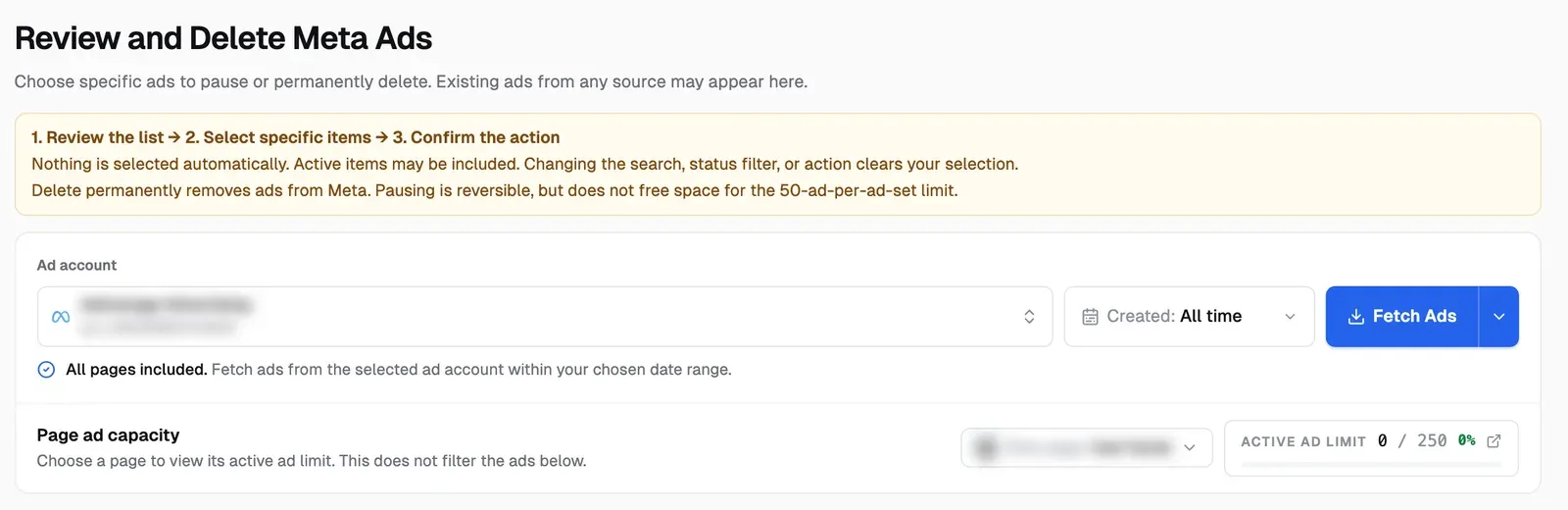
An "Active ad limit" readout on Bulk Delete Ads. The Bulk Delete Ads page (under Manage in the sidebar) shows running and in-review ads against Meta's limit for the Page you pick, colour-coded as it fills up. From the same page you can pause or archive old ads in bulk, or archive old ad sets.
The AdManage Bulk Delete Ads page with the Page ad capacity row showing an active ad limit of 0 out of 250
The Page ad capacity row in AdManage, captured on our own test account on 17 November 2026. The account and Page names are blurred. This Page sits in Meta's 250-ad tier with nothing running.
Plain-language failures. If Meta rejects ads because the ad account is full, the batch shows that as an ad account limit, with the steps to fix it. The launch page then shows a banner that the account recently hit its ad limit, with a shortcut to archive old paused ads.
Is the Facebook ad limit per ad account or per Page?
Both exist, but the one usually meant is per Page: one limit shared by every account advertising for it. Separately, an ad account can hold up to 6,000 non-archived, non-deleted ads, or 50,000 for a bulk ad account.
How many ads can I run on Facebook at once?
It depends on your Page's highest monthly spend: 250 ads running or in review below $100K USD, rising to 1,000, 5,000 and 20,000 at $100K, $1M and $10M. Check your exact number in the Ad limits per Page tool.
Do paused ads count toward Meta's ad limit?
Not toward the Page limit. They do count toward the ad account cap and the 50-ad cap per ad set. Pause to free Page volume; archive or delete to free account or ad set space.
What does error 3253001 mean?
The Page has reached its limit on ads running or in review, or your account has reached a limit the Page owner set for it. Get under the limit, then turn the failed ads back on.
Can I ask Meta to raise my ad limit?
No. Meta says tier upgrades are automatic, usually 2 to 3 days after the Page spends the qualifying amount in one calendar month.
Do dynamic creative or catalog ads count as one ad?
Yes. Meta counts each dynamic creative, Advantage+ placements or Advantage+ catalog ad as one ad.
We share a Page with an agency. Can they block our ads?
They can use up the shared allowance. Someone with full control of the Page can set a limit for each partner in the Ad limits per Page tool.
Launch big batches without hitting the wall
If your team launches in volume, check the room left on each Page before the batch goes out, not after it fails. [Create an AdManage account](https://admanage.ai/sign_up?returnUrl=%2Flaunch) to launch from your creative gallery or spreadsheet with a capacity check built in. Already a customer? Open Bulk Delete Ads to see your active ad limit.
Cedric Yarish is a Meta ads expert, performance marketer and product builder with 10+ years of experience across Photoroom, Nextdoor and MVF. At Photoroom, he led user acquisition with more than $1 million in monthly ad spend and a creative operation producing 400 ads a month across 30 languages.
Today, he leads product and engineering at AdManage, the platform he co-founded with his brother Raphael to help marketers launch, test and manage ads at scale. Meta has quoted him on its developer blog and invited him to speak on its Partner API Panel in New York. His insights on creative testing and advertising automation have also featured in RevenueCat and In Growth We Trust.