
The red notice lands. Every campaign stops. And the first instinct is to move fast. If your Google Ads account is suspended, speed only helps when it takes you toward the right diagnosis. A rushed replacement account, conflicting appeals, or a blanket website rebuild can leave you with a case that's much harder to explain.
The safe route is disciplined: copy the exact notice, preserve the account's current state, identify the specific cause, complete the remediation, then submit one accurate appeal. Google controls the decision. No agency, consultant, or software platform can guarantee reinstatement or offer a legitimate way around enforcement.
The short answer: Don't create or use another Google Ads account. Save the suspension notice, customer ID, recent Change History, account-access list, payment information, linked-account details, and website-security evidence. Fix the issue named in the notice, then appeal through Contact Us in the suspension banner. Google says advertisers have at least six months to appeal an account suspension.
"Fix it fast" means reaching a defensible appeal without wasting days on the wrong workflow. Start with the exact wording on the screen, because Google may not have suspended the account at all.
Suspended Google Ads Account: A Quick Triage Worksheet
| Notice or Observation | Check First | Evidence to Keep |
|---|---|---|
| Billing or payment issue | The exact task in the account and payment ownership | Requested payment records and task outcome |
| Unauthorized changes | Account access, Change History and unfamiliar destinations | Timeline of the changes and recovery |
| Website or policy problem | The named policy and the full affected destination | Before-and-after URLs, fix dates and checks |
| Verification required | The identity task in the account | Requested documents and completion status |
| Related-account issue | The accounts and relationships named in the notice | Separate customer IDs, notices and case records |
This is an investigation worksheet. The account’s notice determines the actual workflow; a payment pause, ad disapproval and account suspension do not all use the same appeal route. Submit identity and payment evidence only through the official channel Google requests.
Confirm Your Exact Google Ads Account Status
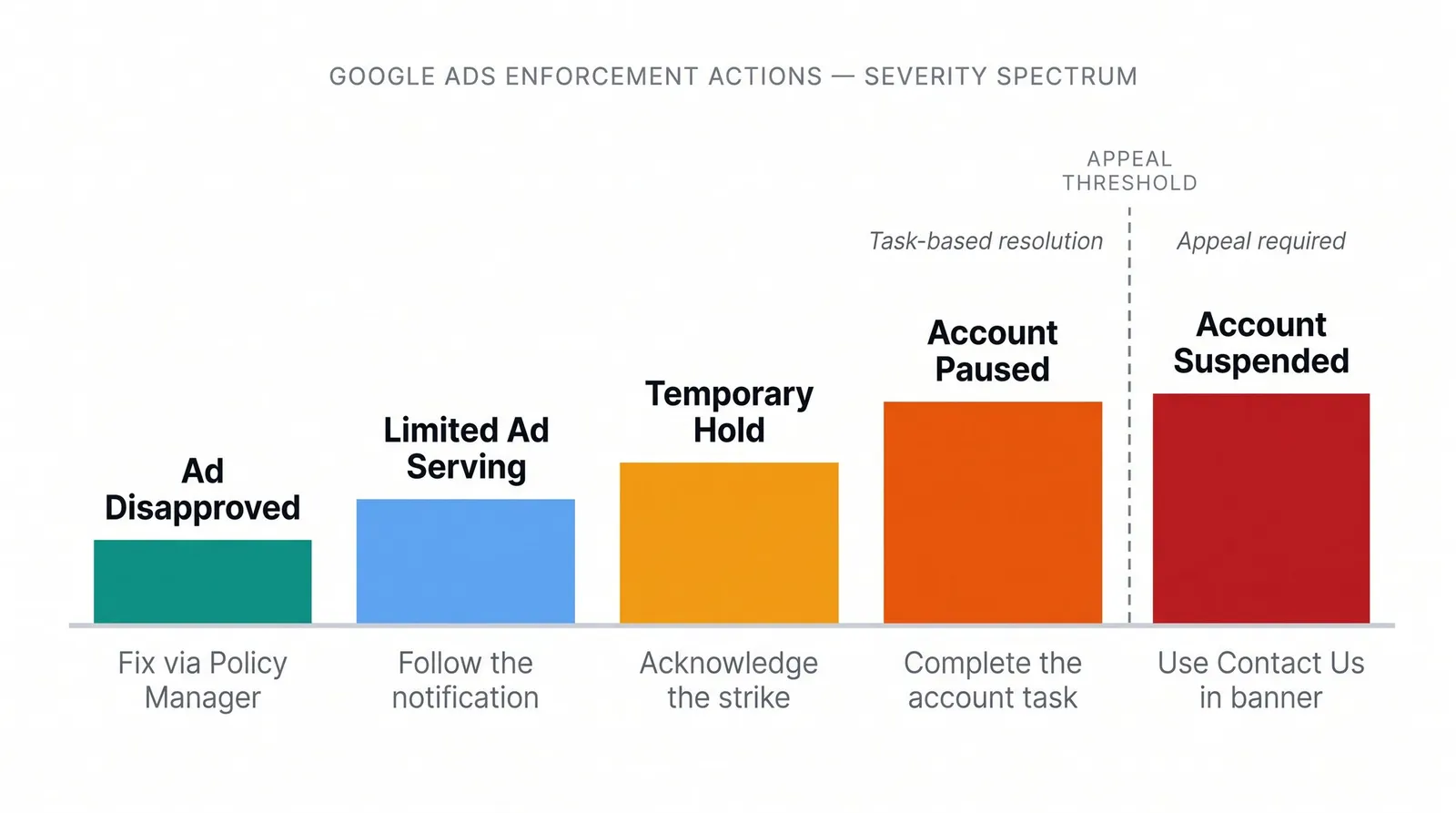
Advertisers often use suspended for any situation where ads stop. Google doesn't. It uses several different statuses, and each one sends you into a different response.
| Status in the account | What it usually means | Correct next move |
|---|---|---|
| Account suspended | All ads stop, and Google treats the action as permanent unless an appeal succeeds. | Diagnose the cited cause, remediate it, and use Contact Us in the suspension notice. |
| Account paused | An account-level task, such as payment or verification, may need to be completed before serving resumes. | Complete the exact task shown in the account. Do not assume the suspension appeal is the right form. |
| Temporary account hold | A time-limited enforcement step may apply after certain repeat-policy strikes. | Acknowledge the strike, fix or appeal the violation, and follow the hold instructions. |
| Limited ad serving | Google is restricting impressions while it evaluates advertiser qualification or trust signals. | Follow the limited-serving notification. This is not necessarily a full suspension. |
| Ad or asset disapproved | A specific item cannot run, but the entire account may still be active. | Fix or appeal the item through Policy Manager. |
| Merchant Center suspended | Shopping-related products or programs may be affected through Merchant Center. | Follow the Merchant Center notice. Do not treat it as an ordinary ad-level disapproval. |
Google's account suspension overview explains that a suspended account cannot advertise in any location and is largely read-only. Its separate account-pausing guidance covers conditions that may be reversible through a task such as verification, security review, or payment action.
The wording can overlap. Google's suspension page still refers to some billing and unauthorized-activity situations as temporary suspensions, while newer workflow pages may call comparable conditions pauses. Trust the exact banner and linked task in your account, not a generic label in a third-party article.
Ad-level policy decisions are also separate. Google's ad-disapproval and Policy Manager instructions govern individual ads and assets, not the standard account-suspension appeal. As of July 21, 2026, older ad-level decisions also have different direct-appeal rules. Do not transfer those limits to an account suspension.
Once you know the status, resist the urge to change everything. The next half hour is for preserving a trustworthy record.
What to Preserve in the First 30 Minutes
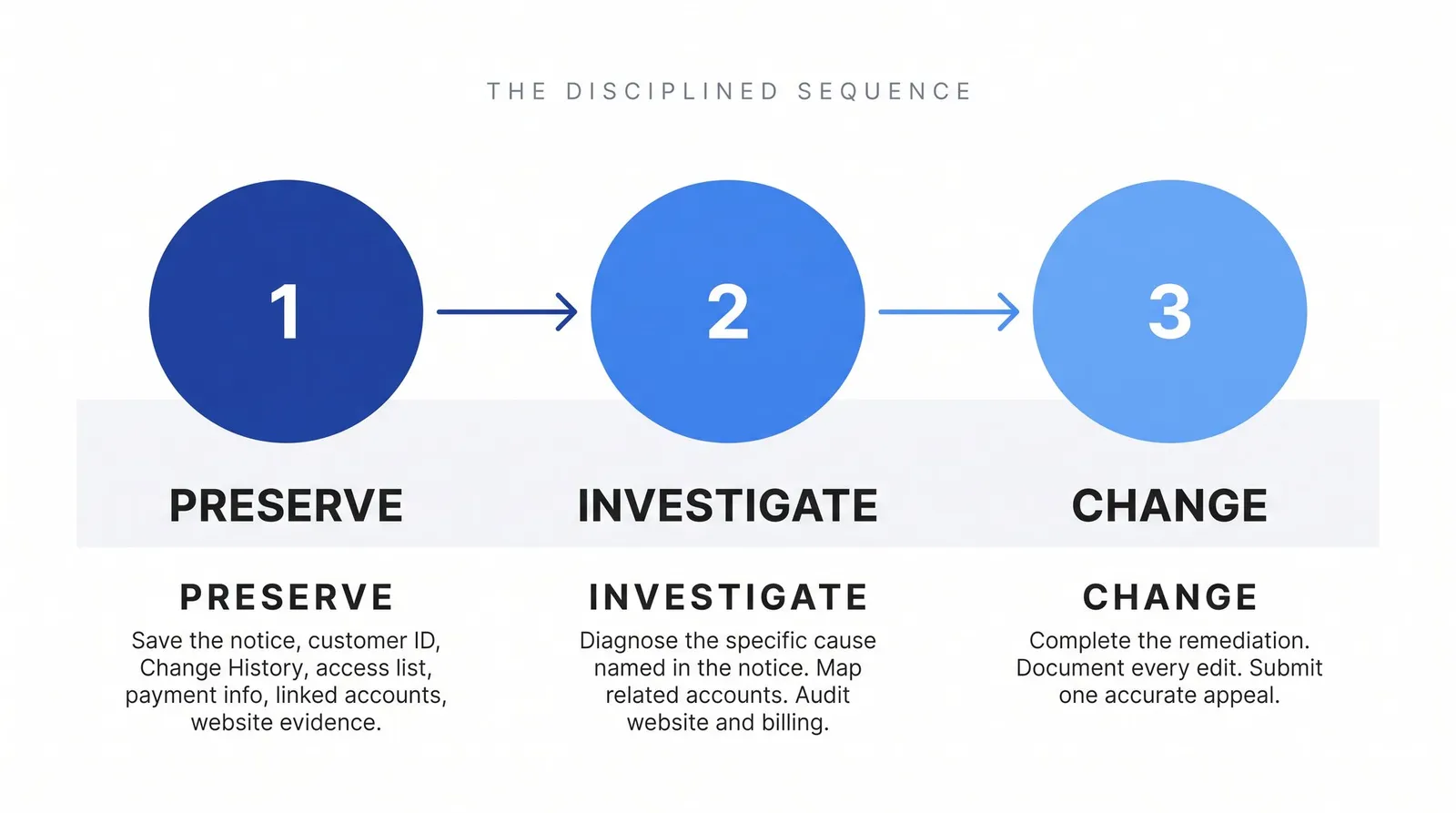
Your job is to capture the "before" state. A reviewer needs a coherent account of what happened, what you found, and what changed. You can't build that chronology after the original evidence disappears under dozens of undocumented edits.
1. Save the Exact Suspension Notice
Record:
- The complete in-account banner and email
- The exact policy name
- The Google Ads customer ID
- The date and time serving stopped
- Whether the notice says suspended, paused, hold, limited, or disapproved
- Any case ID, appeal ID, linked task, or named related account
Take screenshots of the Account Policy page and any task the notification opens. Save the original email rather than pasting only part of it into a document.
2. Don't Create or Borrow Another Account
Google warns that related accounts and new accounts created by a suspended advertiser may also be suspended. That makes these responses especially risky:
- Opening a new account to keep the same campaigns running
- Using an employee's, relative's, client's, or unrelated company's identity
- Moving campaigns into a rented or borrowed account
- Creating a new payment profile to hide the old relationship
- Replacing the domain while presenting substantially the same unresolved business or offer
- Concealing a manager-account, ownership, payment, or identity connection
Multiple accounts can be legitimate. Using them to evade review or continue noncompliant advertising is the problem. If another account exists for a valid business reason, document that reason instead of hiding the relationship.
3. Export Recent Google Ads Change History
Change History is Google's audit log for changes made through Google Ads, Editor, APIs, and automated rules. Google says it covers the previous two years and can be filtered by date, user, tool, campaign, and change type.
Open Campaigns → Change history, set a range around the suspension, and review:
- Unknown users or manager accounts
- New campaigns, large budget increases, or status changes
- Changed final URLs or tracking templates
- Payment or account-access changes
- API, Editor, or automated-rule activity you did not expect
Screenshot suspicious entries before undoing anything. Some changes can be reversed for up to 30 days, but not every change is reversible.
4. Map Every Related Google Ads Account
A manager account, often called an MCC, is the Google Ads account used to manage other accounts. Record current and previous manager links along with:
- Every Google Ads account operated by the same legal business
- Direct users and administrators
- Shared payment profiles or payment methods
- Accounts verified with the same identity documents
- Agency and client relationships
- Current and former business domains
- Related Merchant Center relationships named in the notice
Google specifically tells advertisers to review linked, previously linked, and related accounts before appealing. It does not publish the full formula it uses to determine relationships, so avoid claims that one shared attribute automatically caused the suspension.
5. Freeze Nonessential Changes Until Evidence Is Saved
Keep the business safe, but pause broad cleanup. Don't delete pages, replace servers, rotate every card, remove all users, or rebuild the site just to demonstrate activity.
Preserve first. Investigate second. Change third.
That sequence turns a vague policy label into an incident you can investigate. The evidence you've collected should point toward one of the following cause branches.
Find the Root Cause Before You Appeal
Simple trigger lists don't reflect the scale of Google's enforcement. In its 2025 Ads Safety Report, Google said it blocked or removed 8.3 billion ads and suspended 24.9 million advertiser accounts during 2025. It also described models that evaluate hundreds of billions of signals, including account age, behavior, and campaign patterns.
Those are self-reported global figures, not a suspension rate for ordinary advertisers. Still, they show why an account-level investigation can't stop at one misspelled ad.
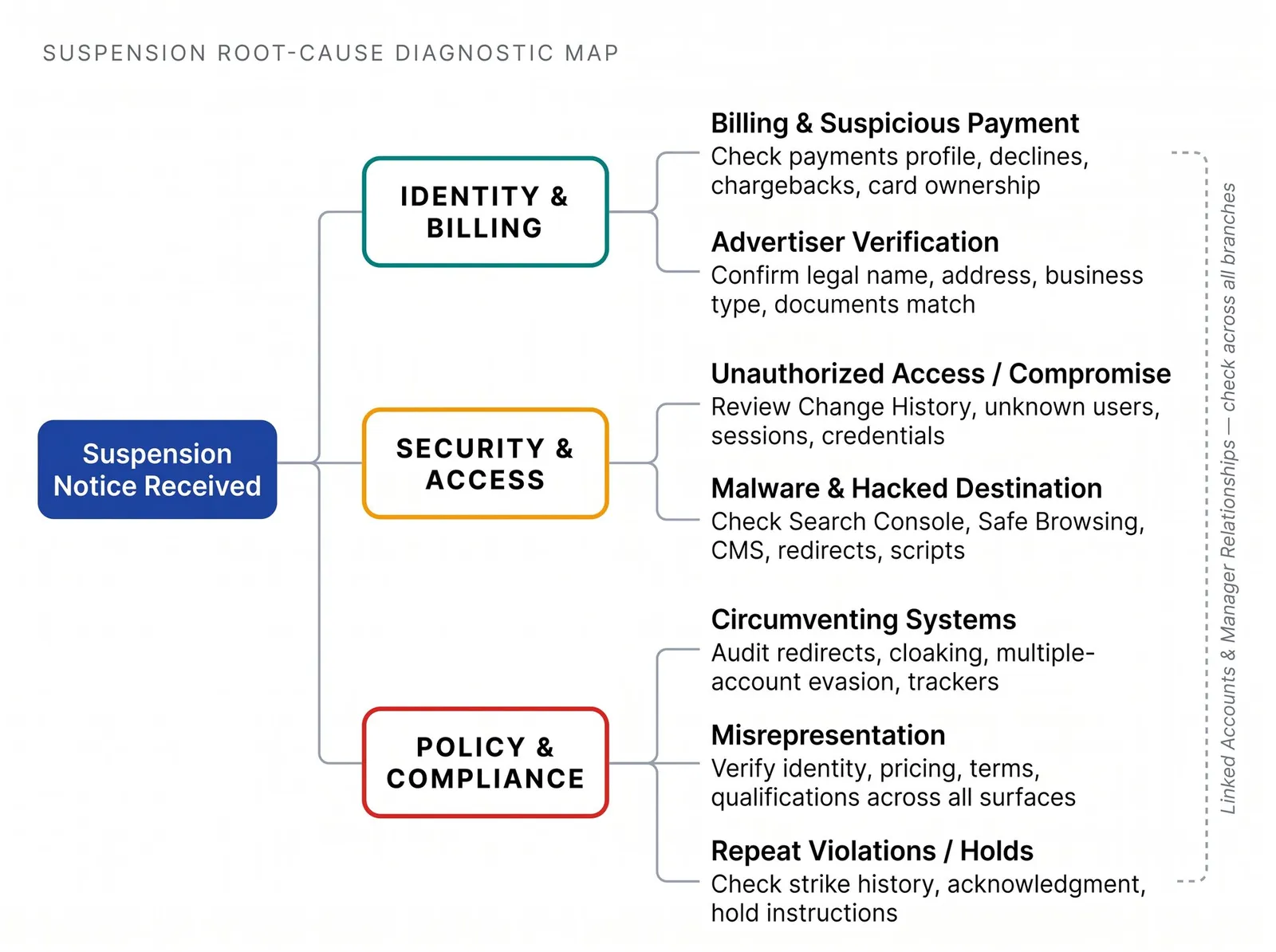
Billing and Suspicious Payment Activity
Google names promotional-code abuse, chargebacks, suspicious payment activity, and unpaid balances among its billing-related causes. Some payment events are pauses rather than formal suspensions, and only an administrator may be able to complete the required challenge.
Start with the exact notice. Then open Admin → Policy → Account and compare:
- The payments profile's legal name and address
- The owner of every current or recently added payment method
- Declines, chargebacks, disputed refunds, and unpaid balances
- Recent card changes
- Agency, employee, parent-company, or client payment arrangements
- Other accounts using the same payment profile or method
Google's suspicious-payment policy points to unclear ownership, identity inconsistencies, declines, chargebacks, and abrupt payment changes as relevant signals. Replacing cards repeatedly can make ownership less clear, so do not keep cycling through payment instruments.
The fix depends on the actual issue. You may need to pay a valid balance, resolve the reason for a chargeback, complete the in-account payment challenge, or explain a legitimate payment relationship. Google's payment-verification guidance says it may request a legal name, payments-profile name, address, date of birth, government ID, proof of address, or payment-method image.
Use only Google's official upload workflow. Do not email sensitive documents to someone who claims they can escalate the suspension.
Unauthorized Access or Account Compromise
Unexpected ads, unknown destinations, sudden spend, or changed owners can point to account compromise rather than an intentional policy breach. Google may stop activity to protect the advertiser from unauthorized charges.
Review Change History, Google Account devices, recent security events, recovery details, direct users, manager access, connected applications, API integrations, and billing statements. Then expand the audit to the website's CMS, hosting, DNS, tag manager, analytics, and recent final-URL changes.
If the account was compromised:
- Use Google's compromised-account recovery guidance.
- Change the Google Account password and remove unknown sessions.
- Remove unknown or inactive Google Ads users.
- Rotate affected API, CMS, DNS, hosting, and analytics credentials.
- Preserve records of the unauthorized changes and their reversal.
- Require account-level two-step verification under Admin → Access and security → Security → Verification during sign-in.
Google's two-step-verification instructions and broader account security guidance recommend individual access, removal of inactive users, and regular review of unexpected changes. Shared logins make both security and accountability worse.
Circumventing Systems Violations
This label covers more than one kind of behavior. Google's Circumventing Systems policy separates two especially important patterns.
Review manipulation or cloaking means showing Google different content from what ordinary users receive in order to conceal a violation. Audit redirect chains, trackers, user-agent rules, geographic variants, device variants, logged-in states, conditional pop-ups, JavaScript-injected content, checkout paths, and hacked redirects. Test the full destination on mobile and desktop, from targeted locations, and in clean logged-out sessions.
Multiple-account evasion means creating or using accounts to avoid a suspension, continue prohibited advertising, or obscure identity and relationships. Map current and former accounts, managers, domains, tracking domains, payment links, and business entities.
Trackers, redirects, and multiple accounts are not automatically prohibited. Google allows appropriate tracking and legitimate account structures. What matters is whether they were used to conceal noncompliance or evade enforcement.
Good remediation evidence may include a before-and-after redirect map, the script or rule that caused inconsistent content, proof that Google's crawlers can access the destination, an explanation of legitimate separate accounts, and confirmation that related suspensions were resolved. Do not invent a supposed IP-address or device-fingerprint fix. Google does not publish an approved isolation recipe.
Misrepresentation and Unacceptable Business Practices
Misrepresentation is a business-consistency problem, not a copyediting problem. Google's misrepresentation policy covers unclear or false identity, affiliations, qualifications, prices, recurring charges, availability, and offers the business can't deliver.
Compare the same facts across every surface the customer or Google can see:
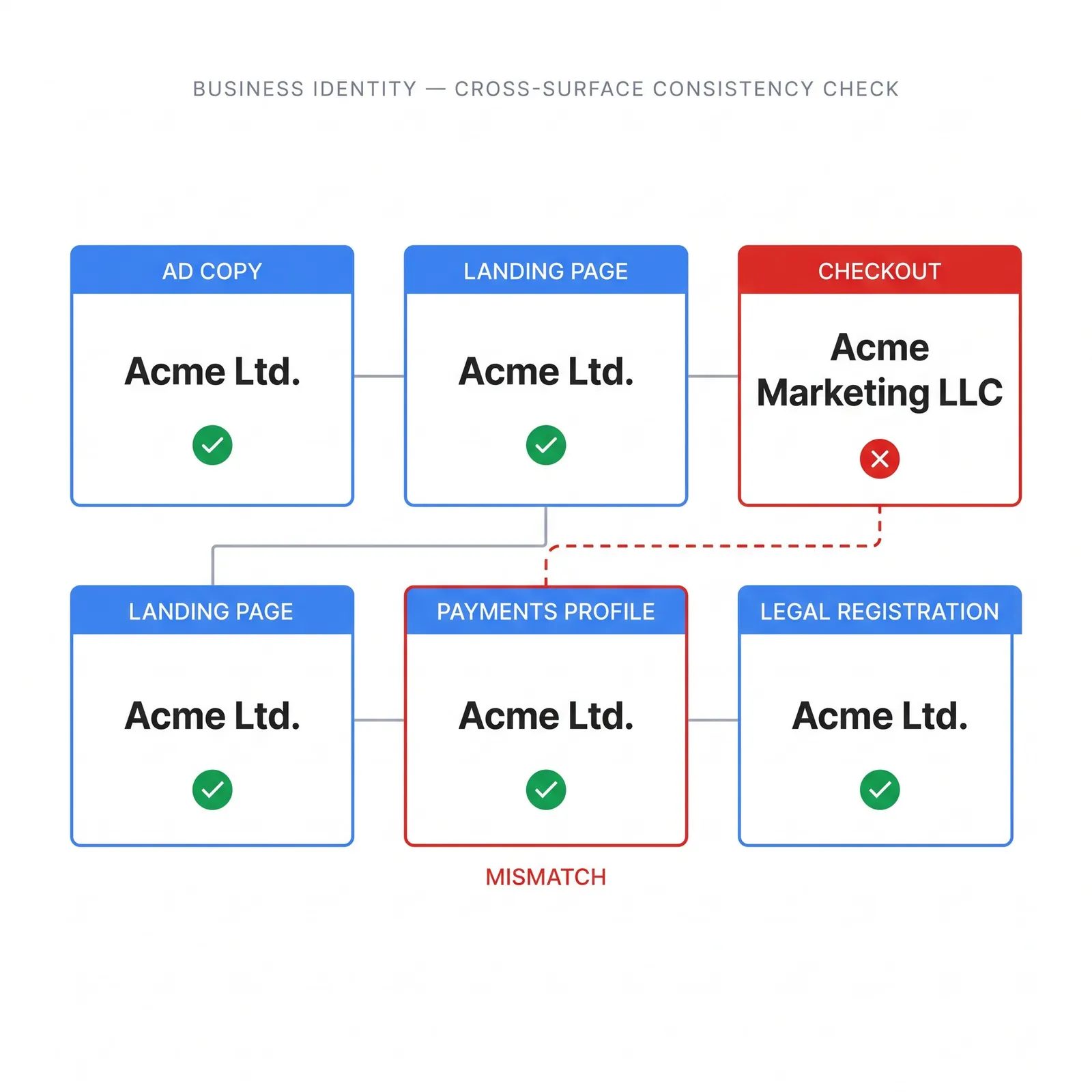
| Business fact | Places that must agree |
|---|---|
| Identity | Advertiser verification, payments profile, legal registration, website footer, contact page |
| Pricing | Ad, landing page, product page, cart, checkout, feed, structured data |
| Terms | Subscription language, mandatory charges, refund and cancellation pages |
| Qualifications | Licences, certifications, partnerships, and professional claims |
| Availability | Inventory, service area, delivery times, and promotional claims |
| Support | Working contact details, response channels, privacy page, terms page |
Google says it may consider the account, website, user complaints, consumer reviews, regulatory information, and other third-party material. That is why changing one headline may not resolve a broader trust problem.
If the notice involves Merchant Center, compare the feed, structured data, visible price, currency, availability, shipping, returns, checkout, and business information. Follow the Merchant Center notification rather than assuming the Google Ads suspension form covers every Shopping-related action.
Malware, Hacked Destinations, and Malicious Software
A business doesn't need to have written malicious code intentionally for its destination to become unsafe. Google's destination requirements can apply to compromised content, injected scripts, and harmful outbound links.
Review:
- Search Console's Security Issues report
- Safe Browsing status
- CMS core, plugins, themes, and templates
- Server files, DNS, CDN, and edge rules
- Tag Manager containers and third-party scripts
- Redirects, forms, checkout integrations, and new administrator accounts
- Recently changed files and unfamiliar outbound links
Google's hacked-site guidance warns that URLs shown in Search Console are samples, not a complete list. Repair the entry point and the whole affected system, not just the examples.
The proper sequence is to remove malicious content, patch the vulnerability, remove unauthorized users, rotate credentials, inspect the full site, test destinations and redirects, request the appropriate Search Console review, and then submit the Ads appeal with technical evidence. Search Console review can take days or weeks, so website repair may be the real recovery bottleneck.
Advertiser Verification
Google may require verification before it allows an appeal. Its advertiser-verification guidance expects names, locations, business type, and documents to align with the payments profile and disclosed business relationships.
Audit the legal name, trading name, country, registered address, business type, required licences, personal identity details, agency relationship, payer, and beneficiary. A legitimate business can fail when it submits a brand name instead of the legal entity, uses an old address, provides an incomplete document, or fails to explain a parent-company or agency relationship.
This isn't an area for repeated guessing. Google says that after three failed identity-verification attempts, an advertiser may lose the ability to appeal that suspension.
Repeat Violations and Temporary Holds
For certain non-egregious policies, Google's strike-based enforcement system starts with a warning. A first strike can lead to a three-day hold after acknowledgment and remediation, a second strike for the same policy can lead to a seven-day hold, and a third can lead to suspension.
This system does not cover every policy. Egregious violations may cause immediate suspension without a warning, so do not assume account age or a previously clean record guarantees a warning period.
Linked Accounts and Manager Relationships
Related suspensions can be the cause, the consequence, or both. Review linked and previously linked manager accounts, direct users, identity documents, payments profiles, payment methods, domains, and agency-client relationships before appealing.
Google says separate appeals are normally required for each suspended account. It also notes a narrower case where accounts affected through the same identity documents may be restored automatically after the primary related suspension succeeds. Follow the instruction in each account rather than submitting one vague appeal for an entire portfolio.
Do not unlink a manager account indiscriminately. Google's pausing guidance says to unlink a manager when the notification specifically tells you to do so. Removing a relationship after the fact does not erase its history.
Once you can state the root cause in one or two precise sentences, you're ready to build the appeal. If you can't, keep investigating.
How to Build an Evidence-Backed Suspension Appeal
For an account suspension, sign in, open the banner at the top of the account, and select Contact Us. Google opens the appeal form in a side panel and displays relevant policy information. After submission, the same area may show Appeal pending, and Google emails the decision. Google documents this flow in its suspension overview.
Google advises advertisers to be thorough, accurate, and honest. It also says to submit one appeal at a time. Too many appeals for the same suspension may not be processed, and misuse of the function can pause certain appeal processing for seven days.
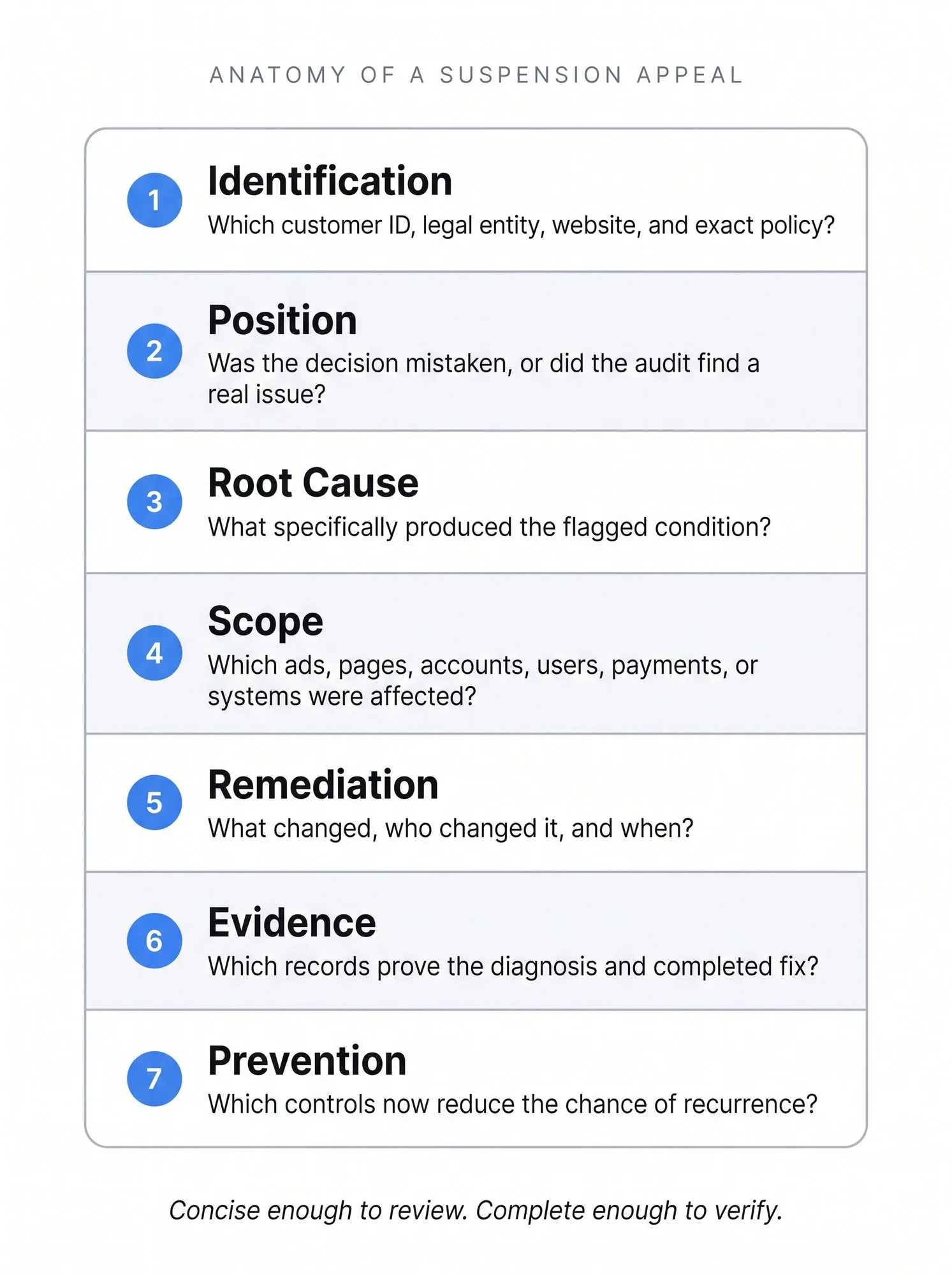
An effective appeal has seven jobs. This is an editorial evidence framework, not a secret Google scoring model.
| Component | Question to answer |
|---|---|
| Identification | Which customer ID, legal entity, website, and exact policy does the appeal concern? |
| Position | Do you believe the decision was mistaken, or did the audit find a real issue? |
| Root cause | What specifically produced the flagged condition? |
| Scope | Which ads, pages, accounts, users, payments, redirects, or systems were affected? |
| Remediation | What changed, who changed it, and when? |
| Evidence | Which records prove the diagnosis and completed fix? |
| Prevention | Which controls now reduce the chance of recurrence? |
Use a structure like this, adapting every line to the facts:
Customer ID: [customer ID]Policy named in the notice: [exact policy]
We reviewed the account, website, payment setup, recent Change History, account users, manager relationships, and related accounts. [State whether the audit found a specific issue or why the decision appears mistaken.]
Root cause: [precise factual explanation].Changes completed: [specific settings, pages, URLs, accounts, and completion dates].Related accounts reviewed: [relevant relationships and customer IDs].Evidence: [documents, screenshots, logs, scans, or checks available through Google's requested channel].Prevention: [access, deployment, billing, identity, or monitoring controls].
We request a new review based on the completed remediation and supporting information.
Keep the appeal concise enough to review and complete enough to verify. Don't add emotional pressure, threats, a long company history, or marketing copy. Don't falsely admit deliberate misconduct when you haven't found it. And don't claim every possible cause at once.
Worked Example: Make the Appeal Verifiable
Hypothetical example: an advertiser finds that a website deployment introduced an unexpected redirect on a product page. The business should investigate the complete scope rather than assume that one redirect explains every policy finding.
| Weak Statement | More Useful Evidence Record |
|---|---|
| We fixed the website | Identify the affected URLs, relevant deployment and completed fix date |
| Everything is compliant now | Describe the cited policy, the checks performed and any unresolved dependency |
| Please restore us immediately | Explain whether the decision appears mistaken or what remediation is complete |
| We will be careful | Name the owner and deployment check intended to catch a recurrence |
Do not copy this scenario as your root cause unless it matches the facts. A concise account-specific explanation with verifiable changes is more useful than a confident generic template. Google decides whether the evidence supports reinstatement.
Appeal after the fix, not before it. If the website repair is still in staging, payment ownership remains unclear, or a related account is still unresolved, the submission doesn't yet describe a completed remediation.
Google Ads Suspension Appeal Timelines and Limits
Google reported in November 2025 that it had reduced incorrect suspensions by more than 80%, made appeals 70% faster, and resolved 99% of advertiser appeals within 24 hours.
That figure is a platform-wide historical benchmark, not an individual service-level guarantee. Google doesn't publish one universal deadline for every suspension case. And a fast response isn't the same as a favorable decision.
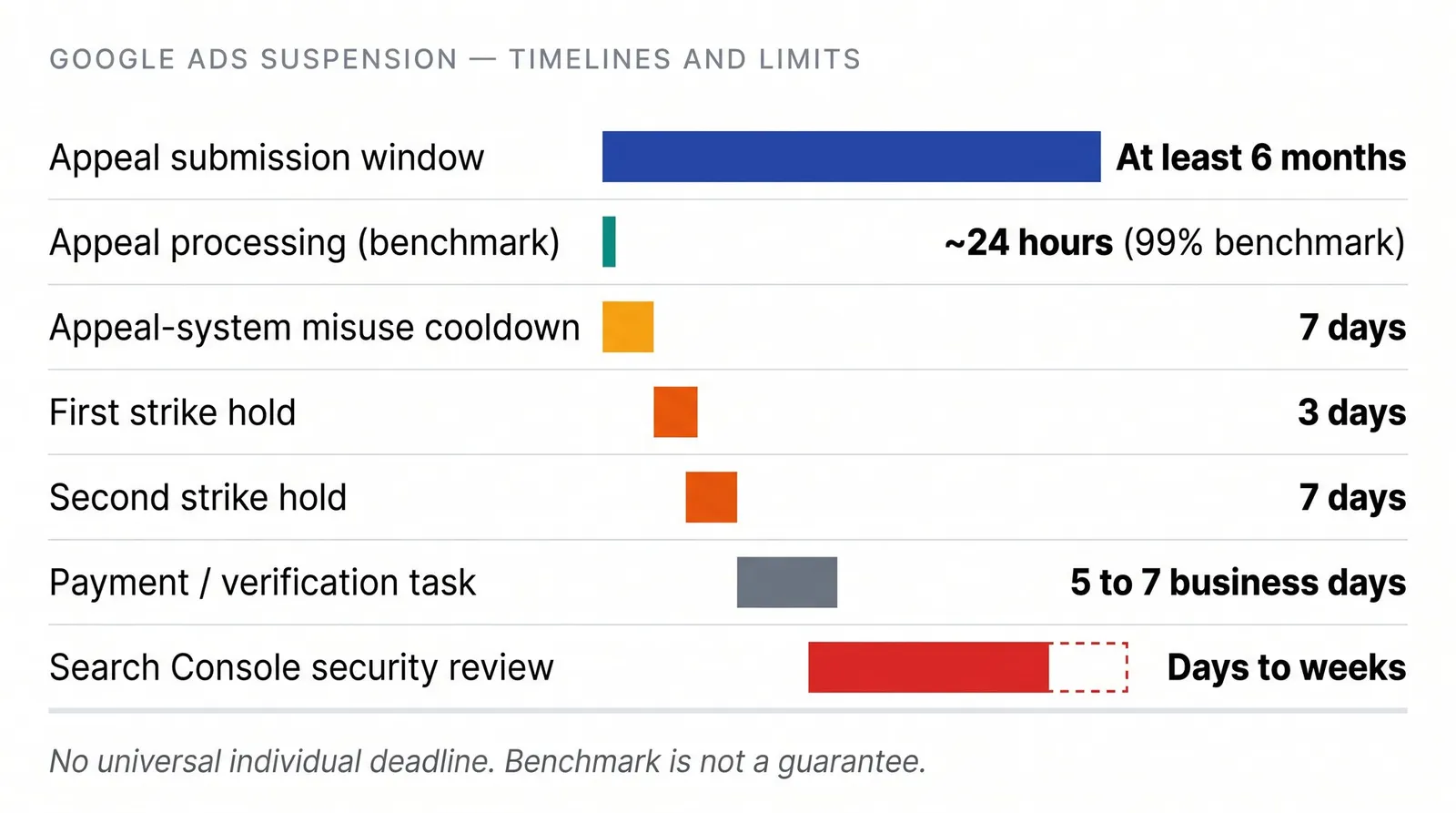
| Workflow | Published timing or limit |
|---|---|
| Account-suspension appeal | No universal individual deadline on the Help page; at least six months to submit an appeal. |
| Appeal-system misuse | Certain processing may be paused for seven days. |
| First and second strike holds | Three days and seven days after the required acknowledgment and remediation. |
| Certain payment or verification tasks | Some pages publish five-to-seven-business-day windows or code-based steps. Follow the exact task in the account. |
| Search Console security review | Days to weeks, depending on the issue and completeness of repair. |
| Ad-level policy appeals | Separate rules, including a maximum of three direct appeals per ad and distinct handling of decisions older than six months. |
Google's payment pages describe different timing for different suspicious-payment and verification workflows. Do not merge them into a single “Google appeals take five days” claim. Your real recovery time may include investigation, document collection, website repair, security review, verification, and related-account remediation before Google can assess a complete case.
Plan internal forecasts and client updates around uncertainty. Give stakeholders the facts you have, the work completed, the next dependency, and the next update time. Don't promise a return date Google hasn't promised you.
What to Do If Google Rejects Your Appeal
A rejection isn't a cue to paste the same text into the form again. Compare the decision with the original policy label and ask what the first investigation failed to prove.
Use this sequence:
- Read the full rejection and note whether it names the same policy or introduces another issue.
- Recheck linked and previously linked accounts.
- Verify that website and redirect changes are live for Google's crawlers, not only visible in a development environment.
- Confirm that legal identity, verification records, payments, public business information, and website terms agree.
- Add material new evidence or complete additional remediation.
- Submit a new appeal only when the record has genuinely changed or when you can explain a specific review error.
- Keep separate appeal records for other suspended accounts unless Google explicitly says an identity-linked restoration will happen automatically.
Don't create a replacement account while waiting. That can turn a difficult original case into an additional Circumventing Systems problem.
Eligible advertisers in the European Union may have further redress options under the Digital Services Act, including a certified out-of-court dispute-settlement body in applicable cases. Google recommends using its internal appeal route first and notes that external decisions are not necessarily binding on Google. Treat this as general information, not legal advice.
There is also no guaranteed phone escalation, chat override, partner exception, manual review, or consultant outcome. An authorized agency can help audit and document a case, but Google makes the enforcement decision.
What You Can Still Access During a Suspension
A suspended account isn't always completely inaccessible. According to Google's suspension guidance, advertisers can generally still:
- View and download reports
- Make payments or add a payment method
- Download tax documents
- Complete advertiser or payment verification
- Update security settings
- Submit an appeal
- Cancel the account and request a qualifying refund
Google warns that report access may not remain available indefinitely. Export what you need for the incident record, internal reporting, and a possible relaunch. Save campaign settings, ad and asset details, conversion configuration, naming, URLs, tracking templates, audiences, and performance reports.
A Google Ads suspension does not by itself remove a website from organic Search. A separate hacked-site, malware, or Safe Browsing issue may affect how Search or browsers treat the destination, which is why Search Console belongs in the security investigation.
While the appeal is pending, keep other existing and compliant business activity operating within each platform's rules. Do not move a prohibited offer elsewhere to dodge Google's decision. Business continuity is legitimate; enforcement evasion is not.
The records you preserve now will make a careful relaunch possible if Google restores the account.
How to Relaunch Google Ads After Reinstatement
Reinstatement isn't the moment to recreate every campaign from memory at maximum speed. First confirm what Google restored, which policies or tasks remain visible, whether billing and verification are complete, and whether related accounts are clear.
Then rebuild through a controlled source of truth:
- Review final URLs, redirects, tracking templates, and UTM values
- Confirm legal and public business information still matches
- Use individual user access and require two-step verification
- Document payment ownership and manager relationships
- Restore campaigns in a paused state for final QA where the workflow supports it
- Keep an activity and change record for high-risk site, billing, identity, and account-access updates
This is where AdManage can help, and its role needs to stay precise. AdManage cannot unsuspend a Google Ads account, file the appeal, override Google's policy decision, or guarantee that a future suspension will not happen.
After Google restores access, teams can use the AdManage Google Ads workflow to prepare structured launch inputs instead of rebuilding large batches manually. The Google Sheets launch workflow supports organized URL, UTM, copy, and launch-status fields, while documented custom naming conventions and Google Drive asset workflows help keep source material consistent.
For teams running established Google Ads campaigns across several existing channels, the manual bulk-launch workflow can centralize launch preparation without presenting another channel as a workaround for Google enforcement.
Operational control reduces drift. It does not create policy compliance by itself. The business, destination, claims, payments, verification, and account relationships still need to satisfy Google's rules.
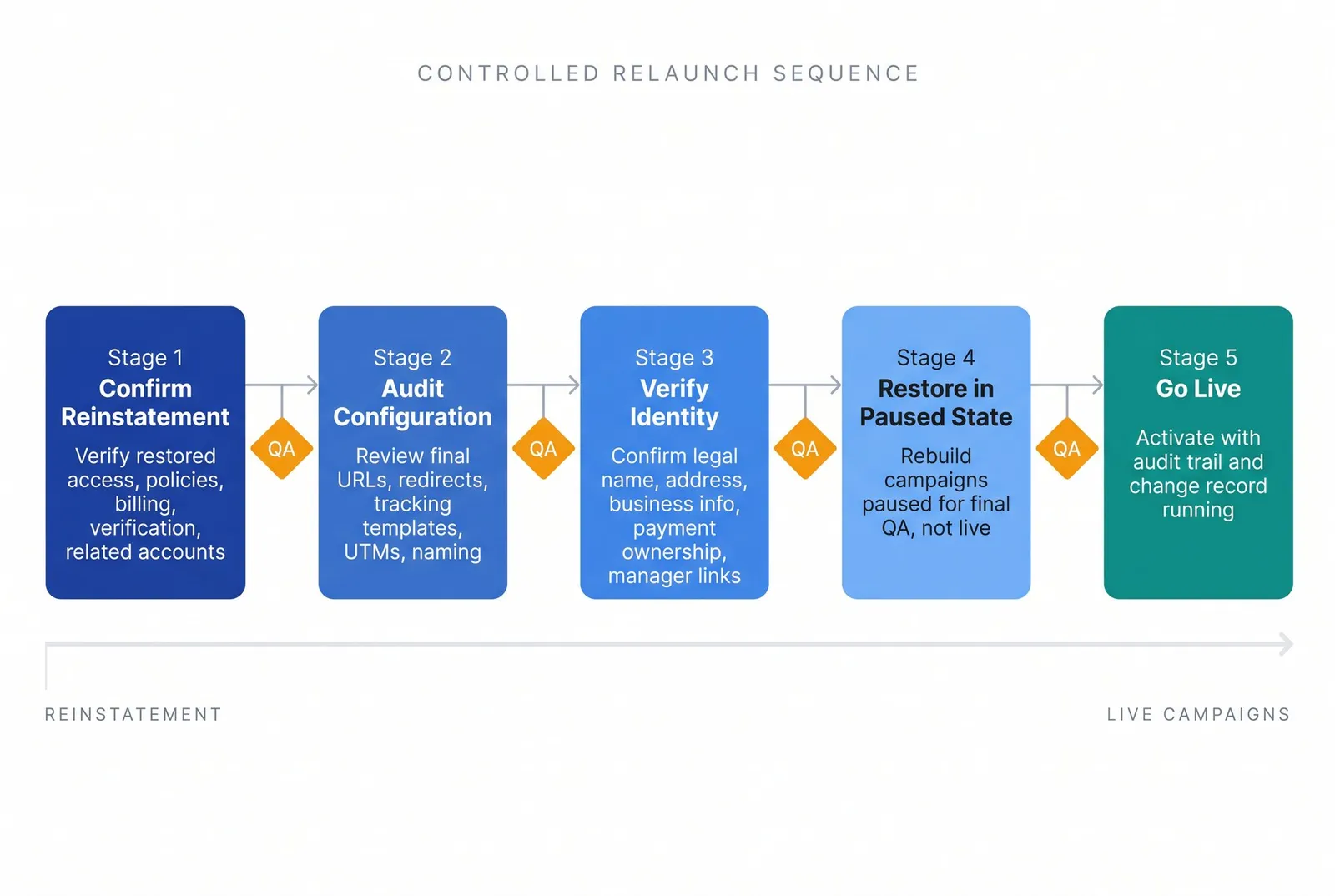
The practical aim is simple. Once access returns, the relaunch should be easier to review, easier to audit, and less dependent on rushed manual entry.
Google Ads Suspension FAQs
Is a Google Ads Suspension Permanent?
Google describes an account suspension as permanent unless an appeal succeeds. Advertisers have at least six months from the suspension date to appeal, according to Google's account-suspension overview.
Can I Create Another Google Ads Account After a Suspension?
Do not create a replacement account to continue advertising. Google says new and related accounts may also be suspended. Restore the original account or resolve the related enforcement first.
Can I Appeal More Than Once?
Yes, Google says a rejected account-suspension appeal can be appealed again. Submit one appeal at a time, and reappeal only when you have material new evidence, completed remediation, or a clear explanation of a review error. Excessive submissions may not be processed.
How Long Does a Google Ads Suspension Appeal Take?
Google reported that 99% of advertiser appeals were resolved within 24 hours in November 2025, but it does not promise that deadline for every individual case. Investigation, payment verification, advertiser verification, website repair, security review, and linked-account issues can extend the real recovery time.
Can an Agency Appeal for Me?
An authorized agency can help investigate, organize evidence, and complete tasks it is permitted to access. It cannot bypass identity or payment requirements, control Google's review, or guarantee reinstatement.
Can I Use an Agency's Account While Mine Is Suspended?
A transparent agency relationship is legitimate, but using another account as a substitute identity to evade a suspension risks Circumventing Systems enforcement. Do not rent, borrow, or disguise an account relationship.
Can I Still Download Reports?
Usually, yes. Google says suspended advertisers can view and download reports, although that access may not continue indefinitely. Export important reports and configuration records promptly.
Can I Get a Refund From a Suspended Account?
Google says qualifying advertisers may cancel and request a refund. “Qualifying” matters, so follow the account's refund workflow and do not assume every unused balance or promotional credit is refundable.
Does a Google Ads Suspension Hurt Organic SEO?
The suspension itself does not mean the site has been removed from organic Search. A related malware, hacked-site, or Safe Browsing issue may independently affect Search visibility or browser warnings, so check Search Console if security is involved.
Is Circumventing Systems Always Cloaking?
No. Google's policy also covers account evasion and other attempts to manipulate enforcement. Legitimate redirects, trackers, and multiple-account structures are not automatically violations. Their purpose and implementation matter.
The Fastest Defensible Path Is the One You Can Prove
A Google Ads suspension becomes a larger problem when urgency replaces sequence. Classify the status. Preserve the evidence. Find the cause. Complete the fix. Submit one honest appeal. If Google rejects it, return to the investigation and add substance before trying again.
Do not build the recovery plan around a borrowed account, a secret technical workaround, or a guaranteed turnaround. Google has not published those routes, and no outside provider controls the decision.
Once the account is reinstated, keep that same discipline. We built AdManage for structured, high-volume ad operations, including controlled Sheets, asset management, naming, URLs, and UTM workflows. That can make a post-reinstatement relaunch easier to review and audit, but it stays downstream of Google's policy process.
For now, your next move is smaller: save the notice and the current account state before changing anything.

About the author
Cedric Yarish
Co-founder of AdManage.ai