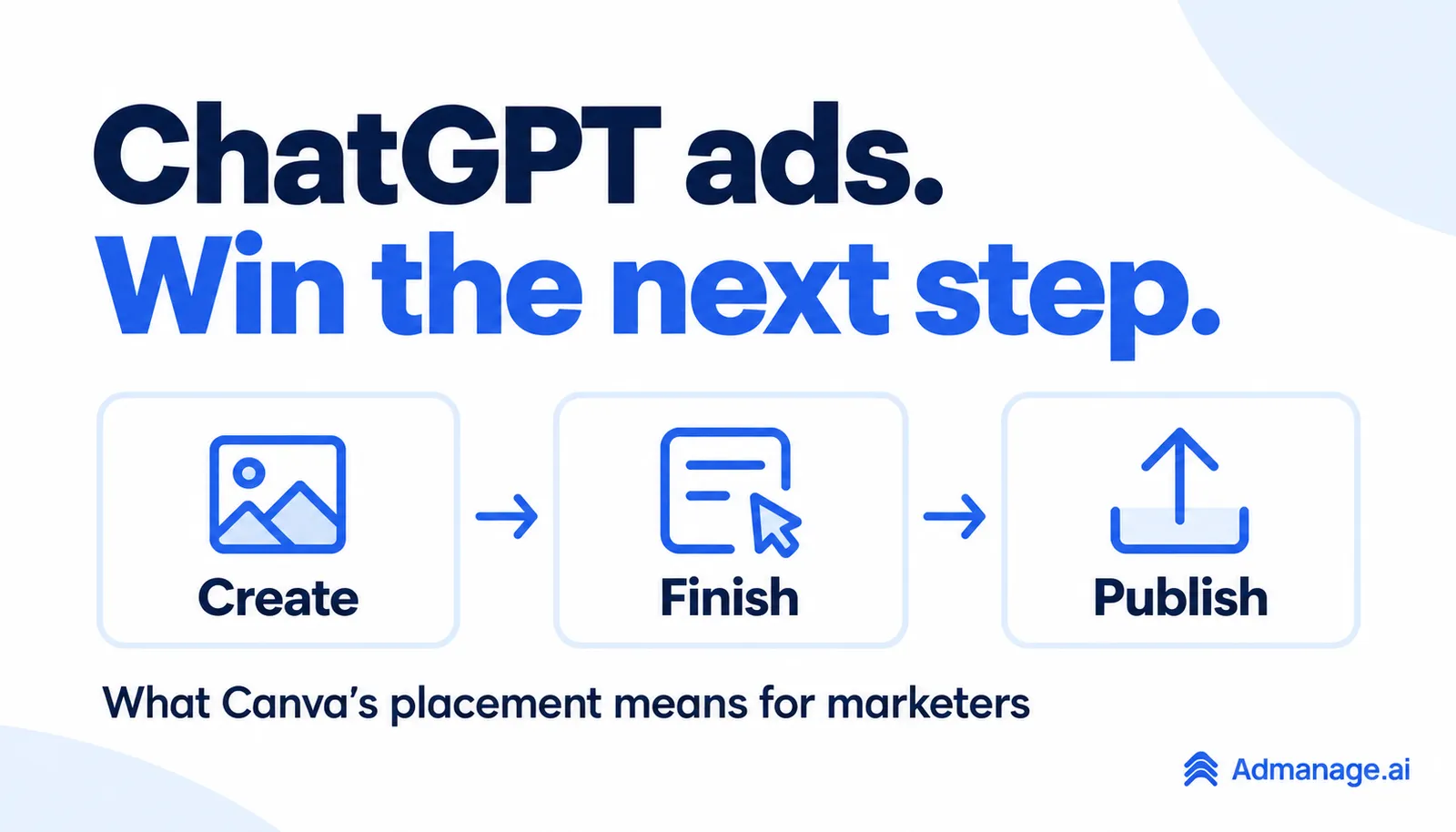
ChatGPT creates the image. Canva advertises the next step.
ChatGPT ads are paid placements shown separately from the assistant’s response. Businesses can use OpenAI Ads Manager to create campaigns, supply creative and measure advertising outcomes. You can also launch ChatGPT ads easily with AdManage, alongside your Meta, TikTok and Google campaigns.
This guide explains how to advertise on ChatGPT, how pricing works, what advertisers can influence and how to judge the results. The Canva screenshot below makes the opportunity concrete: a person is already creating something, and a design tool offers a possible next step.
For media buyers in the UK and beyond, the aim is to connect a useful offer with a task someone has started. We cover a real ad example, the latest formats and controls, a campaign setup checklist and a worked customer-acquisition model. The Canva screenshot illustrates a placement; its campaign results are not known.
ChatGPT ads example: Canva’s placement
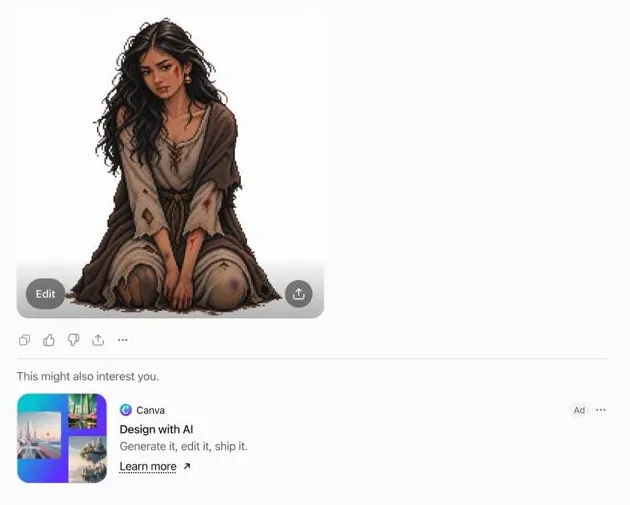
In the supplied screenshot, a generated illustration appears above a separate Canva ad. The copy is short: “Design with AI” and “Generate it, edit it, ship it.” A small Ad label identifies the placement.
The connection is easy to understand. An image can be the start of a larger piece of work: a social post, presentation, product listing or campaign asset. A design tool can offer a route from the initial image to something ready to use.
That is our interpretation of the creative. The screenshot cannot tell us why the ad was selected, whether it was personalised, which market it appeared in or how well it performed. It also does not establish that Canva's campaign used the newer multi-image format.
The image above is a crop of the original screenshot. The personal sidebar and conversation titles have been removed; the illustration, ad creative, copy and disclosure are preserved.
For an advertiser reviewing examples like this, separate two questions. Is the offer a plausible next step? And does that offer create enough customer value to justify the cost of reaching people?
The first can generate a creative idea. The second needs campaign and business data.
Why Canva is an interesting example
Canva has introduced Craft, its first image-generation model developed by Canva Research. Canva describes it as built for design, with image generation available through its product and public API.
It also has an existing ChatGPT connection through the Canva AI Connector, allowing supported design work to start in ChatGPT and continue in Canva.
These are distinct product and distribution routes. A paid placement is an advertisement; using a connected Canva capability is a product interaction.
Our view is that the interesting commercial opportunity extends beyond generating an initial image. People still need to select a format, apply a brand, edit a layout, collaborate or prepare an asset for its destination.
A business can compete to help with one of those steps even when the initial idea or asset comes from another tool. The ad in the screenshot is a useful illustration of that possibility. It is not evidence of Canva's wider acquisition strategy or its campaign returns.
The latest ChatGPT ads changes marketers should know
These are the confirmed developments relevant to this example, checked on 29 October 2026.
| Development | Confirmed position | Practical question for a buyer |
|---|---|---|
| Multi-image ads | OpenAI introduced an open beta from 26 October 2026 | Can several images explain one offering more clearly? |
| Creative enhancements | Automatic enablement announced from 30 October, with existing opt-outs preserved | Which changes can run under your current settings? |
| UK self-service access | The UK is listed as available in the current country table | Is your legal entity eligible, and which features can it access? |
Multi-image ads: explain one offering clearly
OpenAI's ad creation guidance describes a multi-image format using four to six square images. The images share one destination URL, with Learn more as the current call to action.
Think about the sequence as a way to explain a useful outcome. A fictional design tool could show a source asset, a completed layout and examples of the finished work in use.
Each image should contribute something clear. Decide what the visitor needs to understand before clicking, then check that the destination continues that same story.
The supplied Canva screenshot shows a below-response placement. OpenAI separately announced a visual format test during image generation, initially involving Free and Go users in the US. Do not assume the two examples have identical delivery, timing or eligibility.
Creative enhancements: check what can change automatically
OpenAI's creative enhancement documentation says enhancements can use the existing ad and landing page to adapt text, resize images, optimise destination URLs or translate copy. When enabled, variations can run without individual review.
Automatic enablement is announced from 30 October 2026, the day after this article's research date. Existing opt-outs are preserved, and campaign-specific settings take priority over the account default.
Before testing, record the settings that will apply. Check that the product pages used as source material contain current prices, availability and accurate claims. If a destination can change, make sure the relevant pages still support the offer and measurement you intend to use.
Those are preparation checks. They are not a recommendation that every advertiser should choose the same setting.
UK availability: distinguish access from delivery
The current Ads Manager availability table lists the United Kingdom as available for self-service. Eligibility is based on the country of the legal entity that will advertise and be billed.
That does not establish that every new format or placement is available in every market. Confirm the options actually available when setting up a campaign, particularly if your business serves both UK and US customers.
How ChatGPT ads targeting and context hints work
OpenAI's advertiser overview describes relevance signals including conversation context, the ad, the landing page and advertiser-provided context hints. Those hints guide matching; they are not exact-match keywords or a guarantee of delivery in a particular conversation.
For a creative team, a useful starting point is the customer's unfinished task.
“People interested in design software” is a broad audience description. “Someone with an image who needs a finished product announcement” gives a team a more specific offer to develop.
That description is a creative hypothesis. It does not mean the advertiser can identify or read a particular person's conversation.
Write down the task, the remaining obstacle and the outcome your product can credibly deliver. Then create variations that address genuinely different needs.
For example, a layout tool might address format preparation, brand consistency or team review. Each angle deserves its own explanation and appropriate destination. Rephrasing a generic headline several times gives you less to learn.
Four examples of an offer that helps with the next task
The examples below are hypothetical concepts for planning. They are not actual campaigns, targeting guarantees or claims about what users in the supplied screenshot intended.
| Task someone may have started | Possible next need | Offer worth testing | Relevant destination |
|---|---|---|---|
| Generated a product image | Prepare a launch asset | Turn the image into a product announcement | A suitable layout or template workflow |
| Drafted a presentation outline | Build slides the team can edit | Convert the outline into a presentation | A presentation creation workflow |
| Compared products for a small flat | Check fit and availability | Explore products meeting stated constraints | A relevant filtered collection |
| Written a project brief | Organise delivery | Turn the brief into a working project | A project template with clear setup steps |
The offer should describe something the business can actually provide. Be specific about the next useful outcome without inventing details about the person.
The landing page then has one job: help the visitor make progress on that outcome. Show what happens next, what input is needed, what the output looks like and any meaningful limits.
For a software product, that might mean demonstrating a workflow before asking for a sign-up. For ecommerce, it might mean displaying the relevant range with clear stock, price and delivery information.
The strongest destination for a hypothesis is the one that lets you evaluate it. If visitors cannot find the promised workflow after clicking, a weak conversion rate tells you little about the underlying demand.
How much do ChatGPT ads cost?
ChatGPT advertising supports impression-based and valid-click billing. OpenAI’s pricing overview describes maximum CPM and CPC bids. It currently suggests a starting maximum CPC bid of US$3–$5. That is bid-setting guidance, not an average paid CPC, a fixed price or a promised acquisition cost.
Your actual CPC or CPM will depend on auction delivery and campaign settings. Calculate the price you paid from reported spend and valid traffic, then connect it to customer outcomes. The following arithmetic is illustrative, not a platform benchmark.
| Metric | Calculation | Illustrative example |
|---|---|---|
| CPC | Ad spend divided by clicks | £100 divided by 50 clicks = £2 |
| CPM | Ad spend divided by impressions, multiplied by 1,000 | £100 divided by 20,000 impressions × 1,000 = £5 |
Work backwards from your economics, too. If £200 is your acceptable ad spend per customer and 1% of clicks become customers, the implied maximum sustainable CPC is £2 under those assumptions. A different margin or conversion rate changes that threshold.
Consider this hypothetical example for a software product. Both approaches spend £1,200. Activation means the new user completes a defined first useful action, such as exporting a finished asset.
| Metric | Approach A | Approach B |
|---|---|---|
| Ad spend | £1,200 | £1,200 |
| Clicks | 600 | 300 |
| Average CPC | £2 | £4 |
| Sign-ups | 60 | 40 |
| Cost per sign-up | £20 | £30 |
| Activated users | 12 | 24 |
| Cost per activated user | £100 | £50 |
| Paying customers | 6 | 10 |
| Ad spend per paying customer | £200 | £120 |
Approach A wins on click price and sign-up cost. Approach B produces more activated users and paying customers at the same spend.
This is illustrative arithmetic, not a forecast for ChatGPT ads or a comparison with Canva's campaign.
The business decision still needs margin, retention, refunds and the time taken to convert. A customer who has just signed up cannot be judged against a fully matured cohort from an earlier period.
Choose an activation event that reflects value received. Opening a page, creating an account and completing a useful task are different stages. Track them separately so an increase in easy actions does not conceal a decline in meaningful outcomes.
For a broader explanation of reporting credit versus business impact, see our guide to multi-touch attribution.
Launch ChatGPT ads easily with AdManage
AdManage makes launching ChatGPT ads easier: connect your eligible advertiser account, create or choose campaigns and ad groups, and bulk-launch image ads or product catalog templates from the same workspace as Meta, TikTok and Google.
In AdManage, open Integrations → ChatGPT Ads to connect your Ads Manager API key. Then add your creatives, titles, descriptions, destination links and tracking details in the launcher, review the preview and publish. You can manage the ads and review results in AdManage.
Explore AdManage’s ChatGPT Ads integration to get started. You’ll need an eligible ChatGPT Ads advertiser account and the appropriate advertiser API access.
How to advertise on ChatGPT: Ads Manager setup
Use OpenAI Ads Manager and its campaign quickstart to move from account setup to an approved campaign:
- Confirm eligibility and define the test. Check the country of the legal entity that will advertise and be billed. Choose one offering, one customer task and an acceptable acquisition cost.
- Set up Ads Manager. Use a work account and complete verification, billing and team access.
- Create the campaign. Choose the available objective, budget and delivery settings. Record your spending limit.
- Organise ad groups around intent. Group related offers, provide accurate context hints and record the inputs.
- Add the ads and destination. Supply the copy and images, match the landing page to the offer, and check enhancements.
- Verify measurement. Test tracking and conversion events. Reconcile sign-ups, activated users and customers.
- Submit for review and monitor delivery. Once approved and eligible to serve, check delivery and allow outcomes time to mature.
Check first-campaign scheduling before submission. OpenAI notes that date controls may appear only after initial campaign creation. Do not publish merely to reveal scheduling options if you need delivery to begin on a specific date.
OpenAI provides a measurement pixel and Conversions API for advertising outcomes. Match the measurement method to your implementation, and verify events against your own analytics or order records.
Keep attributed results and incremental results distinct. A reported conversion associates an outcome with advertising under a measurement method. Establishing how much business the ads added requires a suitable experimental design.
Avoid changing the offer, landing page, targeting inputs and conversion definition at the same time unless the test is explicitly designed to evaluate that package. Otherwise, it becomes harder to explain what made the difference.
For teams also reviewing Google's conversational search changes, our Google AI Mode ads guide covers a related measurement problem. The platforms have different features, so keep their settings and results separate.
Questions advertisers are asking
How do I access ChatGPT Ads Manager?
Use ads.openai.com to create or access an advertiser account. Account creation, verification and the availability of specific campaign features are separate checks; follow the setup steps above.
Do ChatGPT ads influence the answer?
OpenAI says paid placements are separate from ChatGPT's answers and do not influence them. Advertisers do not receive private conversations. The user-facing ads explanation describes these boundaries.
Does this screenshot show the new multi-image format?
It shows an illustration followed by a Canva ad. It does not establish that the advertiser used the new format, the campaign's settings or how the ad was selected.
Is Canva's ChatGPT connection the same as an advertisement?
They serve different purposes. The connection enables supported Canva product actions; a labelled ad promotes an offering. Do not infer that paying for an ad changes the assistant's response.
Are creative enhancements already automatic?
As of this article's 29 October research date, automatic enablement has been announced to start on 30 October, with existing opt-outs preserved. Check the current settings and documentation when planning delivery.
Can I promote my business on ChatGPT?
Yes, eligible businesses can create advertising campaigns through OpenAI Ads Manager. Check country access, account verification and ad policies before planning delivery. Start with a plausible customer task, a useful offer and a way to measure valuable outcomes.
Before your next creative brief, write one sentence: “After someone uses AI to do this, our product helps them do this next.” Build your first test around the most credible answer.
Research checked on 29 October 2026. Platform availability and controls may change. The screenshot is supplied as an example, and all performance figures in the worked table are hypothetical. No private ad account counts, customer records or conversation histories are disclosed.