

Meta Catalog Ads, Product Extensions and Collection Ads: How They Fit Together
Meta gives you three ways to put catalog products in front of people. They are easy to mix up because they can all use the same catalog, but they aren't three competing options. Each one starts from a different place:
- Catalog ads start with the products. Your catalog powers personalised product advertising, so you can promote a range of products at scale instead of building a separate creative for every item.
- Product extensions start with your creative, then add products. You keep your uploaded image or video, and Meta adds relevant products from your catalog alongside it. The brand story leads, and shoppers get an easier route to the products.
- Collection ads combine storytelling with product browsing. A hero image or video appears with product tiles, and a tap typically opens an Instant Experience for further browsing.
Put another way: catalog ads are a catalog-led way of advertising, product extensions enhance a creative you already have, and collection is an ad format. They overlap. A catalog ad can be shown in a collection layout, and product extensions can create a collection-style presentation automatically.
To make this concrete, this guide uses one real catalog throughout: Nurtured Coach – Certifications, the course catalog of Nurtured Coach, a coaching certification brand run from AdManage's own Zapish Apps ad account. It has five products: Autism, ADHD, Neurodiversity and Neuroscience coach certifications (£77 each) and a Client Attraction System included with each certification. Every Ads Manager screenshot below comes from that account.
Catalog ads: start with the products
With catalog ads, the catalog is the creative. Meta builds each ad from your product images and details and picks the products to show each person.
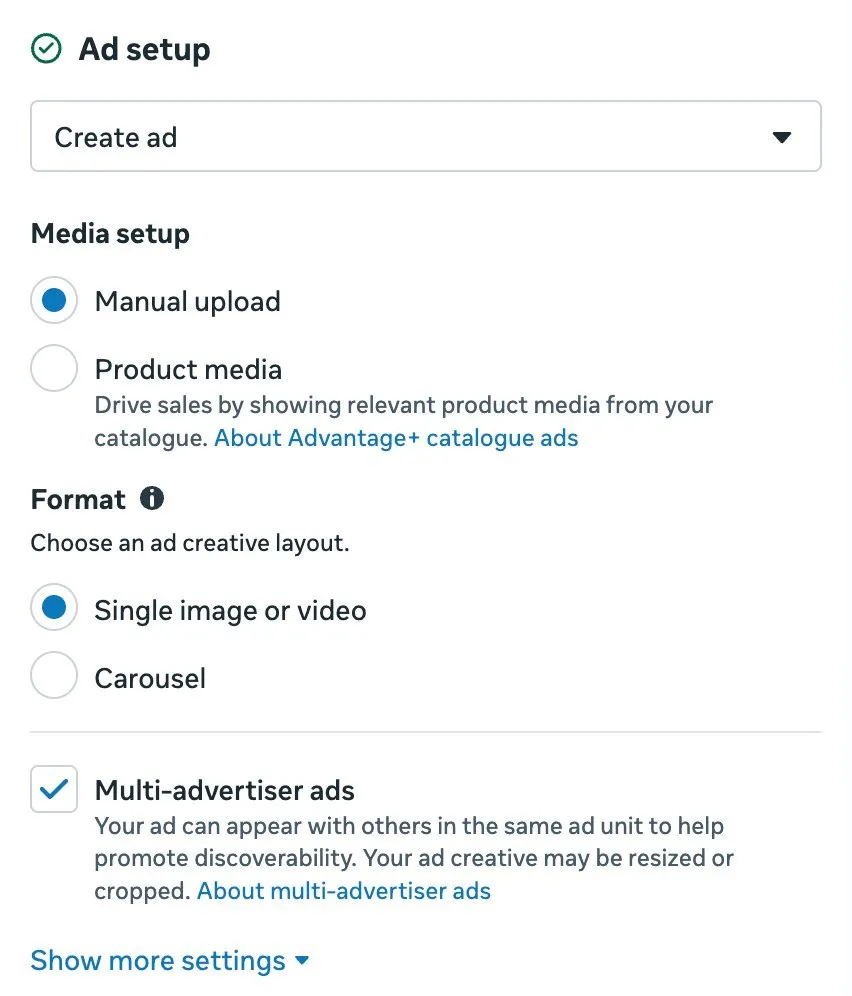
Meta has renamed Advantage+ catalog ads. Its Help Center now calls them ads with product media and says they "show people the most relevant products or services from your catalogue based on their interests, intent and actions online", using data from your Meta pixel, app SDK or on-platform signals (About ads showing product media). You turn them on by choosing Product media as the creative source in the Ad setup section.
Catalog ads are useful when you want to promote a range of products at scale: a large inventory, retargeting people who viewed products, or cross-selling. Setup needs a catalog, a product set and event data from a pixel or SDK. For more on feed-driven ads, see our guide to Facebook dynamic ads.
Product extensions: start with your creative, then add products
Meta's developer documentation describes product extensions as an Advantage+ creative optimization that "showcases products from your catalog below your static single media when it's likely to improve performance" (Meta for Developers). Ads Manager calls the setting Products (the developer docs also call it "Add catalog items"), and it sits in the ad's Creative setup.
In practice:
- You upload your own image or video, write your own copy and choose your own landing page, as for any single image or video ad.
- You turn on Products and select or confirm the catalog and product set.
- Meta decides when to add products. The number, order and layout of products can vary by placement, available media and audience, according to Meta's Help Center article on showing products from your catalog with your ad creative.
- When someone taps a product, they go to that product's page on your website.
On the Nurtured Coach ad, the main image sells the Autism Coach Certification. With Products turned on, the ADHD, Neurodiversity and Neuroscience certifications from the same catalog can appear underneath, so someone who is more interested in ADHD coaching has a direct path to that course.

Product extensions are useful when you want the brand story to lead while giving shoppers an easier route to the products.
Collection ads: storytelling plus product browsing
Collection is an ad format. Meta's developer docs say a collection ad "includes an Instant Experience" and that "the in-feed ad will feature three products under a hero image or video that opens into a full-screen Instant Experience when someone interacts with your ad" (Collection Ads, Meta for Developers). Supported placements listed there are Facebook Feed, Facebook Reels, Instagram Feed and Instagram Stories, and a collection needs at least four photo or product elements.
Collection ads are useful when you want a more immersive shopping journey. Setup covers the creative, the products and the browsing experience (the Instant Experience people land in after the tap).
How the three fit together
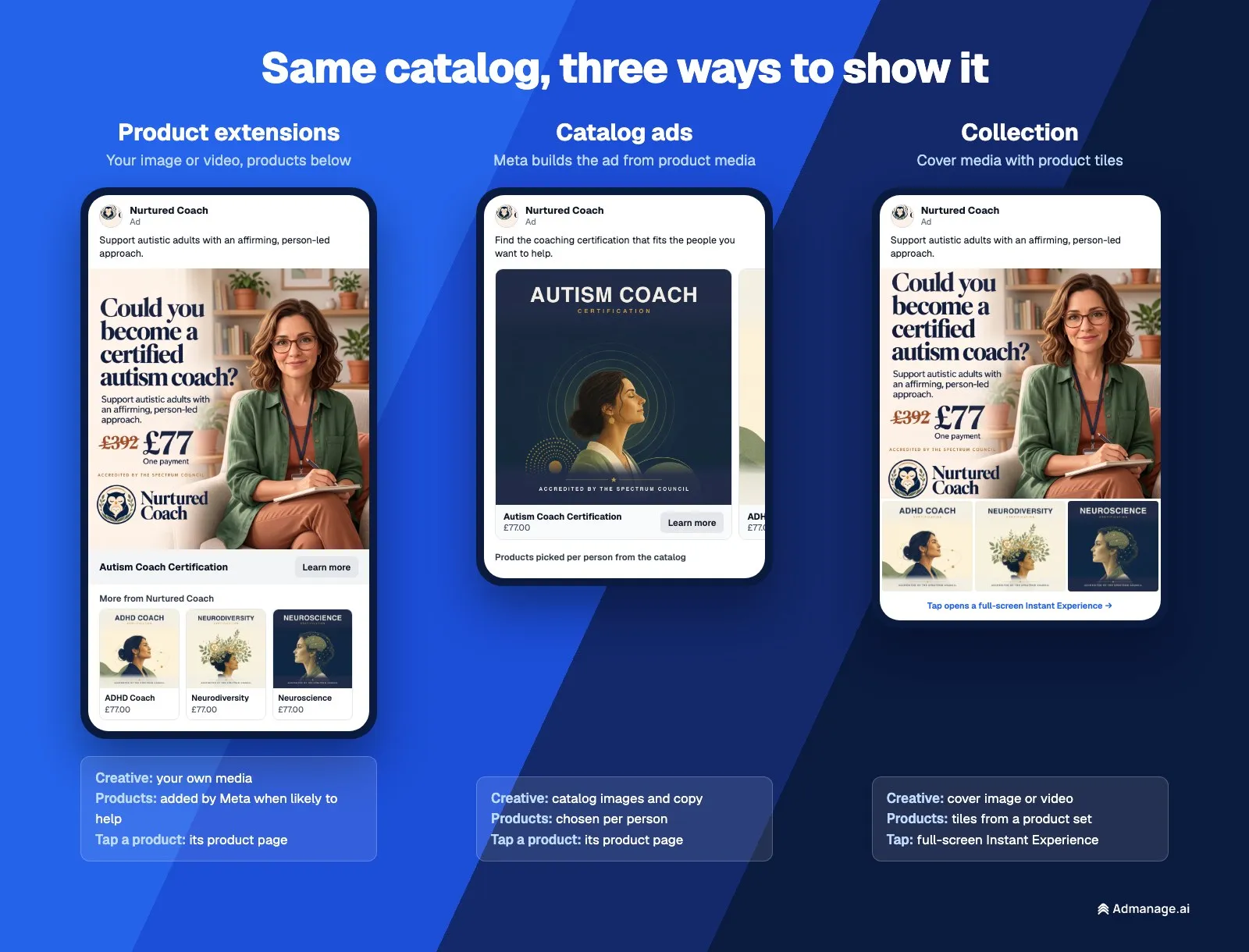
| Catalog ads (ads with product media) | Product extensions | Collection ads | |
|---|---|---|---|
| What it is | A catalog-led advertising approach | An enhancement to your own creative | An ad format |
| Starts with | The products in your catalog | Your own image or video | A hero image or video, plus product tiles |
| Who picks the products | Meta, per person, from the catalog or product set | Meta, from the catalog or product set you choose | The product set you choose for the tiles and Instant Experience |
| Where a product tap goes | The product's page on your website | The product's page on your website | Typically a full-screen Instant Experience |
| Formats it can appear in | Single image, carousel, collection or video, built from the feed | Single image or video, with optional carousel and collection display | Collection (hero + tiles + Instant Experience) |
| Setup | Catalog, product set and event data (pixel or SDK) | Turn on Products and select or confirm the product set | Creative, products and the Instant Experience |
| Useful when | You want to promote a range of products at scale | You want the brand story to lead, with a route to products | You want a more immersive shopping journey |
The table shows where they overlap. Collection appears in all three columns because it is a format: catalog ads can use it, product extensions can produce a collection-style layout, and you can build a collection ad yourself.
In Ads Manager, the quickest way to tell catalog ads and product extensions apart is the creative source in Ad setup:
- Product media = a catalog ad. The catalog is the creative.
- Manual upload + Products on = product extensions. Your creative leads, and products are added to it.
Product extensions can create a collection-style ad automatically
Product extensions start from a single image or video, but Meta can display them in other layouts through Format display options. On the Nurtured Coach ad, Ads Manager showed three groups:
- Single media: your image or video on its own, with an optional "Show mixed media" collage of your media and products.
- Carousel: "Show uploaded media in the intro card, followed by products."
- Collection: "Show uploaded media as a cover and products as tiles."
The Ad sources panel confirmed Products was on and "Used in 2 of 3 formats", drawing from the All Products set of five items.
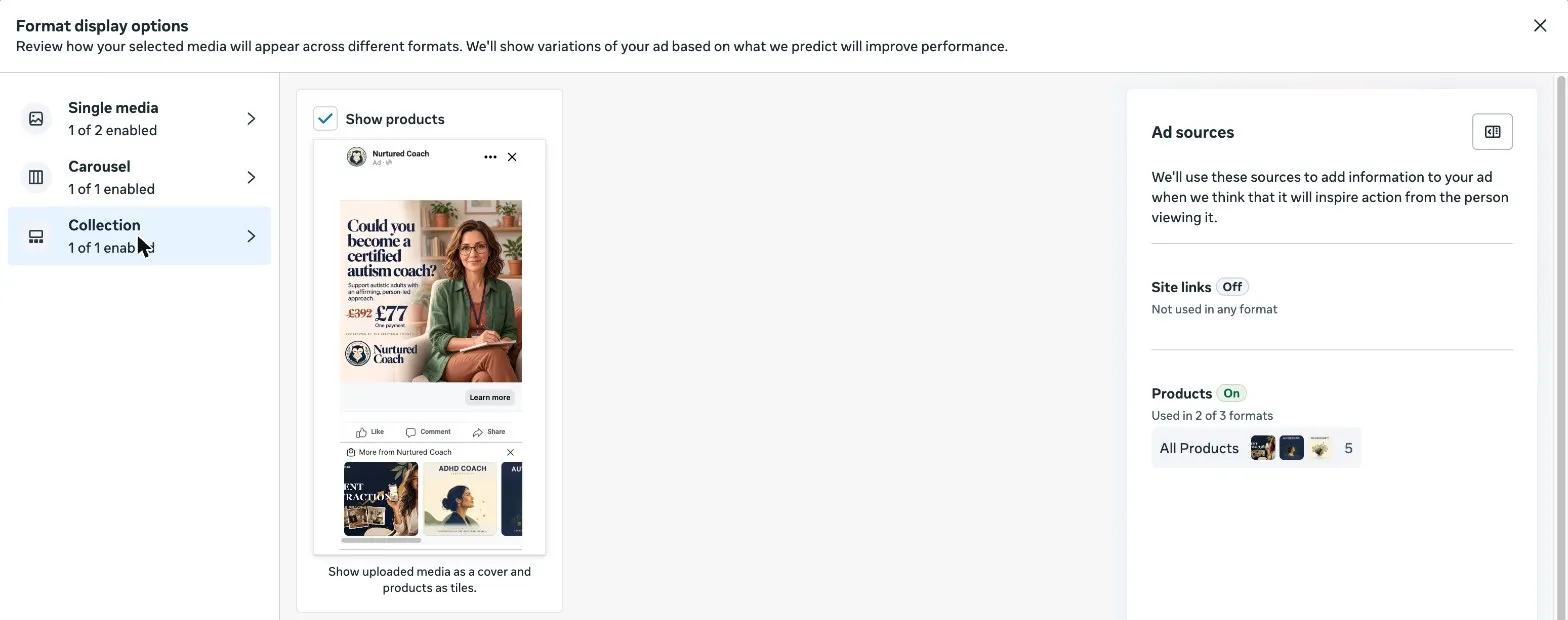
So one ad can be served as a plain single image, a carousel led by your creative, or a collection-style layout with product tiles, and Meta chooses per placement. You get a collection-style presentation without building a separate collection ad. Meta notes that the Carousel display option is not available for ads that click to WhatsApp (Meta Help Center). Meta's format display options article covers the other ad sources these layouts can use.
Requirements for product extensions
From Meta's Help Center and developer docs:
- Format: single image or video.
- Catalog: a catalog in Commerce Manager with at least four products. If you can't see Products in Creative setup, the catalog may be missing or too small.
- Objective: the Help Center lists Traffic, Leads, Engagement, Sales and App promotion. With the Sales objective, turn off Advantage+ catalog ads at the campaign level, otherwise you are building a catalog ad instead.
- Placements: products only show on Facebook and Instagram Feed, Stories and Reels.
- Destination: Website, App, Website and app, or Message destinations (Messenger or WhatsApp).
One thing we hit while testing: when the ad's website URL pointed to a different domain from the catalog's products, Ads Manager warned "The catalogue that you selected does not match this URL." Keep the ad's link on the same site as the products in the set.
How to set up product extensions in Ads Manager
- Click + Create and choose an objective such as Sales or Traffic. For Sales, turn off Advantage+ catalog ads at the campaign level.
- At the ad set level, set the conversion location (for example Website).
- At the ad level, in Ad setup, choose Manual upload and Single image or video.
- In Creative setup, go to Products. It may be on by default. Select or confirm the catalog and product set.
- Upload your media and write your copy.
- In Format display options, tick Show products under Carousel and Collection if you want those layouts.
- Check the Carousel and Collection previews, then publish.
Product extensions through the Marketing API
Meta's developer docs show product extensions set on the creative with two fields:
creative_sourcing_spec.associated_product_set_id: the product set to show under the media.degrees_of_freedom_spec.creative_features_spec.product_extensions.enroll_status:OPT_INorOPT_OUT.
Since Marketing API v20.0, every ad creation request that is eligible for product extensions must say whether it opts in or out (Meta for Developers). If you launch ads through a tool or your own scripts, check that it sends this field. Otherwise the request may be rejected, or products may not show as you expect.
Where to start
Because the three answer different questions, the useful question is where you want to start, not which one wins:
- Start with catalog ads when the products are the message and you want to promote a range of them at scale, without building a creative for every item.
- Start with product extensions when your best creative is a brand, offer or UGC asset and you want it to lead, with products alongside. The Nurtured Coach autism ad is a good example: the creative sells one course, and the extensions show the other three.
- Use the collection format when you want a more immersive shopping journey, with a hero image or video, product tiles and an Instant Experience to browse.
They work together. The same catalog can power catalog ads for retargeting and product extensions on your brand creative, and product extensions add a product path to ads you would run anyway. For the full list of Meta formats, see Meta ad formats explained. For how Meta's automated creative options compare with manual control, read Meta Advantage+ vs manual creative.
Frequently asked questions
Do I have to choose between catalog ads, product extensions and collection ads?
No. Catalog ads are a catalog-led advertising approach, product extensions enhance your own creative, and collection is an ad format. They can use the same catalog, and product extensions can create a collection-style presentation automatically.
What are product extensions on Meta ads?
Product extensions are an Advantage+ creative feature that shows products from your catalog alongside your single image or video ad when Meta expects it to improve performance. In Ads Manager the setting is called Products, under Creative setup.
Are product extensions the same as Advantage+ catalog ads?
No. A catalog ad (now called ads with product media) starts with the products and is built from your catalog. Product extensions start with your own image or video and add catalog products to it.
What is the difference between a collection ad and a catalog ad?
Collection is a format: a hero image or video with product tiles that typically opens an Instant Experience. A catalog ad describes where the content comes from: your product feed, with products chosen per person. Catalog ads can be shown in a collection layout.
How many products do I need for product extensions?
Meta asks for a catalog with at least four products. The Nurtured Coach catalog in this guide has five.
Which placements show product extensions?
Facebook and Instagram Feed, Stories and Reels. On other placements the ad runs without products.
Can I choose which products appear?
Yes. Choose a product set to limit the products Meta can show. Meta still decides how many to show, in what order and in which layout.
Do product extensions work with video ads?
Yes. Meta supports product extensions on single image and single video ads.
Launch product extension ads at scale with AdManage
Turning Products on for one ad is quick. Doing it across dozens of ads, ad sets and accounts, with the right catalog and product set on each one, takes much longer in Ads Manager.
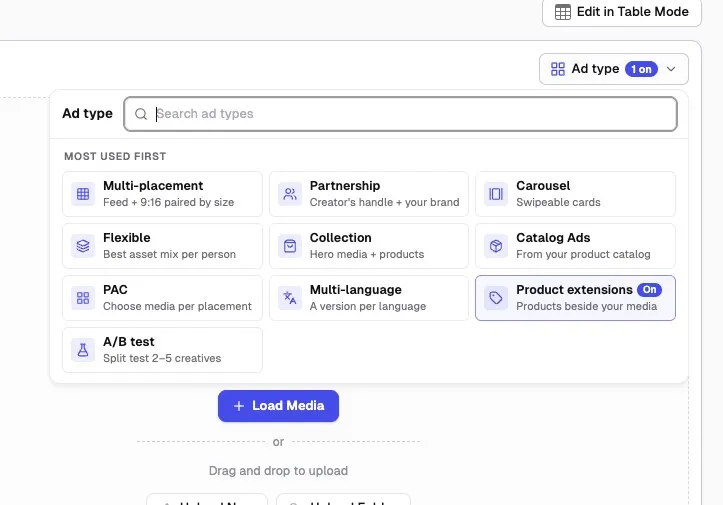
In AdManage, open Ad type on the launch page and choose Product extensions ("Products beside your media"). AdManage asks Meta which catalog and product set match each ad's link and shows Meta's recommendation, or you can choose a set yourself. Every ad in the batch is then launched with product extensions opted in. The same menu covers Catalog Ads, Collection, Carousel and Flexible formats.
See how AdManage compares with other tools in our guide to bulk Meta ad launch tools, or start a free trial.

About the author
Cedric Yarish
Co-founder of AdManage.ai