
How to set up Meta Advantage+ catalog ads the right way, scale them without losing control, and write copy that actually works across your entire product catalog.
If you're reading this, you probably want one (or all) of these things:
- Stop building one ad per SKU and let Meta match the right product to each person automatically
- Retarget people who viewed or carted products with the exact items they touched
- Prospect with your catalog instead of guessing which static creatives will land
- Fix a broken setup where match rates are low, events are misfiring, or Meta keeps showing the wrong products
- Make catalog ads look like real creative, not generic product tiles
This guide covers all of it. It's a tutorial, a reference, and a playbook you can hand to your ad ops team and say, "Ship this."
We built it from the perspective of teams launching hundreds (or thousands) of catalog ad variations every month, because that's the world we live in at AdManage. If you're testing at scale, you'll find specific blueprints, copy templates, and troubleshooting patterns here that most guides skip entirely.
What "Dynamic Ads" Actually Means in 2026
Meta has renamed and restructured this feature area multiple times, and it causes real confusion. Quick clarification before anything else.
What most people mean when they search "Facebook Dynamic Ads" in 2026 is one of two things:
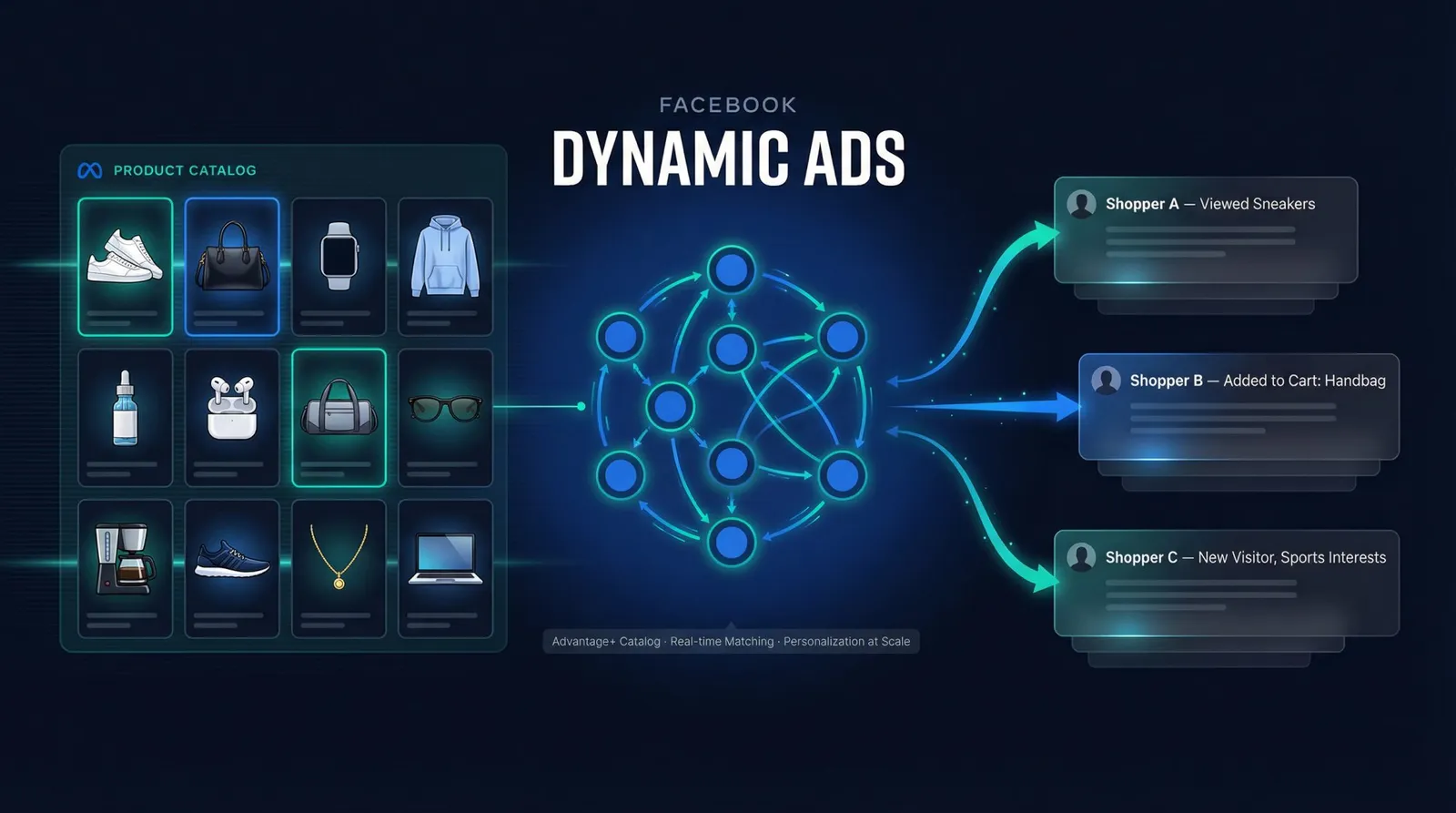
Catalog ads (Dynamic Product Ads / DPA): These are ads that pull products directly from a catalog and personalize which items each person sees based on their behavior and signals. The concept hasn't changed, but the branding has. The catalog setup process requires clean product feeds, accurate IDs, and precise field formatting.
Advantage+ catalog ads: This is Meta's more automated version of the same idea. It leans harder into Meta's machine learning for targeting, delivery, and even which creative format to use. Understanding Meta Advantage+ vs manual creative helps you decide when to lean into automation and when to stay in control.
One confusion worth clearing up immediately: Dynamic creative is a completely different thing. Dynamic creative assembles variations of headlines, primary text, and images/videos that you upload manually. It's not a catalog product recommender. People mix these up constantly, and the distinction matters for your campaign setup.
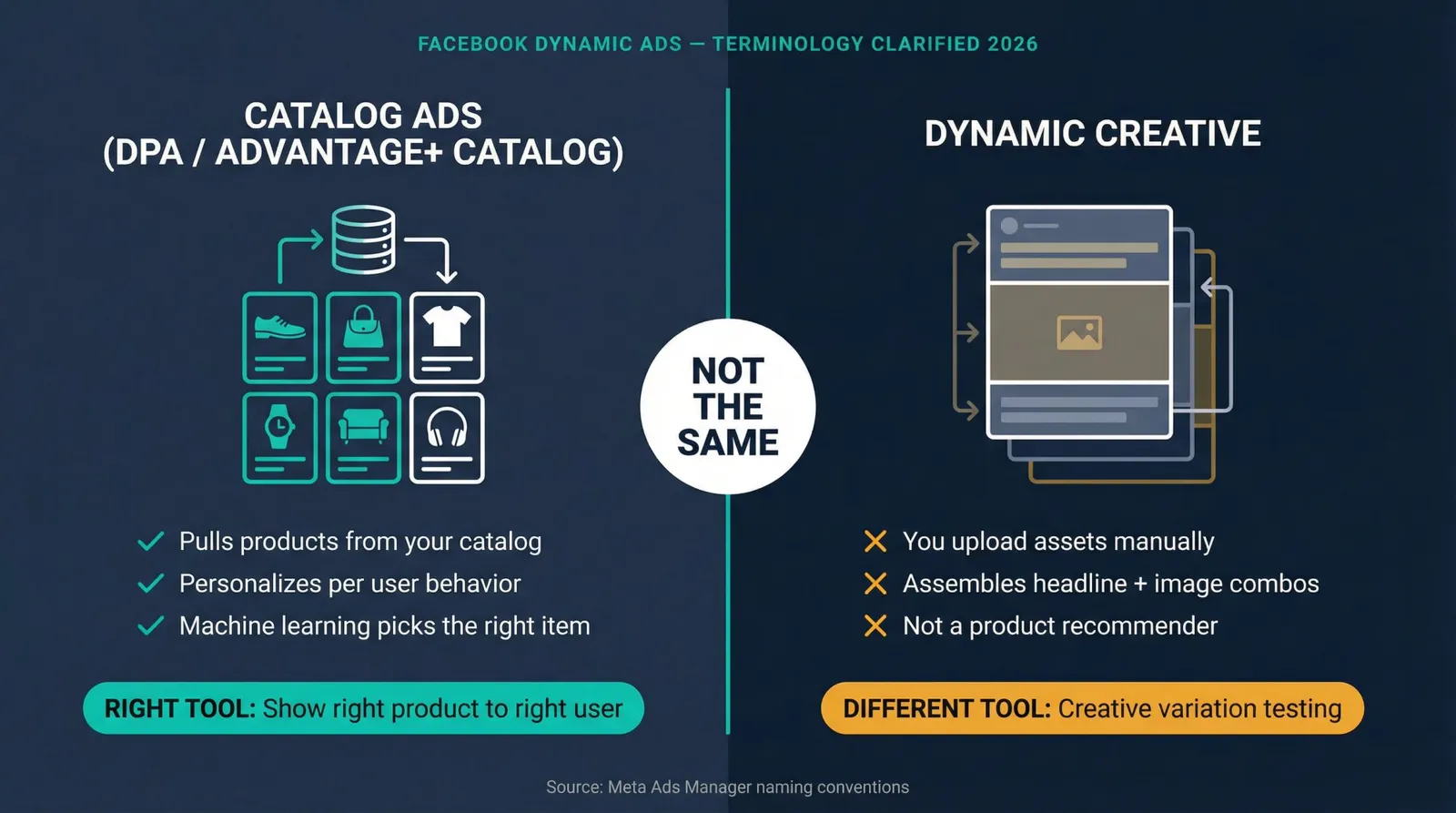
If your goal is "show the right product to the right user," you want catalog-based dynamic ads (Advantage+ catalog ads), not dynamic creative.
How Facebook Dynamic Ads Actually Work
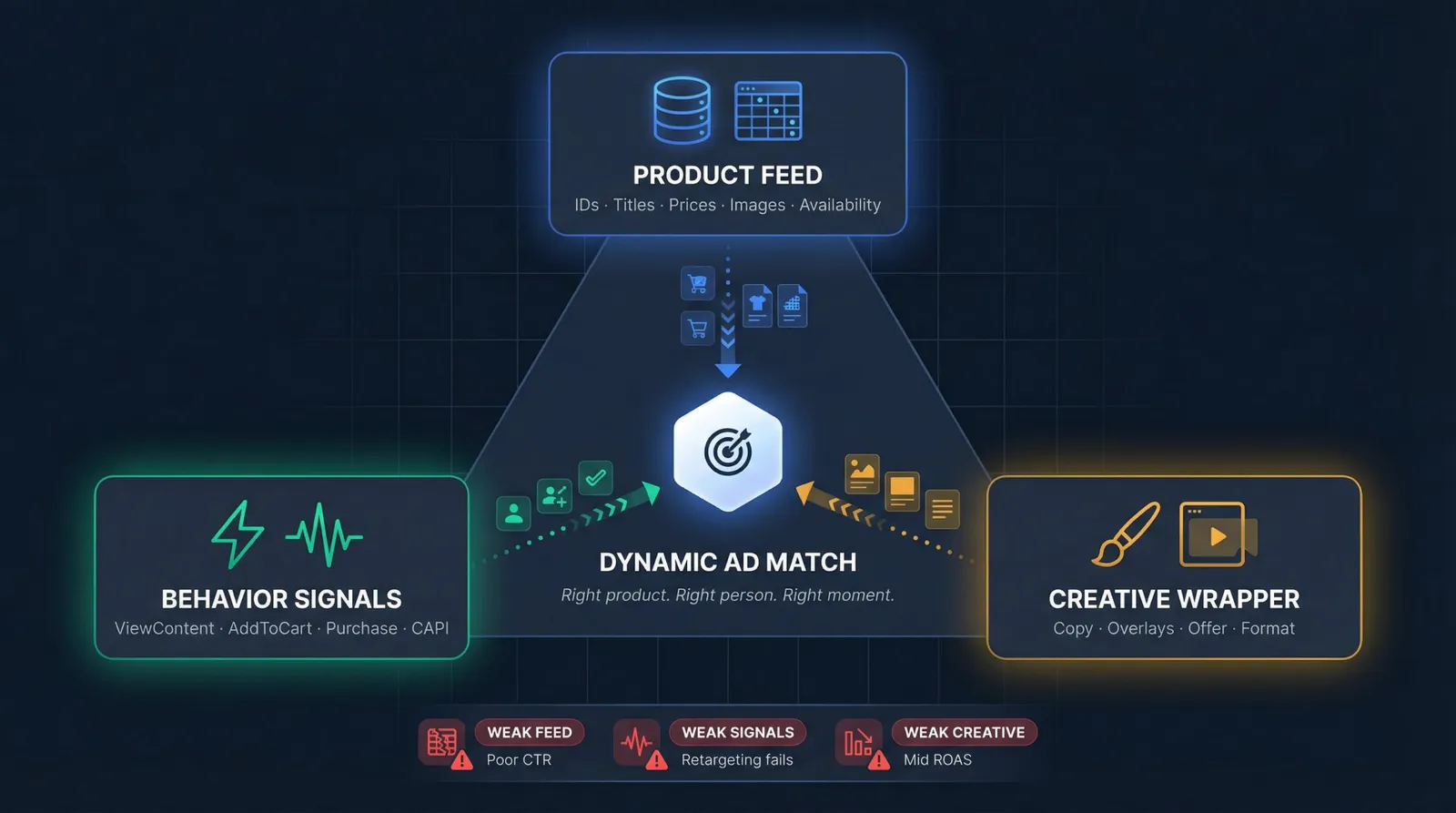
At their core, dynamic ads are a matching system with three inputs. Knowing these inputs pays off because every performance problem with catalog ads traces back to one of them being weak.
Product Data: Your Catalog Feed
Your feed defines what can be shown. It includes product IDs, titles, images, prices, availability, URLs, and optional segmentation labels like margin tiers or seasonal tags. A messy feed creates messy ads, full stop. Proper ecommerce product catalog management covers the complete field requirements and how to maintain clean data across channels.
Behavior Signals: Pixel, Conversions API, and App SDK
Signals define who should see what. Your site or app fires events like ViewContent, AddToCart, and Purchase. Meta uses those signals to pick the right items and optimize delivery. Proper implementation of your Meta Pixel and Conversions API is the foundation.
And here's the part that trips up more teams than you'd expect: the product IDs in your events must match your catalog's IDs (or group IDs). If they don't, personalization breaks entirely. Meta's own content ID matching documentation is the canonical reference on this.
Creative Wrapper: Your Template, Copy, Offer, and Overlays
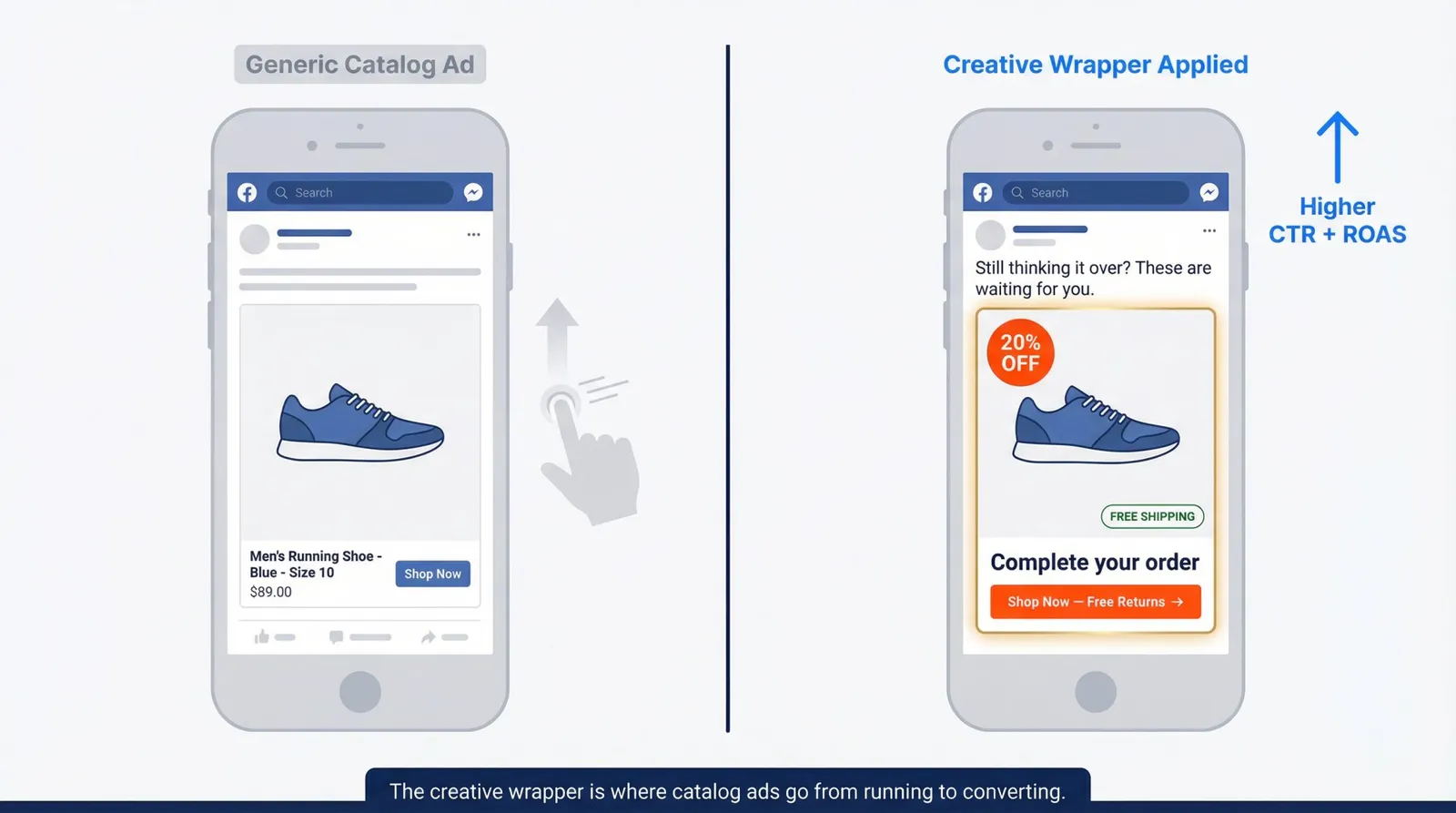
The creative wrapper determines whether the ad is persuasive. You can run raw catalog ads with generic product tiles, or you can make them look like real creative with overlays, frames, custom text, and better copy. The difference between "it works" and "it actually converts" usually comes down to this layer. Understanding what makes a great ad creative is the starting point for building wrapper copy that converts across your entire catalog.
When any of these three inputs is weak, performance degrades in predictable ways:
| Weak Input | What Happens | Visible Symptom |
|---|---|---|
| Feed | Ugly, wrong, or disapproved products | Poor CTR and conversion rates |
| Signals | Low match rate between events and catalog | Retargeting doesn't actually retarget |
| Creative wrapper | Ads work but underperform | "It's running, but ROAS is mid" |
That triangle is the foundation for everything else here.
Facebook Dynamic Ads Changes in 2026 (Why Old Tutorials Are Wrong)
If you last set up dynamic ads before mid-2025, two significant platform changes affect how you should build campaigns now.
Why Meta Removed Audience Types for Advantage+ Catalog Ads
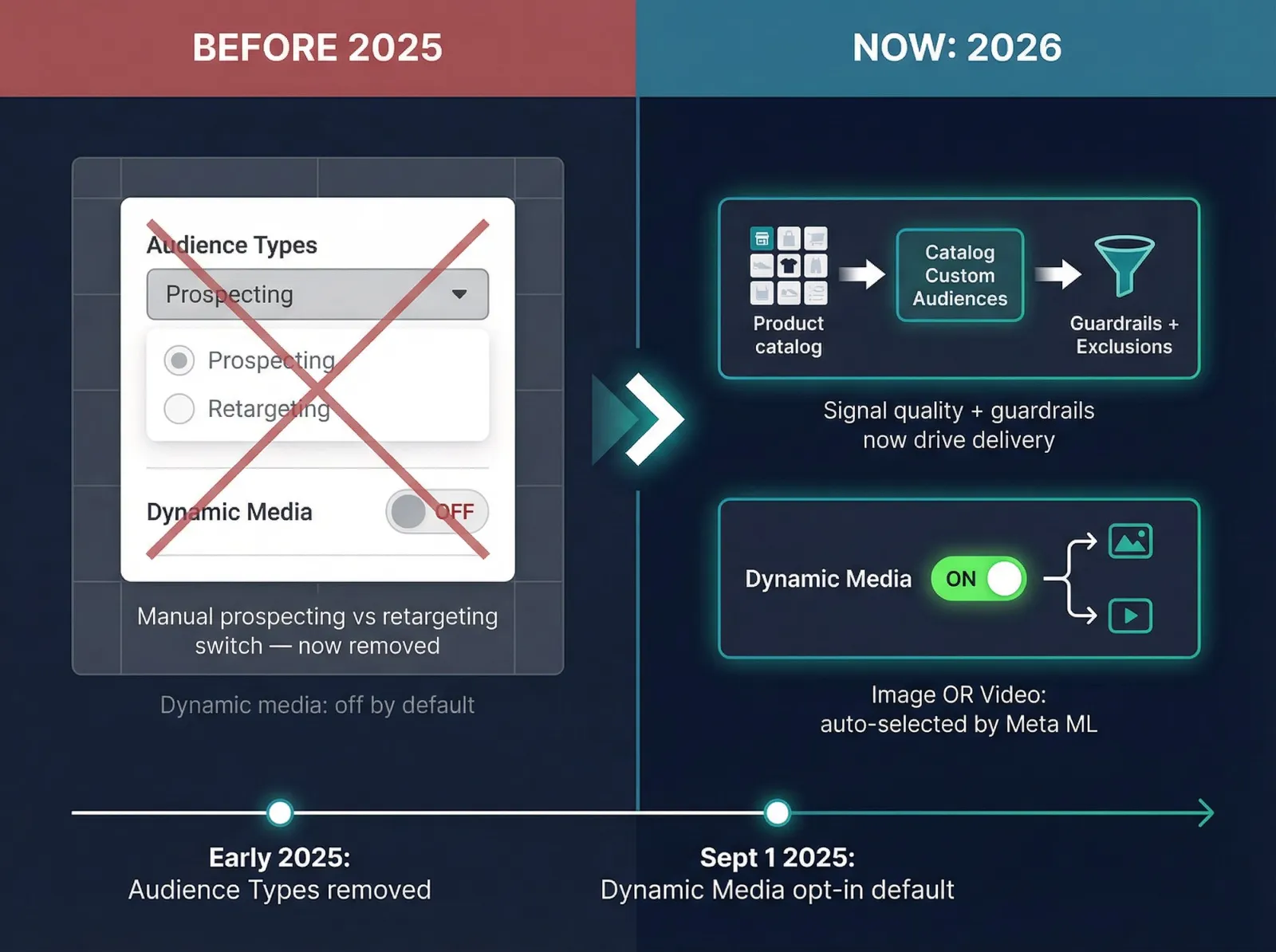
In early 2025, Meta removed the "Audience Types" selector for Advantage+ catalog ads running under the Sales objective. This pushed advertisers toward automated delivery rather than manually toggling between prospecting and retargeting. Search Engine Land's coverage of Meta's targeting changes covered this shift in detail.
You can still retarget, but you do it through catalog custom audiences instead of the old in-ad-set switch. The practical implication: you need to think in terms of guardrails (exclusions, catalog audiences, product sets) rather than micromanaging "prospecting vs retargeting" from a single dropdown.
What Dynamic Media Default Opt-In Means for Your Campaigns
Starting September 1, 2025, Meta began defaulting the dynamic media field to opt-in for Advantage+ catalog ads. In practice, this means Meta can automatically use image or video catalog assets depending on what it predicts will perform best. Meta's Graph API v24.0 release notes documented this change.
If you have strict branding guidelines or operate in a regulated category, you need to explicitly manage this setting. Your catalog's video assets suddenly matter more, and so does auditing what Meta is actually serving. This is exactly the kind of creative enhancement control that careful teams audit before campaigns go live.
The 2026 reality: guardrails and signal quality matter more than audience targeting tricks. Build your campaigns around what Meta's model needs to learn, not around the toggles that no longer exist.
What You Need Before Setting Up Facebook Dynamic Ads
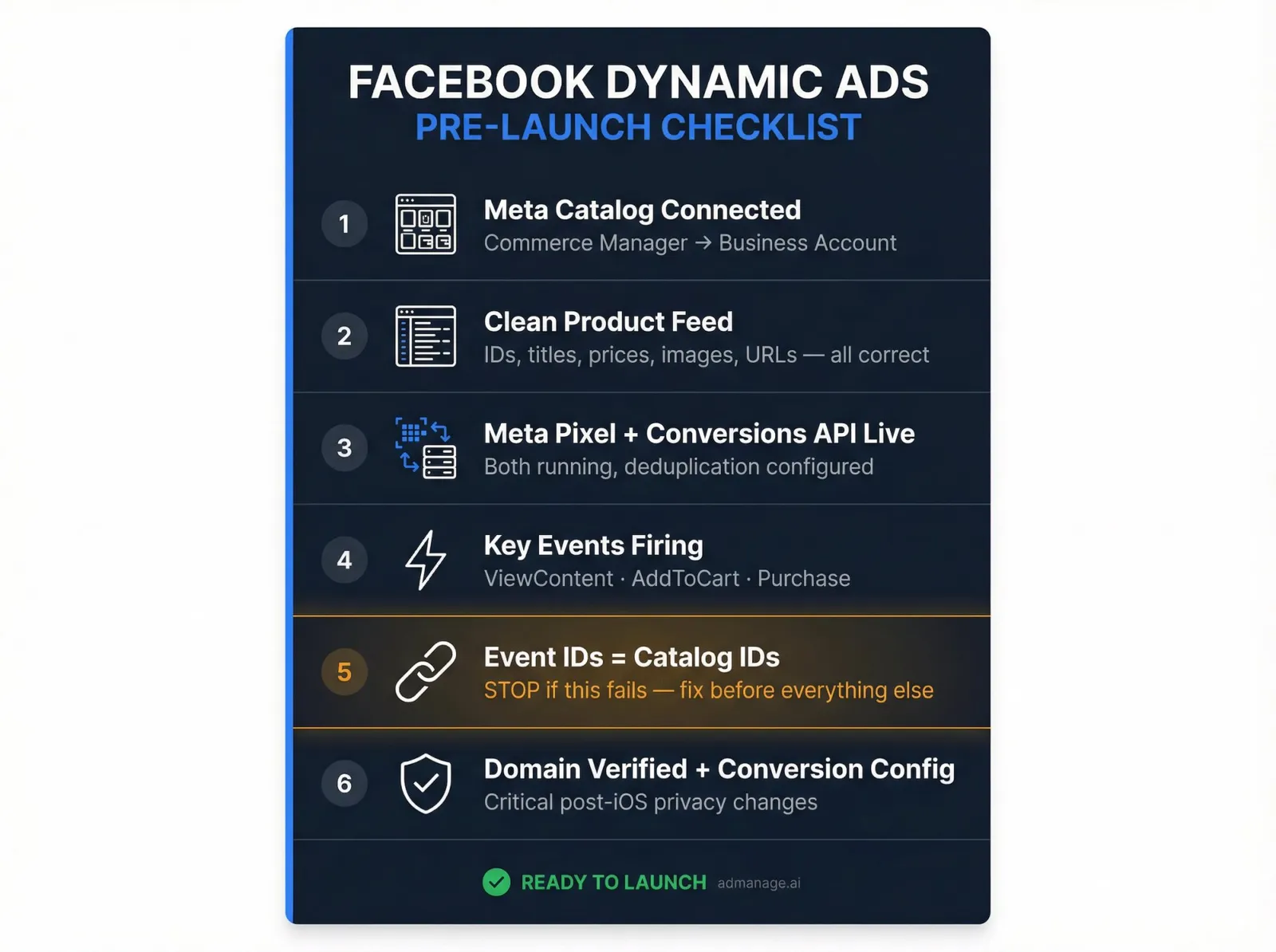
Before you create a single campaign, make sure these are in place. Skipping any of them guarantees problems later.
| # | Prerequisite | Why It Matters |
|---|---|---|
| 1 | Meta catalog (Commerce Manager) connected to your business/ad account | Without it, you can't run catalog ads at all. Proper ecommerce product catalog management covers setup. |
| 2 | A clean product feed | Messy data = disapproved items, wrong prices, broken images. See the required fields in our ecommerce product catalog management guide. |
| 3 | Meta Pixel + Conversions API (or app SDK for mobile apps) | Running both is standard now. Pixel handles audiences; CAPI improves tracking reliability. Deduplication is required. |
| 4 | Key events firing (ViewContent, AddToCart, Purchase at minimum) | These are the signals Meta uses to match users to products. Use the Meta Pixel Helper Chrome extension to verify events are firing correctly. |
| 5 | Event product IDs match catalog IDs | If IDs don't match, personalization breaks entirely. Meta's content ID matching documentation is the reference. |
| 6 | Domain verification + conversion configuration | Especially critical post-iOS privacy changes where browser signals are weaker. |
If prerequisite #5 fails, stop everything else. Dynamic ads without ID matching are essentially random product ads. Fix your ID strategy first, then come back.
How to Set Up Facebook Dynamic Ads: 10-Step Guide
Step 1: Build a Catalog Feed That Won't Sabotage You
Your feed needs these fields correct at minimum for proper ecommerce product catalog management:
| Required Field | Notes |
|---|---|
| id | Unique product identifier, must match your site/app events |
| title | Descriptive, clear, no keyword stuffing |
| description | Full product context |
| availability | in stock / out of stock / preorder |
| condition | new / used / refurbished |
| price | With currency code (e.g., 29.99 USD) |
| link | Final landing page URL |
| image_link | HTTPS only, no auth walls |
| brand | Required for most categories |
But "minimum viable feed" and "feed that performs well" are different things. You should also strongly consider adding:
- Additional images (gives Meta more creative options)
- Sale price fields (enables price-drop overlays)
- Product type categories
- Google product category
- Custom labels for segmentation: margin tiers, seasonal flags, best sellers, clearance
That last one, custom labels, is where catalog ads become strategy instead of just automation. More on that in the "levers" section below.
The blind spot that burns teams: If your "id" in the feed is the parent product, but your site events fire variant IDs (or vice versa), your match breaks. Decide your ID strategy (variant-level or parent-level) and align feed + events. This single mismatch is behind more "mystery performance" issues than most teams realize.
Step 2: Choose Your Feed Method Based on Inventory Speed
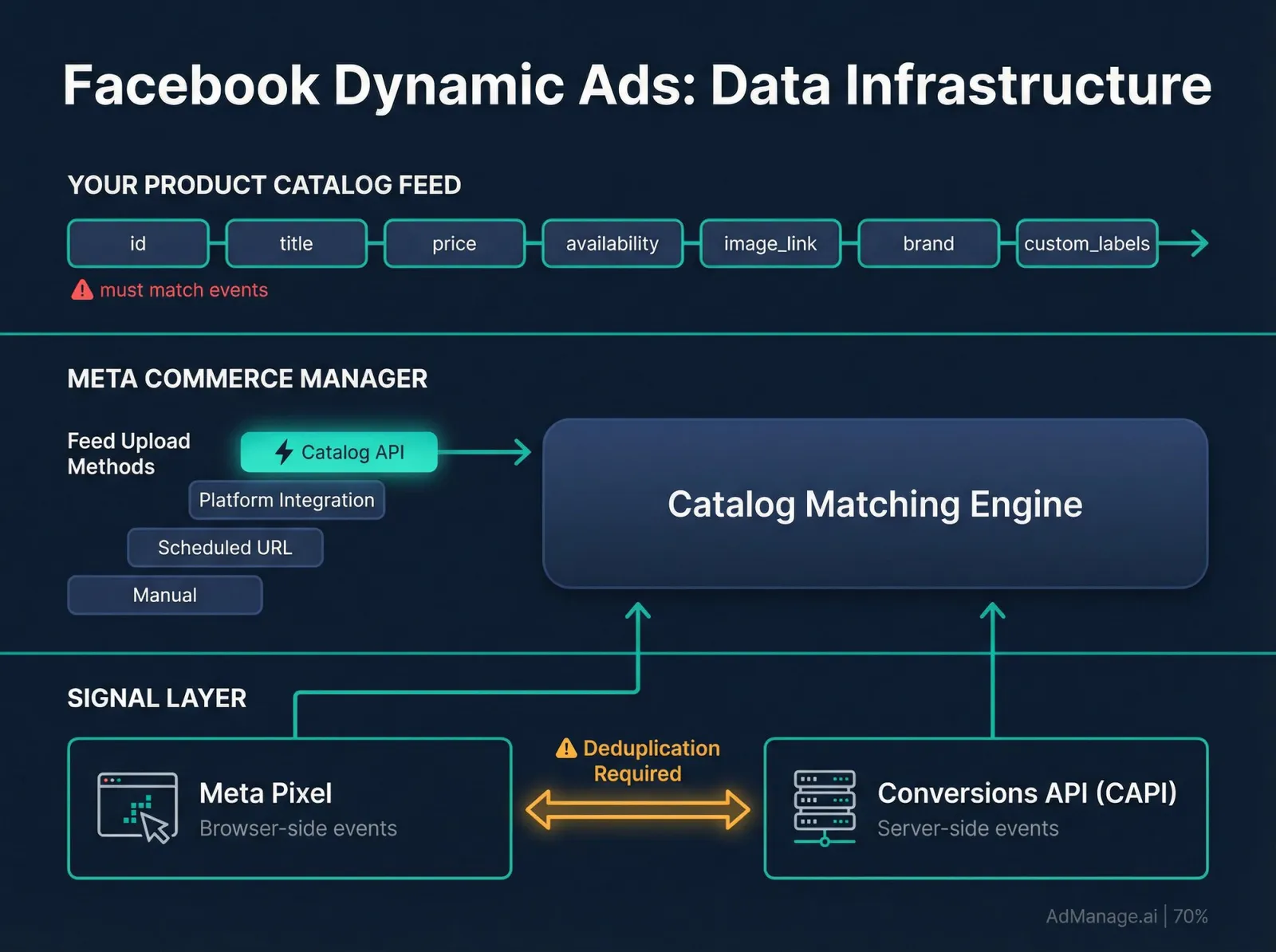
Meta supports multiple ways to keep a catalog updated:
| Method | Best For | Update Speed |
|---|---|---|
| Manual upload | Small catalogs or initial testing | On-demand only |
| Scheduled feed URL | Medium to large catalogs | Multiple times per day |
| Platform integration | Shopify, WooCommerce, etc. | Near real-time |
| Catalog API | Large catalogs with frequent changes | Real-time |
The rule of thumb: if prices or stock change frequently, scheduled feeds multiple times per day (or API-based updates) prevent broken user experiences like showing sold-out or mispriced products.
Step 3: Install Pixel + Conversions API (and Actually Deduplicate)
Pixel is browser-based. CAPI is server-based. Pixel is easier to install but more fragile with ad blockers and privacy controls. CAPI is more resilient but requires deduplication so you don't double-count conversions.
Deduplication is not optional. If both Pixel and CAPI send the same conversion event, Meta needs matching event_id and event_name parameters to avoid counting two purchases when there was only one. This is a technical step that your dev team needs to handle correctly from the start.
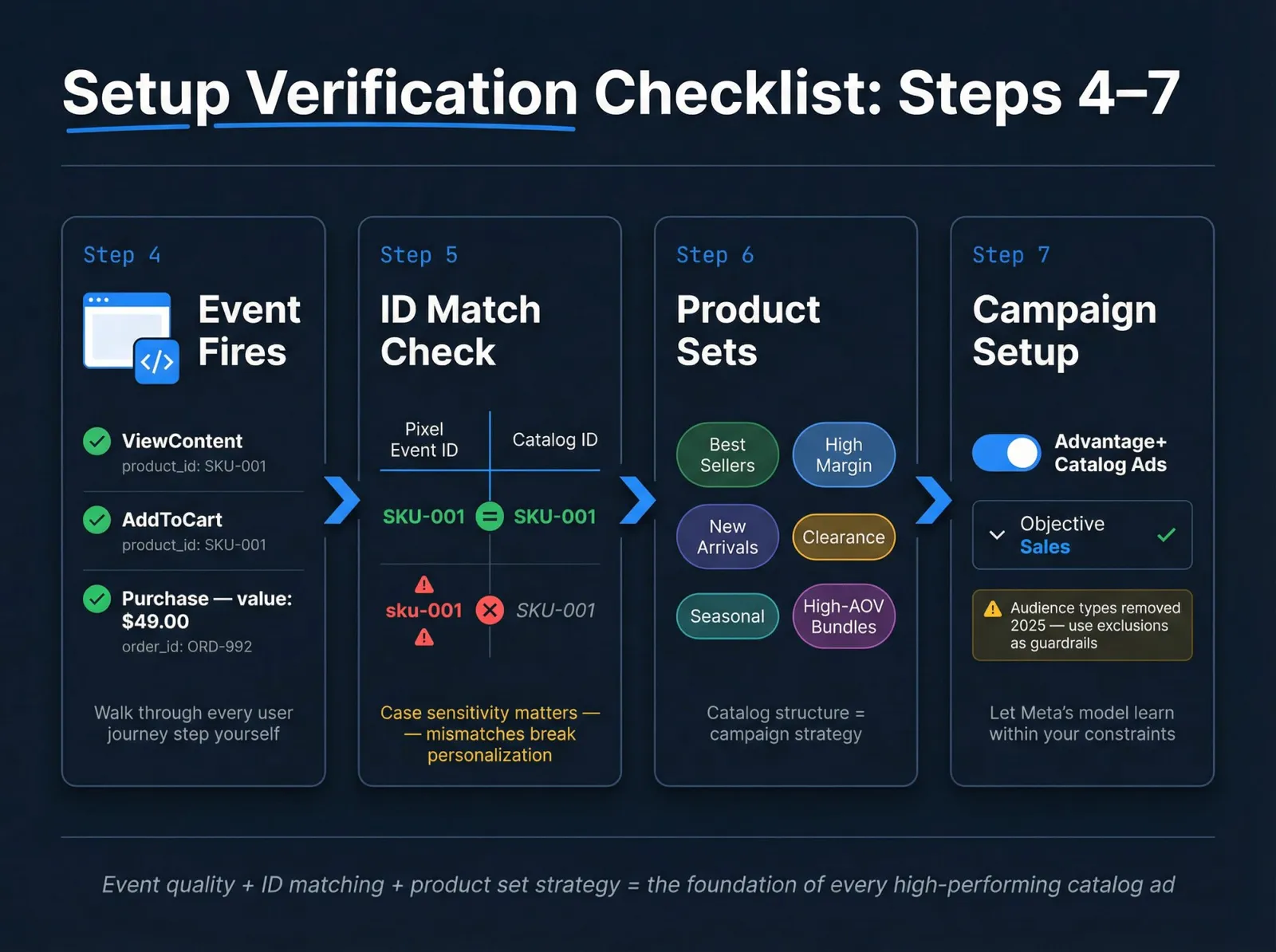
Step 4: Verify Events Like an Engineer, Not a Marketer
Don't trust that events "should be working." Use the Meta Pixel Helper Chrome extension (Test Events, Diagnostics) and literally walk through the user journey yourself:
- Load a product page → does ViewContent fire with the correct product ID?
- Add to cart → does AddToCart fire?
- Start checkout → does InitiateCheckout fire? (nice to have)
- Complete purchase → does Purchase fire with the right value?
The event payload must include product identifiers that map to your catalog. This is the verification step where most teams cut corners, and it's exactly where things break.
Step 5: Confirm ID Matching Between Your Events and Catalog
Meta's content ID matching documentation is explicit: to run Advantage+ catalog ads, the content ID in your Pixel or SDK events must exactly match the content ID or group ID in your catalog.
When your match rate is low, here's where to look:
- Standardize IDs (case sensitivity matters, "SKU-001" and "sku-001" are different to Meta)
- Remove extra prefixes or suffixes added by your platform
- Confirm variant vs parent logic is consistent between feed and events
- Verify events fire on the correct pages (not triggered by button-click errors on unrelated pages)
Step 6: Create Product Sets That Mirror Your Business Goals
Product sets are where catalog ads become strategy, not just automation. Without them, you'll end up blaming Meta for showing "weird products" when your catalog simply has no structure.
Good product set patterns:
- Best sellers (proven converters, use these for prospecting)
- High margin (products worth spending more to acquire customers for)
- New arrivals (time-sensitive inventory that needs early traction)
- Clearance / overstock (price-sensitive audiences, different messaging)
- Seasonal collections (aligned with calendar-driven demand)
- Bundles or high-AOV sets (cross-sell and upsell opportunities)
A well-structured product set strategy pairs naturally with Facebook A/B testing so you can isolate individual product sets to measure which assortment actually drives better results.
Step 7: Create the Campaign (Sales Objective Is the Default)
Most ecommerce use cases run catalog ads under the Sales objective. But Meta also supports Advantage+ catalog ads under objectives like app promotion, engagement, leads, and traffic depending on your setup, as Social Media Today reported.
Inside the campaign, you'll see a toggle to enable Advantage+ catalog ads and select your catalog.
The 2025+ reality: you're not choosing "audience types" the old way anymore for the Sales objective. Plan to use custom audiences and exclusions as guardrails instead. Search Engine Land's coverage of Meta's targeting changes explains the shift in detail.
Step 8: Configure the Ad Set Like You're Designing a Learning System
Ad set decisions in 2026 are less about "targeting hacks" and more about giving Meta's model the right constraints to learn within. Focus on:
- Which product set you're promoting (this is your biggest lever)
- Which countries/languages you allow
- What conversion event you optimize for
- Exclusions (recent purchasers, internal traffic, etc.)
- Placements (Advantage+ placements often outperform manual selection unless you have a clear reason to restrict)
Understanding the Facebook ads learning phase is critical here: the choices you make at ad set configuration directly determine how fast the algorithm learns and how quickly you can trust the data you're seeing.
Step 9: Build Ads That Don't Look Like Generic Tiles
Catalog ads can appear as single image, carousel, or collection-style units. The format determines how products display, but the creative wrapper is what makes them persuasive.
Your job is to add:
→ Strong primary text and headline copy (see our 12 templates below)
→ A coherent offer: shipping, returns, urgency, bundles
→ On-brand overlays and frames: price drop badges, percent-off tags, free shipping labels
→ Intentional dynamic media behavior (image vs video) based on your brand tolerance
The difference between catalog ads that get scrolled past and ones that convert is almost always in this creative layer. Having a solid Facebook ad creative testing framework lets you run structured experiments to find which wrapper copy and creative combinations actually move the needle.
Step 10: Pre-Launch QA Checklist (Where Bad Performance Starts)
Before hitting publish, run through this checklist:
- Products show correct price and availability
- Landing page URLs load fast and don't redirect through broken chains
- Images are accessible (HTTPS, not blocked by auth)
- Out-of-stock items are excluded or marked correctly in your feed
- UTM parameters are consistent and not duplicated
- Dynamic media behavior is set intentionally (if enabled)
This QA step is where most "why are my ads performing badly?" questions get their real answer. A surprising number of catalog ad problems come down to a feed issue or a broken landing page, not campaign structure. Consistent UTM parameters for Facebook ads also prevent attribution data from turning into noise during this launch step.
5 Campaign Blueprints That Actually Convert
Because Meta removed "Audience Types" for Sales objective setups, you should think in campaign systems rather than toggle choices. Running Facebook ads at scale means building these systems once and iterating from there. Here are five blueprints that cover roughly 95% of ecommerce catalog ad needs.
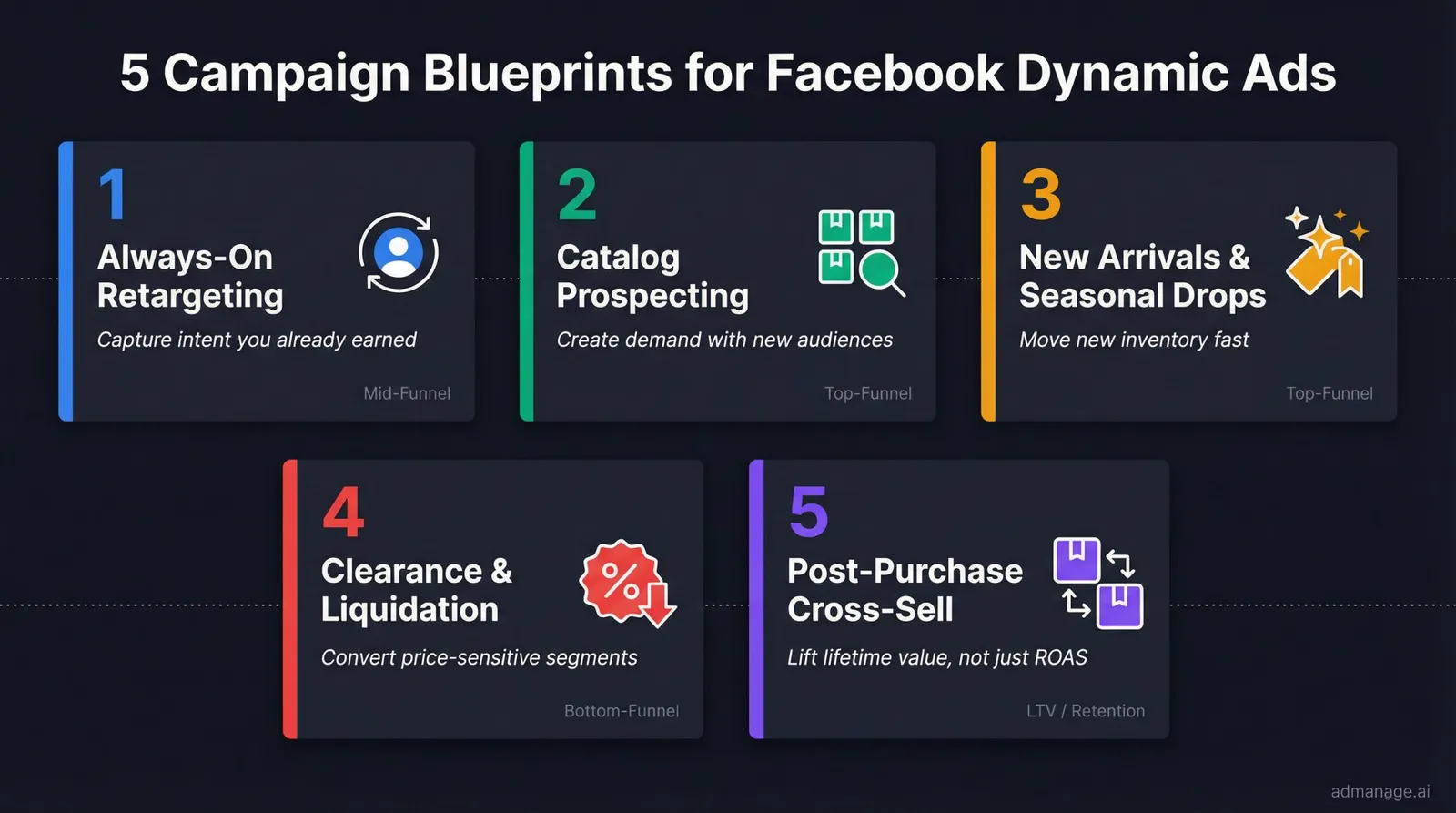
Blueprint 1: Always-On Retargeting (Viewed + AddToCart)
Goal: Capture intent you already earned.
| Element | Setting |
|---|---|
| Product set | All products or category-specific sets |
| Audience | Catalog custom audiences for ViewContent/AddToCart, exclude recent purchasers |
| Creative | Direct, specific, low-friction. Focus on shipping, returns, trust. |
| Offer | Only if needed. Don't train customers to wait for discounts. |
This is the campaign most teams set up first, and for good reason. The audience already showed intent. Your job is to remove friction, not create demand. Scaling Facebook ads effectively starts with this always-on retargeting foundation.
Blueprint 2: Catalog Prospecting for New Audiences
Goal: Use catalog personalization to create demand with new audiences.
- Product set: Best sellers or a curated "hero assortment." Not your entire long tail.
- Audience: Broad with guardrails (geo, age). Minimal interest stacking.
- Creative: Treat as top-of-funnel. These people don't know you yet. Write accordingly.
- Signal quality: Make sure your Pixel + CAPI is strong because the model needs clean learning data to optimize delivery. Understanding how many ad creatives to test for prospecting ensures you give the algorithm enough variation to find winners without spreading budget too thin.
Blueprint 3: New Arrivals and Seasonal Drops
Goal: Move new inventory fast.
Use custom labels in your feed to tag new arrivals, then build a product set around that label. Copy should lean into "new" language, drop framing, limited stock, and early access. Watch early CTR and landing page view quality closely because new products don't have purchase history for Meta to optimize against. Our creative testing budget guide covers how to allocate spend when learning from scratch.
Blueprint 4: Clearance and Overstock Liquidation
Goal: Convert price-sensitive segments without poisoning your whole account's economics.
- Product set: Clearance items only (isolated from your main catalog)
- Creative overlays: Percent-off or price-drop messaging
- Exclusion: Consider excluding full-price buyers if protecting brand perception matters
The key here is isolation. You don't want clearance dynamics bleeding into how Meta optimizes your other campaigns.
Blueprint 5: Post-Purchase Cross-Sell and Upsell
Goal: Lift lifetime value, not just front-end ROAS.
Target recent purchasers in a specific category with complementary products. Copy like "goes with what you bought," accessories, refills, and upgrades works well. This blueprint is underused by most teams, but it's one of the highest-margin catalog ad strategies because you've already paid to acquire the customer. Running clean Facebook A/B testing on your upsell copy variants is how you find the angles that actually lift post-purchase revenue.
12 Copy Templates for Facebook Dynamic Ads That Work Across Your Catalog
These templates are written as "wrapper copy" around catalog products. You're not writing copy for one SKU. You're writing copy that works across many items inside a product set. If you want to understand what separates high-converting copy from generic filler, see our guide on what makes good ad copy.
One important rule: avoid hardcoding specifics that will be untrue for half your catalog (like "fits all sizes" if it doesn't).
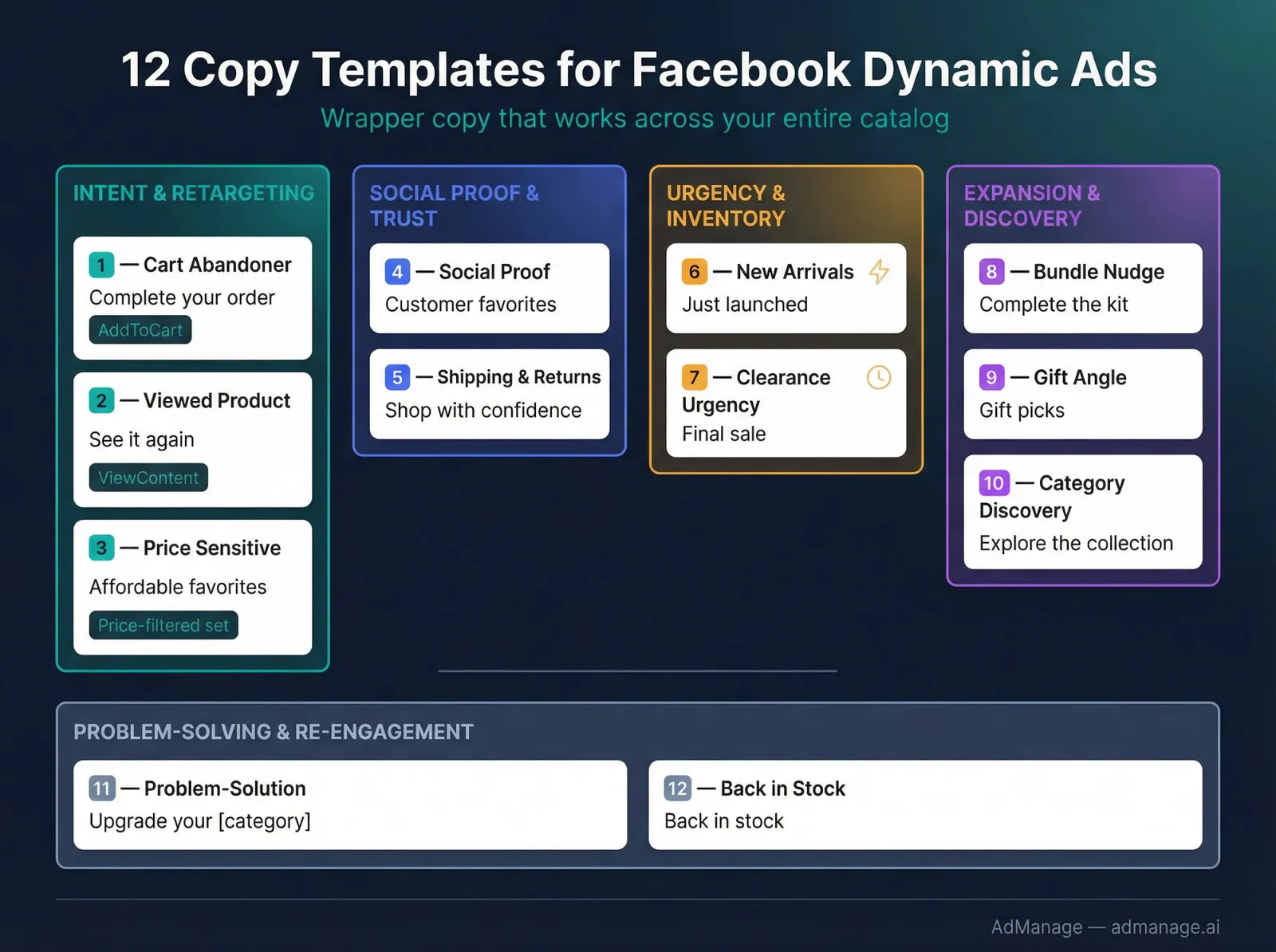
Intent and Retargeting
1) Cart Abandoner: Friction Remover
Primary text: Still thinking it over? Your picks are waiting. Checkout is quick, and returns are easy.
Headline: Complete your order
Best for: AddToCart audiences
2) Viewed Product: Gentle Reminder
Primary text: Quick reminder: the items you viewed are back here. Tap to see price and availability.
Headline: See it again
3) Price-Sensitive: "Under X" Hook
Primary text: Great picks, great value. Shop our best options in this price range.
Headline: Affordable favorites
Best for: product sets filtered by price
Social Proof and Trust
4) Social Proof (Without Fake Claims)
Primary text: These are the products people keep coming back for. See what's trending right now.
Headline: Customer favorites
Best for: best seller product sets
5) Shipping and Returns as the Offer
Primary text: No guesswork: clear sizing, fast shipping, and easy returns. Pick your favorite.
Headline: Shop with confidence
Urgency and Inventory
6) New Arrivals Drop
Primary text: New in. Fresh styles, limited early inventory.
Headline: Just launched
Best for: new arrival product sets
7) Clearance Urgency
Primary text: Last chance pricing. Once it's gone, it's gone.
Headline: Final sale
Best for: clearance sets only
Expansion and Discovery
8) Bundle Nudge
Primary text: Better together. Build your set and save time later.
Headline: Complete the kit
9) Gift Angle
Primary text: Need a gift that actually lands? These are easy to love and easy to buy.
Headline: Gift picks
10) Category Discovery (Broad Prospecting)
Primary text: Not sure where to start? Browse the top picks in this collection and find your match.
Headline: Explore the collection
Problem-Solving and Re-Engagement
11) Problem-Solution Framing
Primary text: If you're tired of [common pain], these are built to fix it. Find your best fit in minutes.
Headline: Upgrade your [category]
Best for: product sets where the benefit is consistent
12) "Back in Stock"
Primary text: They're back. If you missed it last time, now's your chance.
Headline: Back in stock
Two Levers Most Teams Underuse (And They Matter More in 2026)
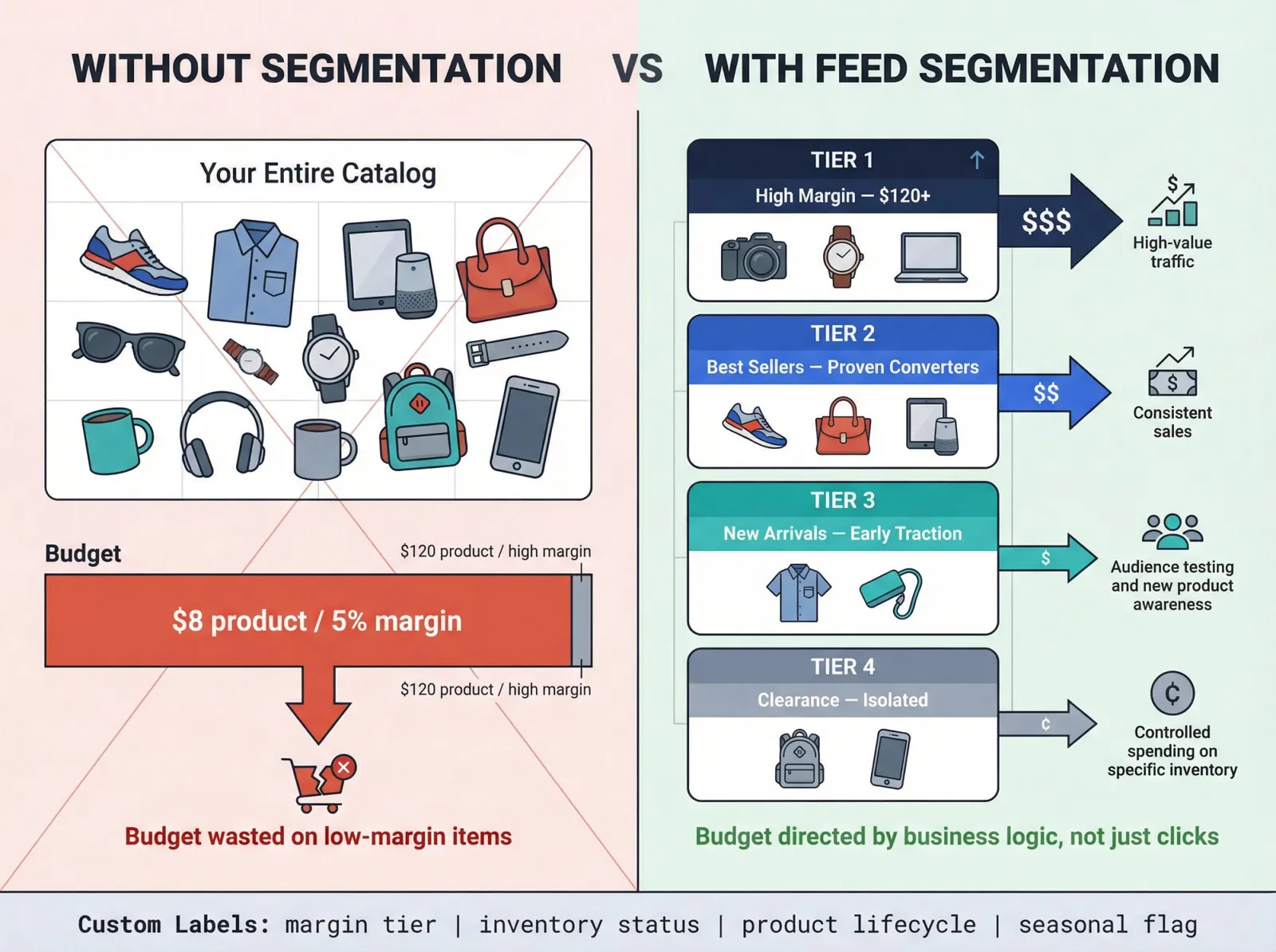
Lever 1: Feed Segmentation as a Catalog Ad Strategy
Most "catalog optimization" doesn't happen in Ads Manager at all. It happens in how you label products in your feed and build product sets around margin, inventory, and lifecycle. How you approach ecommerce product catalog management directly impacts ad delivery quality. Clean, well-segmented feeds give Meta's algorithm better signals to work with.
Without segmentation, Meta optimizes for conversions in ways that can actually hurt your business. Your 8 best seller with 5% margins might eat your entire budget while your 120 high-margin products barely get shown. Meta's own product sets documentation outlines how to use catalog segments to control delivery at this level. Custom labels for margin tiers, inventory levels, and product lifecycle stage give you control over what Meta promotes, not just to whom.
Lever 2: Signal Quality Beats Targeting Tricks
Meta has been steadily removing manual targeting controls and pushing toward automation. Search Engine Land's coverage of Meta's targeting changes makes this clear.
Your competitive edge in 2026 isn't in finding clever audience targeting hacks. It's in having cleaner signals than your competitors. That means Pixel + CAPI running together, properly deduplicated, with product IDs that actually match your catalog. Consistent UTM tracking for Facebook ads is part of signal quality too. When your attribution is clean, you can make confident optimization decisions rather than guessing. The teams that get signal quality right give Meta's algorithm better data to learn from, and better data compounds over time.
Troubleshooting: Why Facebook Dynamic Ads Fail (And How to Fix Them Fast)
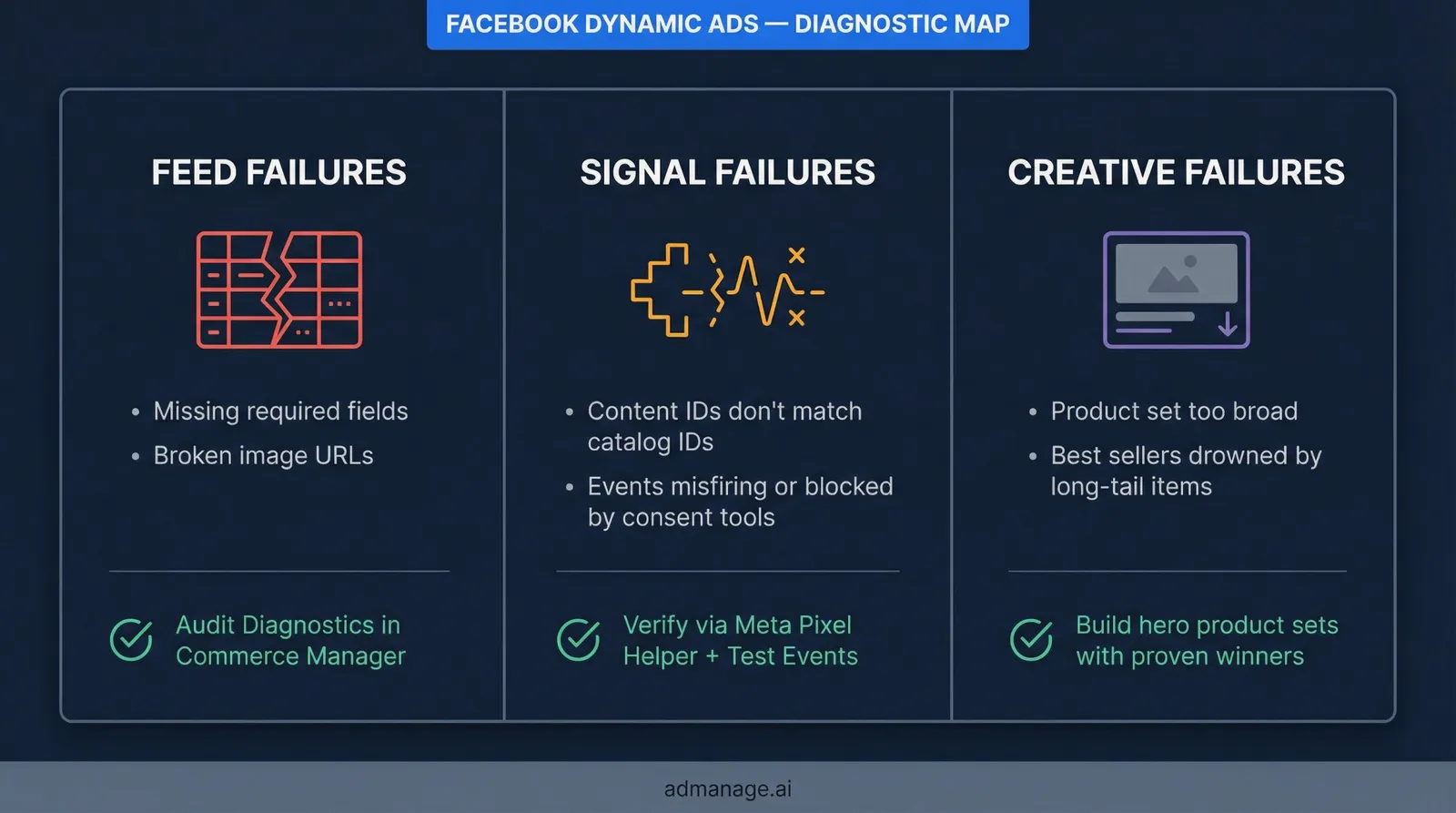
When catalog ad performance falls apart, the root cause is usually one of the three core inputs: feed, signals, or creative wrapper. Here's how to diagnose and fix each failure mode. For broader delivery issues beyond catalog ads, our guide on Facebook ads not delivering covers the full diagnostic process.
Problem: "Retargeting Isn't Actually Retargeting"
Likely causes:
- Content IDs in events don't match catalog IDs. Meta's content ID matching documentation covers the matching requirements.
- Events firing inconsistently: only on button click instead of page load, blocked by consent tools, or missing on certain page templates.
Fix it:
- Verify events with Meta Pixel Helper and Test Events tool
- Standardize your ID strategy (variant vs parent, case sensitivity)
- Add Conversions API if Pixel is heavily blocked by your audience's browsers
Problem: "Meta Is Showing Weird Products"
Likely causes:
- Product set is too broad with no feed structure
- Best sellers are getting drowned by long-tail items nobody wants
- Out-of-stock products aren't labeled correctly in your feed
Proper ecommerce product catalog management explains how feed quality directly affects which products Meta chooses to show.
Fix it:
- Create a "hero assortment" product set with your proven winners
- Use feed labels for margin, seasonality, and inventory status
- Exclude or suppress out-of-stock items at the feed level
Problem: "Catalog Items Are Disapproved or Missing"
Likely causes:
- Missing required feed fields (like condition, availability, or properly formatted prices)
- Broken image URLs (HTTP instead of HTTPS, auth-protected, or dead links)
- Price formatting issues (wrong currency code, missing decimals)
These are among the most common catalog rejection reasons.
Fix it:
- Go to Diagnostics in Commerce Manager and work through every warning
- Validate your feed URLs in an incognito browser window
- Check that price format matches Meta's requirements for your target country
How AdManage Makes Dynamic Ad Launches Actually Scalable
Meta's catalog system handles the matching and delivery side. But the execution side (launching campaigns, testing variations, keeping naming and tracking consistent across dozens of ad sets) is where most teams hit a wall.
This is exactly the problem we built AdManage to solve.
Naming Conventions and UTM Governance at Scale
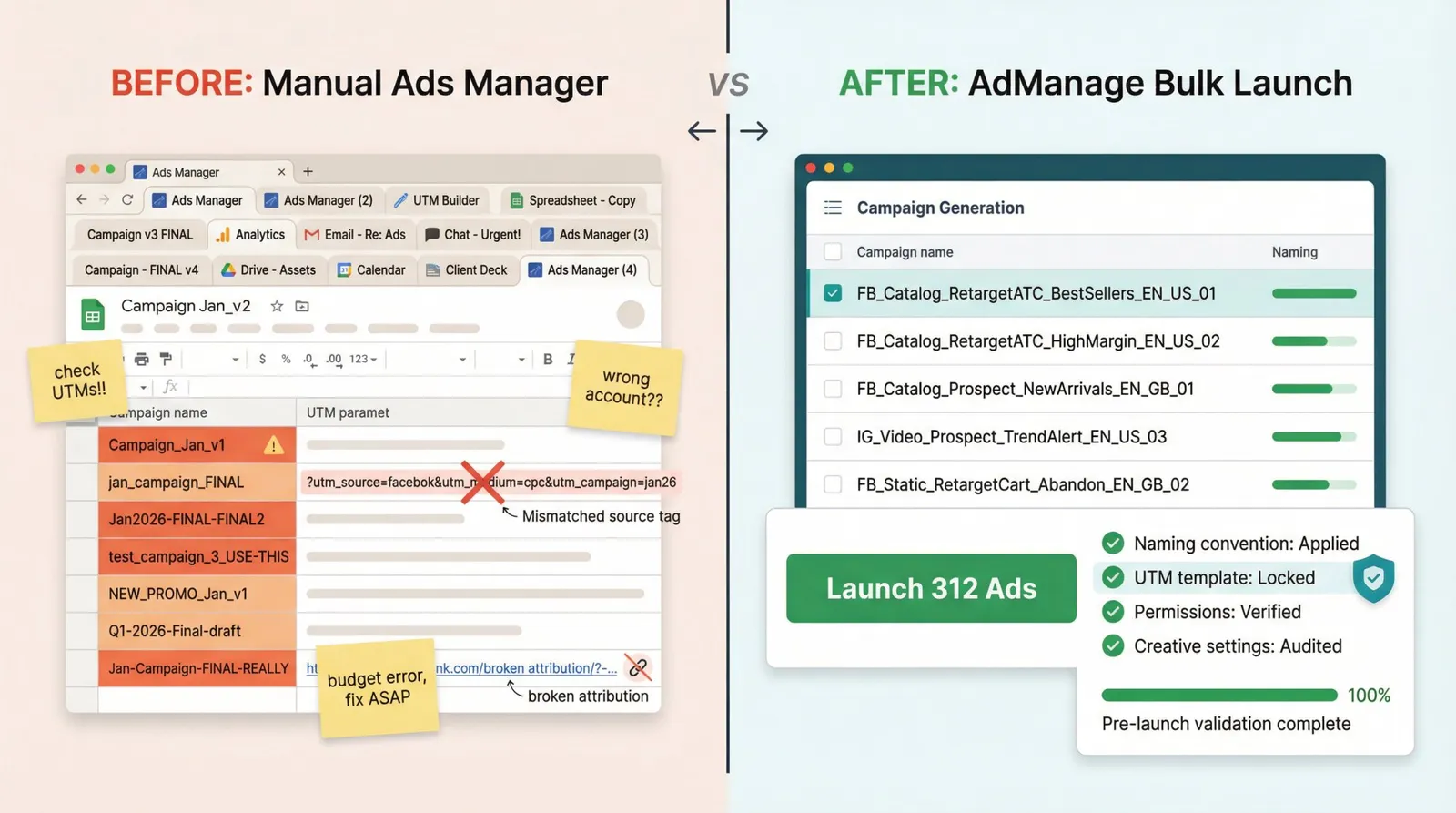
One of the fastest ways to ruin your analytics is inconsistent naming and UTM parameters across catalog ad campaigns. When you're launching 50 variations of a retargeting campaign with different product sets, copy, and formats, it takes one person pasting the wrong UTM to turn your attribution data into noise. See our complete guide to Facebook ad naming conventions for the structure that makes large-scale operations manageable.
AdManage enforces naming conventions across campaign, ad set, and ad layers automatically. UTM templates are locked at the account level, so dynamic links don't turn your Google Analytics into spaghetti. And permissions checks run before launch so campaigns don't fail because someone lost access to a Page or ad account.
Bulk Launching for Combinatorial Creative Testing
Catalog ads get better when you test variations across multiple dimensions simultaneously:
- Product sets (best sellers vs high margin vs new arrivals)
- Wrapper copy (different hooks, offers, CTA language)
- Format (single image vs carousel vs collection)
- Placements and geos
- Languages (for multi-market brands)
This kind of combinatorial testing is exactly what AdManage is built for. Our templates, bulk ad launch workflows, and consistent tracking eliminate the manual mistakes that creep in when you're building dozens of campaigns by hand.
Teams using AdManage routinely launch hundreds of catalog ad variations in a single session, something that would take days in native Ads Manager.
If you're spending more time launching ads than analyzing results, the bottleneck is execution, not strategy. That's the gap AdManage closes.
Managing Creative Enhancement Controls
Meta's Advantage+ creative and creative enhancements can change how your ads actually render. Text overlays, image adjustments, format swaps. If you're in a regulated category, have strict brand guidelines, or just don't like surprises in how your ads appear, you want explicit control and auditing over these settings. AdManage surfaces creative enhancement configurations so you can review and lock them before anything goes live.
Post ID Preservation: Protecting Social Proof at Scale
For non-catalog creatives and boosted posts, preserving Post IDs keeps engagement (likes, comments, shares) attached to the same ad identity rather than resetting every time you iterate. This is critical when scaling Facebook ads while preserving social proof. AdManage has a dedicated Post ID workflow that makes this automatic instead of a manual copy-paste exercise.
Ready to scale your catalog ad launches without the manual bottleneck? See how AdManage works →
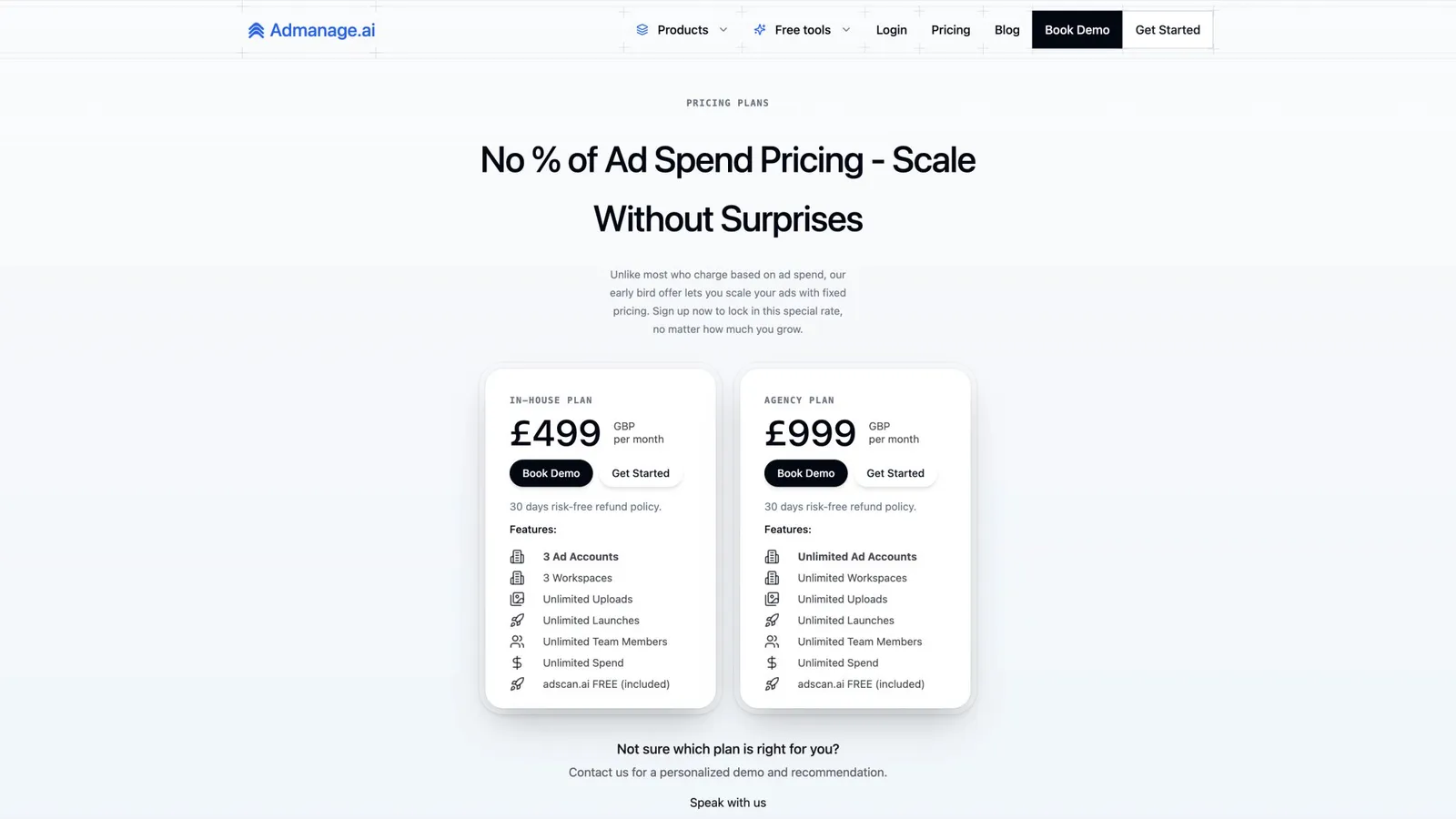
Or if you want to see what it costs: View AdManage pricing →
The Facebook Dynamic Ads Launch Checklist (Copy Into Your SOP)
Feed
- Unique IDs, consistent with site/app events
- Correct availability and price with currency
- Clean titles and high-quality images
- Custom labels for segmentation (margin, season, lifecycle)
Signals
- Pixel installed site-wide
- CAPI configured + deduplication working
- ViewContent, AddToCart, Purchase verified in Test Events
- ID matching confirmed between events and catalog
Campaign
- Product sets aligned to business goals (not just site categories)
- Exclusions set (recent purchasers, employee traffic, etc.)
- Creative wrapper copy works across all products in set
- Dynamic media behavior understood and intentionally chosen
Ops (with AdManage)
- Naming conventions locked across campaign/ad set/ad
- UTM template applied at account level
- Templates saved for repeatable launches
- Creative enhancement settings reviewed and approved
Facebook Dynamic Ads: Frequently Asked Questions
Are Facebook Dynamic Ads the same as Advantage+ catalog ads?
Functionally, yes. Meta renamed Dynamic Product Ads to Advantage+ catalog ads as part of their broader Advantage+ branding rollout. The underlying mechanics (catalog feed, signal matching, automated product selection) are the same. The difference is that Advantage+ catalog ads lean harder into Meta's automation for targeting and delivery. If you hear someone say "DPA," they almost certainly mean the same thing. For a deeper look at the automation tradeoffs, see Meta Advantage+ vs manual creative.
Do I need both Pixel and Conversions API for dynamic ads?
You don't technically need both, but running Pixel and CAPI together is the current best practice. Pixel is easier to set up and handles browser-side tracking. CAPI sends data server-side, which is more resilient against ad blockers and privacy restrictions. Running both with proper deduplication gives Meta the cleanest signal to work with. Use the Meta Pixel Helper Chrome extension to verify your implementation is firing correctly.
Why is Meta showing the wrong products in my dynamic ads?
This almost always comes back to one of three issues: your product set is too broad (Meta is pulling from your entire catalog including low-quality items), your feed lacks custom labels for segmentation, or out-of-stock items aren't properly excluded. Build specific product sets (best sellers, high margin, new arrivals) instead of letting Meta choose from everything. Investing in proper ecommerce product catalog management fixes this at the root.
Can I still run retargeting with dynamic ads after the Audience Types removal?
Yes. Per Search Engine Land's coverage of Meta's targeting changes, Meta removed the "Audience Types" selector for Advantage+ catalog ads under the Sales objective, but you can still build retargeting campaigns using catalog custom audiences (ViewContent, AddToCart) with purchaser exclusions. The targeting mechanism changed; the capability didn't.
What's the minimum catalog size for dynamic ads to work?
There's no official minimum, but in practice you'll see better results with at least 20-30 products. The system works by matching users to relevant items, so more products generally mean better personalization. That said, even small catalogs benefit from the automation, especially for retargeting where Meta shows people the specific items they already viewed.
How do I make catalog ads look good instead of generic product tiles?
Use creative overlays (price drop badges, free shipping labels, percent-off tags), strong wrapper copy (not default "Shop Now" headlines), and high-quality product images in your feed. The 12 copy templates above are designed specifically for this. Also, collection-format ads tend to feel more "editorial" than carousels if you're looking for a premium look. Our guide on what makes good ad copy has deeper frameworks for writing copy that works across an entire product catalog.
What's the most common reason dynamic ads underperform?
Product ID mismatching between your events and catalog. When IDs don't match, Meta can't connect user behavior to specific products, so "personalization" becomes random product rotation. Meta's content ID documentation explains the matching requirements. Fix this before optimizing anything else. If performance has been inconsistent for a while, our framework for identifying winning ads faster helps you stop wasting spend on ads that aren't working.
How does AdManage help with Facebook Dynamic Ads specifically?
AdManage handles the execution layer that Meta doesn't: bulk launching catalog ad variations across product sets, copy, formats, and geos with enforced naming conventions and UTM tracking. When you need to test 50 variations of a retargeting campaign across three product sets with different copy, doing that manually in Ads Manager takes hours. AdManage compresses that to minutes while keeping everything structured and auditable. Check our pricing to see which plan fits your team.
This guide reflects platform behavior and public documentation available as of March 2026. Meta changes UI labels and feature defaults frequently, especially within Advantage+ features. Treat the specific button names and screenshots as "current as of publication," and treat the underlying mechanics (feed quality, signal quality, creative wrapper quality) as the stable foundation that doesn't change.
Need to scale your catalog ad launches? Get started with AdManage and turn hours of manual campaign building into minutes of structured, trackable execution.