
You’re about to read the most tactical guide on the internet for connecting an AI coding agent to a live ad launching platform. Not theory. Not “imagine the possibilities.” The actual commands, the actual API endpoints, and the actual workflow for turning Claude Code into an autonomous ad operations assistant that talks directly to AdManage.ai’s API.
By the end of this guide, you’ll be able to open your terminal, type a natural language instruction like “launch my top 5 UGC creatives into the US Broad 25-44 ad set on Meta and TikTok,” and watch it happen. No Ads Manager. No manual uploads. No 17 clicks per ad.
This is possible because of two things that converged in 2025-2026: Claude Code’s support for the Model Context Protocol (MCP), which lets AI agents connect to external APIs through natural language, and AdManage.ai’s decision to build a comprehensive REST API with 100+ endpoints, an llms.txt machine-readable spec, and explicit Claude integration examples in their documentation.
Let’s build it.
Key Takeaways
- AdManage.ai has 100+ API endpoints covering ad launching (multiple platforms), campaign duplication, performance reporting, automation rules, media library, and comment sentiment (all accessible via REST with a single API key).
- Claude Code connects via MCP in 5 minutes. Register AdManage as an HTTP MCP server or use the included Node.js MCP wrapper code. Once connected, Claude can launch ads, pull reports, and manage campaigns through natural language.
- AdManage publishes an llms.txt spec at api.admanage.ai/llms.txt: a machine-readable overview of every endpoint, designed for AI agents to consume in a single read. No 400-page doc sprawl.
- 10 real terminal workflows included: from “show me my ROAS for the last 7 days” to “launch these 5 creatives into my US Broad ad set on Meta and TikTok,” each mapped to the exact API call.
- This closes the “agentic ad ops” loop. Existing Claude Code tools can audit and analyze ads, but none could launch them. AdManage’s API adds the execution layer (the same agent that identifies underperformers can pause them and launch replacements).
- Production-ready CLAUDE.md template included with account configs, naming conventions, KPI thresholds, and a morning brief workflow you can copy-paste into your project.
- Multi-agent architecture outlined: Creative Scout, Launch Agent, Performance Monitor, and Comment Manager are the four specialized agents that together create a fully autonomous ad operations system.
What Is Claude Code (and Why Should Media Buyers Care)?
If you’ve been using Claude through the web chat interface at claude.ai, you’ve been using the polite, helpful version. Claude Code is the version that gets things done.
Claude Code is Anthropic’s command-line interface (CLI) agent.
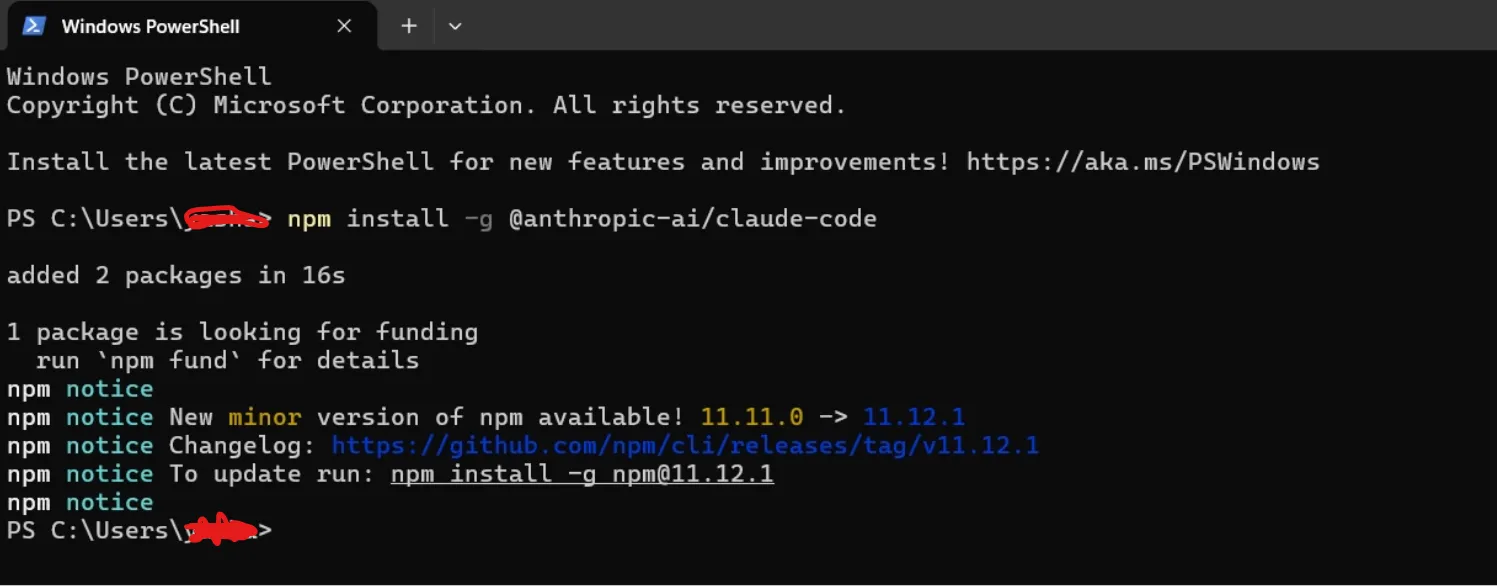
You install it via npm (npm install -g @anthropic-ai/claude-code), open your terminal, and interact with an AI that can read files, write code, execute scripts, call APIs, and orchestrate complex multi-step workflows. It’s not a chatbot. It’s an autonomous agent that operates inside your development environment.
For media buyers and growth engineers, Claude Code matters because of one specific capability: the Model Context Protocol (MCP). MCP is an open standard that lets Claude Code connect to external tools, databases, and APIs. Once you connect an MCP server, Claude can “see” and “touch” systems outside its training data. It can query your ad account, pull last week’s ROAS, identify underperformers, and launch new creatives, all from a single natural language prompt.
Many communities have been building exactly this kind of tooling.
What’s been missing until now is the launch layer.
The thing is most such tools audit and analyze.
But they explicitly note: stuff like “creating, editing, or posting ads remains manual in your ad platform.”
AdManage.ai’s API fills that gap.
What AdManage.ai’s API Actually Exposes (It’s More Than You Think)
AdManage.ai is not just a bulk ad launching UI: the tool that turns 3-4 hours of manual ad creation into 20 minutes.
What most people don’t know is that AdManage has quietly built one of the most comprehensive ad management APIs in the space, with 100+ endpoints covering the entire ad operations lifecycle.
Here’s the full API reference.
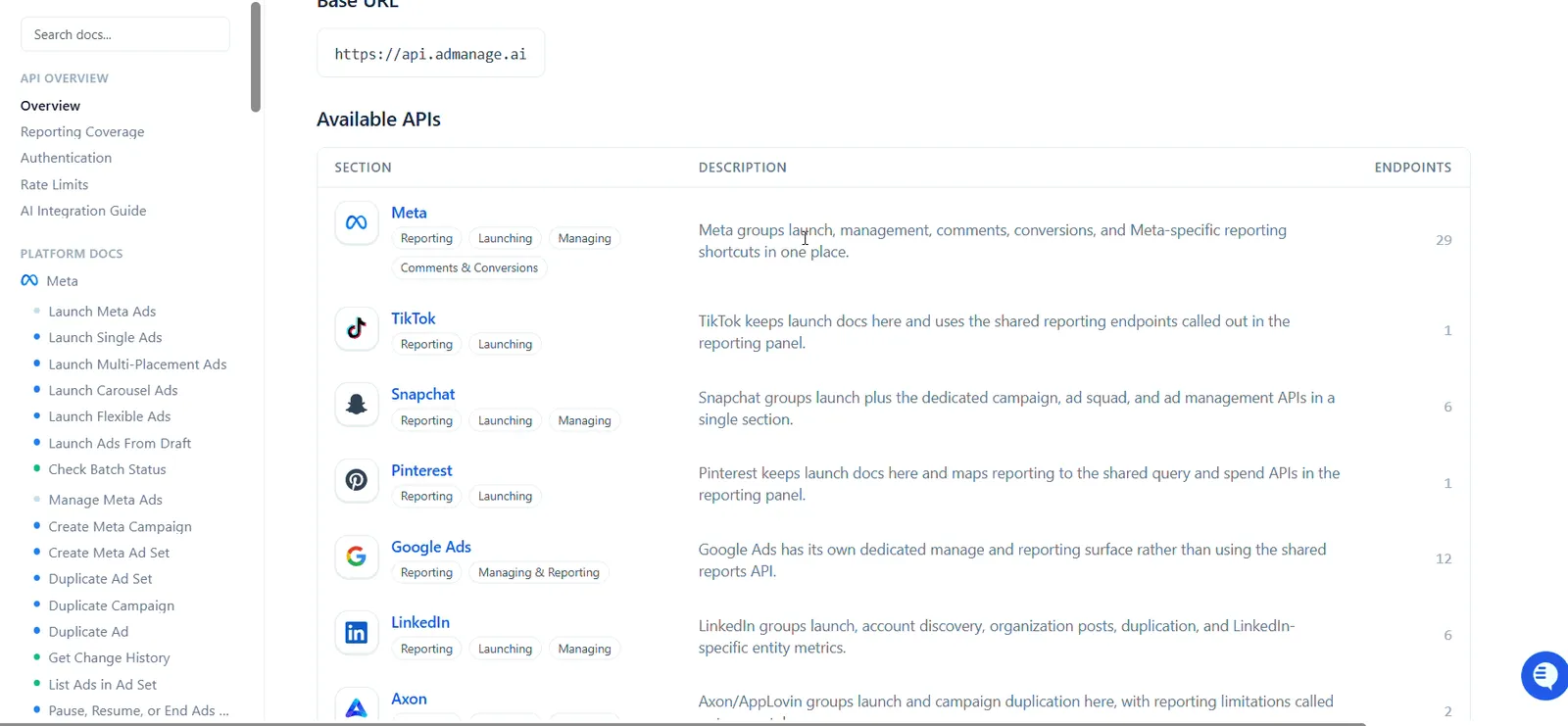
Here’s what you can do programmatically:
Launching ads (6 platforms)
- POST /v1/launch – Launch single, multi-placement, carousel, flexible, or partnership ads on Meta, TikTok, Snapchat, Pinterest, AppLovin/Axon, and Taboola. Each ad is self-contained with its own account, ad sets, and media.
- POST /v1/launch/from-draft – Re-launch an existing batch from a saved draft.
- GET /v1/batch-status/:id – Poll launch progress (total ads, successful, failed, percentage complete).
Managing campaigns (Meta + Google)
- POST /v1/manage/duplicate-adset – Duplicate ad sets 1-10x with deepCopy support.
- POST /v1/manage/duplicate-campaign – Clone entire campaigns including all child objects.
- POST /v1/manage/duplicate-ad – Duplicate ads with optional creative modifications (new headlines, new URLs, new UTMs).
- PATCH /v1/manage/entity-status – Pause, activate, or archive campaigns, ad sets, and ads.
- PATCH /v1/manage/campaign-budget – Update campaign budgets.
- PATCH /v1/manage/adset-budget – Update ad set budgets.
Google Ads management (12 endpoints)
List campaigns, toggle status, rename, duplicate campaigns/ad groups/ads, add/remove/update text and video assets, and launch.
Performance data and reporting
- GET /v1/reports/query – Query ad-level performance with 30+ metrics (spend, impressions, clicks, ROAS, purchases, hookRate, VTR, etc.), groupable by ad, campaign, ad set, landing page, creative, or headline.
- GET /v1/reports/fields – Get all available dimensions and metrics with descriptions.
- GET /v1/spend/daily – Cross-platform daily ad spend per account (Meta, TikTok, Pinterest, Snapchat).
- GET /v1/campaigns – List campaigns with spend and ad set counts.
- GET /v1/adsets – List ad sets with status, spend, and ad counts.
Automation rules (10 endpoints):
Create, update, delete, and execute automation rules programmatically.
- - POST /v1/automations/execute – Execute inline automations without saving a rule (supports dryRun: true).
- - GET /v1/automations/executions/:id – Get execution details with step results and logs.
Media library (10 endpoints)
Browse, search, filter, and tag creative assets.
Filter by type (video/image), dimension (1080x1920 or 9:16), launch status, tags, boards, and uploader.
Each asset includes transcript, smartSummary, and smartTags for AI-powered search.
Comments and sentiment
- GET /v1/comments – List ad comments with sentiment analysis (positive/neutral/negative), filterable by ad, account, sentiment, date range.
- GET /v1/comments/analytics – Aggregated sentiment distribution, top ads by comments, volume over time.
The LLM-specific features are the killer detail
- llms.txt spec at api.admanage.ai/llms.txt – A machine-readable overview of every endpoint, designed specifically for AI assistants to consume. Point your AI at this URL and it understands the entire API surface in one read.
- Claude tool-use code examples – The API docs include ready-to-use JavaScript examples showing exactly how to register AdManage endpoints as Claude tools using Anthropic’s SDK.
- AI Integration Guide – A dedicated section walking through the recommended workflow: get API key -> get ad accounts -> get profiles -> get ad sets -> launch.
As the AdManage docs put it: “Connect AI assistants like Claude, ChatGPT, or Gemini to the Admanage API to automate ad analysis, launch workflows, and performance reporting. Any AI that supports HTTP tool calls can use these endpoints.”
Step-by-Step: Connecting AdManage.ai to Claude Code via MCP
Here’s the exact setup. This takes about 5 minutes.
Step 1: Get Your AdManage API Key
Go to admanage.ai/connect and generate a new API key. It will look like ak_N-XqphL3DxvA.... Copy it.
API keys are company-scoped and all data returned is automatically filtered to your company’s accounts, workspaces, and creatives.
Step 2: Verify the Key Works
Open your terminal and run:
curl -sS "https://api.admanage.ai/v1/health"You should get {"success": true, "status": "ok", "db": "ok"}.
Now test with auth:
curl -sS "https://api.admanage.ai/v1/adaccounts" \

-H "Authorization: Bearer ak_YOUR_KEY_HERE"
You should see your ad accounts with their IDs, names, platforms, and workspace IDs.
Step 3: Add AdManage as an MCP Server in Claude Code
This is the key step. There are two approaches:
Option A: HTTP MCP Server (recommended if AdManage ships an MCP endpoint)
claude mcp add --transport http admanage https://api.admanage.ai/mcp \

--header "Authorization: Bearer ak_YOUR_KEY_HERE"
Option B: Custom stdio MCP wrapper (if using raw REST API)
Create a lightweight MCP server that wraps AdManage’s REST API. Save this as admanage-mcp.js:
// admanage-mcp.js -- Minimal MCP server wrapping AdManage REST API

const { Server } = require("@modelcontextprotocol/sdk/server/index.js");
const { StdioServerTransport } = require("@modelcontextprotocol/sdk/server/stdio.js");

const API_KEY = process.env.ADMANAGE_API_KEY;
const BASE = "https://api.admanage.ai";

if (!API_KEY) {
  throw new Error("Missing ADMANAGE_API_KEY environment variable");
}

async function call(method, path, body) {
  const opts = {
    method,
    headers: {
      "Authorization": `Bearer ${API_KEY}`,
      "Content-Type": "application/json"
    }
  };

  if (body) opts.body = JSON.stringify(body);

  const res = await fetch(`${BASE}${path}`, opts);

  if (!res.ok) {
    const text = await res.text();
    throw new Error(`AdManage API error ${res.status}: ${text}`);
  }

  return res.json();
}

const server = new Server(
  { name: "admanage", version: "1.0.0" },
  { capabilities: { tools: {} } }
);

server.setRequestHandler("tools/list", async () => ({
  tools: [
    {
      name: "list_ad_accounts",
      description: "List all ad accounts",
      inputSchema: { type: "object", properties: {} }
    },
    {
      name: "get_ad_sets",
      description: "List ad sets for a campaign or account",
      inputSchema: {
        type: "object",
        properties: {
          accountId: { type: "string" },
          campaignId: { type: "string" }
        }
      }
    },
    {
      name: "query_reports",
      description: "Query ad performance reports",
      inputSchema: {
        type: "object",
        properties: {
          accountIds: { type: "string" },
          startDate: { type: "string" },
          endDate: { type: "string" },
          metrics: { type: "string" }
        },
        required: ["accountIds", "metrics"]
      }
    },
    {
      name: "launch_ads",
      description: "Launch ads on Meta, TikTok, Snapchat, Pinterest, Axon, or Taboola",
      inputSchema: {
        type: "object",
        properties: {
          ads: { type: "array" }
        },
        required: ["ads"]
      }
    },
    {
      name: "get_batch_status",
      description: "Check launch batch progress",
      inputSchema: {
        type: "object",
        properties: {
          batchId: { type: "string" }
        },
        required: ["batchId"]
      }
    },
    {
      name: "duplicate_adset",
      description: "Duplicate a Meta ad set",
      inputSchema: {
        type: "object",
        properties: {
          adsetId: { type: "string" },
          accountId: { type: "string" },
          copyCount: { type: "number" }
        },
        required: ["adsetId", "accountId"]
      }
    },
    {
      name: "get_daily_spend",
      description: "Get daily ad spend across platforms",
      inputSchema: {
        type: "object",
        properties: {
          startDate: { type: "string" },
          endDate: { type: "string" }
        },
        required: ["startDate", "endDate"]
      }
    },
    {
      name: "get_top_ads",
      description: "Get top performing ads",
      inputSchema: {
        type: "object",
        properties: {
          accountId: { type: "string" }
        }
      }
    },
    {
      name: "list_library_assets",
      description: "Browse creative assets in media library",
      inputSchema: {
        type: "object",
        properties: {
          filterType: { type: "string" },
          limit: { type: "number" }
        }
      }
    },
    {
      name: "get_comment_analytics",
      description: "Get comment sentiment analytics",
      inputSchema: {
        type: "object",
        properties: {
          accountId: { type: "string" }
        }
      }
    }
  ]
}));

server.setRequestHandler("tools/call", async (request) => {
  const { name, arguments: args } = request.params;

  let result;

  switch (name) {
    case "list_ad_accounts":
      result = await call("GET", "/v1/adaccounts");
      break;

    case "get_ad_sets":
      result = await call("GET", `/v1/adsets?${new URLSearchParams(args)}`);
      break;

    case "query_reports":
      result = await call("GET", `/v1/reports/query?${new URLSearchParams(args)}`);
      break;

    case "launch_ads":
      result = await call("POST", "/v1/launch", { ads: args.ads });
      break;

    case "get_batch_status":
      result = await call("GET", `/v1/batch-status/${args.batchId}`);
      break;

    case "duplicate_adset":
      result = await call("POST", "/v1/manage/duplicate-adset", args);
      break;

    case "get_daily_spend":
      result = await call("GET", `/v1/spend/daily?${new URLSearchParams(args)}`);
      break;

    case "get_top_ads":
      result = await call("GET", `/v1/analytics/top-ads?${new URLSearchParams(args)}`);
      break;

    case "list_library_assets":
      result = await call("GET", `/v1/library/assets?${new URLSearchParams(args)}`);
      break;

    case "get_comment_analytics":
      result = await call("GET", `/v1/comments/analytics?${new URLSearchParams(args)}`);
      break;

    default:
      throw new Error(`Unknown tool: ${name}`);
  }

  return {
    content: [
      {
        type: "text",
        text: JSON.stringify(result, null, 2)
      }
    ]
  };
});

const transport = new StdioServerTransport();
server.connect(transport);
Step 4: Verify the Connection
Inside Claude Code, type /mcp to see all connected servers. You should see admanage listed with its tools.
Step 5: Set Up Your CLAUDE.md Context
Create a CLAUDE.md file in your project root with your ad operations context:
# Ad Operations Context

## AdManage API

- Base URL: https://api.admanage.ai
- LLM spec: https://api.admanage.ai/llms.txt
- Auth: Bearer token in Authorization header

## My Accounts

- Meta: act_384730851257635 (workspace: cmiypwwnf00012m2rhiutlf3f)
- Facebook Page: 470703006115773
- Instagram: 17841471826052348

## Workflow

1. Always check ad sets before launching (GET /v1/adsets)

2. Poll batch status after launch (GET /v1/batch-status/:id)

3. Default naming: *[*Date*]*_[Audience]_[CreativeType]_*[*Variant*]*

4. Start with read-only operations; confirm before launching

## Metrics I Care About

- Primary: ROAS, CPA, purchases
- Creative: hookRate, VTR (videoP100Watched / impressions)
- Efficiency: CPM, CPC, CTR
10 Things You Can Now Do From Your Terminal
With AdManage connected to Claude Code, here are the actual workflows that become possible:
1. “Show me my ad performance for the last 7 days, sorted by ROAS”
Claude calls GET /v1/reports/query?accountIds=act_123&startDate=2026-04-09&endDate=2026-04-16&metrics=spend,impressions,roas,purchases,hookRate&sortBy=roas&sortDirection=DESC&limit=20 and formats the results as a readable table in your terminal.
2. “Launch these 5 creatives into my US Broad 25-44 ad set”
Claude constructs the launch payload with your stored account IDs, page IDs, Instagram IDs, and ad set IDs, then calls POST /v1/launch with 5 ads. Each ad gets a structured name following your naming convention. Claude polls GET /v1/batch-status/:id until all 5 are live.
3. “Duplicate my winning campaign 3 times and pause the copies”
Claude calls POST /v1/manage/duplicate-campaign with copyCount: 3 and initialStatus: "PAUSED". Returns the new campaign IDs.
4. “What’s my daily spend across all platforms this week?”
Claude calls GET /v1/spend/daily?startDate=2026-04-09&endDate=2026-04-16 and breaks down spend by Meta, TikTok, Snapchat, and Pinterest per day.
5. “Find all my UGC videos that haven’t been launched yet”
Claude calls GET /v1/library/assets?filterType=video&launchStatus=Not Launched&tags=UGC&limit=50 and returns a list of unused creative assets with thumbnails.
6. “Launch those unlaunched videos to both Meta and TikTok”
Claude takes the URLs from the library response and constructs two launch payloads (one per platform), then calls POST /v1/launch for each.
7. “Create a rule to pause any ad with ROAS below 1.5x after 3 days”
Claude calls POST /v1/automations with the rule definition, action type pause_ad, and frequency daily.
8. “How’s comment sentiment on my active ads?”
Claude calls GET /v1/comments/analytics?accountId=act_123 and returns sentiment distribution (positive/neutral/negative percentages), top ads by comment volume, and flags any negative trends.
9. “Kill all ads spending more than $50 with zero purchases”
Claude calls the reports endpoint to identify the offenders, then uses PATCH /v1/manage/entity-status to pause each one. Or executes an inline automation with dryRun: true first so you can review before committing.
10. “Generate a morning brief: spend, top 3 ads, worst 3 ads, and any comment spikes”
Claude chains 4 API calls (spend, reports sorted by ROAS desc for top 3, reports sorted by ROAS asc for worst 3, comment analytics) and outputs a formatted morning report.
Why This Matters: The “Agentic Ad Ops” Shift
This isn’t a toy project. This is the direction the entire ad tech industry is moving.
As Stormy AI’s research puts it: “The advertisers who win in 2025 aren’t those with the biggest budgets, but those who can test 11x more creatives to find the 11x variance in ROAS.”
And as Digital Applied’s analysis of Claude Code v2.0.28 documented: marketing agencies using Claude Code sub-agents are seeing “75% faster content audits and campaign analysis” and “$1,200+ saved per multi-channel campaign.”
The missing piece has always been the execution layer. Tools like claude-ads can audit your campaigns. Tools like ai-marketing-claude can generate copy and strategy. But none of them could launch ads. They all hit the same wall: “creating, editing, or posting ads remains manual.”
AdManage.ai’s API removes that wall.
When your AI agent can: -
- Read your creative library
- Pull your saved ad copy templates
- Query your ad set structure
- Launch ads across 6 platforms
- Monitor batch status
- Check performance the next day
- Duplicate winners
- Pause losers
…you’ve built a closed-loop system. The agent doesn’t just suggest. It executes.
That’s not “AI for ads.” That’s ad ops on autopilot.
The llms.txt Advantage (And Why It’s a Big Deal)
AdManage.ai publishes a machine-readable API spec at api.admanage.ai/llms.txt. This is a single, comprehensive document that describes every endpoint, every parameter, every response format, and every example in a format specifically optimized for AI consumption.
Why does this matter? Because the #1 failure mode for AI agents calling APIs is hallucinated parameters. The AI guesses at field names, invents endpoints, or misformats request bodies. The llms.txt spec eliminates this by giving the AI a complete, authoritative reference it can read in a single context window.
Compare this to Meta’s Marketing API, where documentation spans 400+ pages across multiple subdomains. An AI agent trying to figure out how to create a Meta ad has to navigate concept guides, endpoint references, migration docs, and changelog entries – most of which don’t fit in a context window.
AdManage’s approach: one document, every endpoint, copy-paste ready. As the founder said in our earlier research: “We have everything on one page for all you need to launch and record.”
The practical impact: when you point Claude Code at the llms.txt, it understands the full API surface immediately. No hallucinated field names. No guessing at authentication patterns. No “let me try a different endpoint” loops.
Building a Full CLAUDE.md for Ad Operations
Your CLAUDE.md is Claude Code’s persistent memory. For ad operations, a well-structured CLAUDE.md turns Claude from a generic AI into a specialized media buying assistant that knows your accounts, your naming conventions, your KPI thresholds, and your creative workflow.
Here’s a production-grade template:
# Ad Operations Agent -- CLAUDE.md

## Identity

You are an ad operations agent managing paid media for *[*COMPANY*]*.

You have access to AdManage.ai's API via MCP.

Always start with read-only operations. Confirm before launching or modifying.

## API Reference

- Full spec: https://api.admanage.ai/llms.txt
- Auth: Bearer token (already configured in MCP)

## Accounts

### Meta

- Ad Account: act_XXXXXXXXX
- Workspace: ws_XXXXXXXX
- Facebook Page: XXXXXXXXX
- Instagram: XXXXXXXXX

### TikTok

- Ad Account: XXXXXXXXX
- Workspace: ws_XXXXXXXX

## Naming Convention

*[*YYYY-MM-DD*]*_[Platform]_[Audience]_[CreativeType]_*[*Variant*]*

Example: 2026-04-16_META_USBroad2544_UGC_v03

## KPI Thresholds

- Kill: ROAS < 1.5x after $100 spend
- Scale: ROAS > 3x with 10+ purchases
- Watch: CPA > $25 for lead gen campaigns
- Creative Fatigue: frequency > 3.0 or CTR drop > 20% week-over-week

## Workflow Rules

1. Never launch without confirming ad set selection first

2. Always poll batch status until complete

3. Default to PAUSED for new launches; activate after review

4. When duplicating, always use deepCopy: true

5. Report in markdown tables with key metrics bolded

## Morning Brief Template

1. Yesterday's total spend by platform (GET /v1/spend/daily)

2. Top 5 ads by ROAS (GET /v1/reports/query, sortBy=roas)

3. Bottom 5 ads by ROAS with >$20 spend (same endpoint, sortDirection=ASC)

4. Comment sentiment summary (GET /v1/comments/analytics)

5. Any batches from yesterday (GET /v1/adbatches, dateFrom=yesterday)
Security: What to Lock Down
A few critical safety rails:
Scope your API key. Create a dedicated API key for your Claude Code integration at admanage.ai/connect. If you ever need to revoke it, you won’t affect your team’s dashboard access.
Start read-only. AdManage’s docs recommend starting with GET endpoints (reports, accounts, batch status) before enabling write operations like launching. The dryRun: true parameter on automation execution lets you simulate changes without committing.
Use initialStatus: "PAUSED" for launches. This is the safest pattern: launch ads in a paused state, review them in AdManage’s UI or via the API, then activate. The API supports PATCH /v1/manage/entity-status to flip status after review.
Rate limits are explicit. 60 reads/minute and 10 writes/minute per API key, with X-RateLimit-Remaining headers on every response. Claude Code can read these headers and self-throttle.
What’s Next: The Multi-Agent Stack
The most advanced teams are already layering AdManage’s API into multi-agent workflows:
Agent 1 (Creative Scout): Uses the media library API to find high-performing assets, identifies creative fatigue via reporting endpoints, and flags which new creatives should be tested.
Agent 2 (Launch Agent): Takes the scout’s recommendations and constructs launch payloads. Launches across Meta and TikTok simultaneously. Polls batch status.
Agent 3 (Performance Monitor): Runs on a schedule (Claude Code supports scheduled tasks). Pulls daily reports, compares against KPI thresholds, executes automation rules to pause underperformers and scale winners.
Agent 4 (Comment Manager): Monitors comment sentiment in real-time, flags negative spikes, and can auto-hide toxic comments via POST /v1/comments/:id/hide.
This is the stack that agencies managing 25+ accounts at scale are building toward. AdManage already reports over 10,000 professional media buyers launching 1M+ ads monthly through the platform. The API layer makes all of that programmable.
The Bottom Line
The gap between “AI that analyzes your ads” and “AI that runs your ads” has been the defining limitation of agentic ad tech. Every Claude Code marketing skill, every MCP server for Google Ads, every performance audit tool hits the same wall: they can tell you what to do, but they can’t do it.
AdManage.ai’s API removes that wall. 100+ endpoints. multiple platforms. Launch, duplicate, manage, report, automate. All accessible via REST. All documented in a single llms.txt that any AI agent can consume.
Claude Code provides the agent. AdManage provides the actions. Together, they create the first true closed-loop AI ad operations system, where the same agent that identifies your worst-performing ads can pause them, find replacement creatives in your library, and launch them into the same ad sets, all before you finish your morning coffee.
The setup takes 5 minutes. The CLAUDE.md takes 10. The time saved is measured in hours per week, per team member, compounding every day you run it.
Get your AdManage API key -> | Read the full API docs -> | Browse the llms.txt spec ->